ACE Email Setup
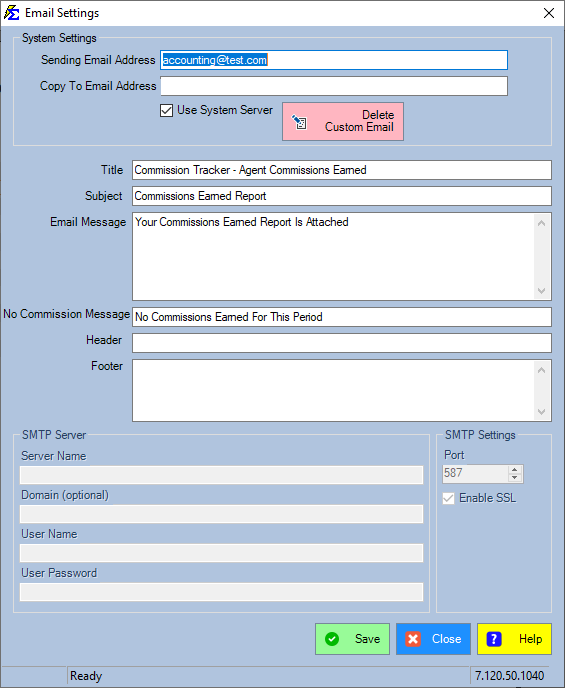
The ACE Email Setup form allows you to configure how commission statements and automated emails are delivered to your agents. This setup ensures that your outgoing communication looks professional and that any replies are routed to the correct person.
When to Use This Setup
Use this configuration page to:
-
Define Sender Identity - Set the "From" address your agents see.
-
Configure Delivery Methods - Choose between the Commission Tracker System Server or a custom SMTP.
-
Customize Branding - Design the Title, Subject, Header, and Footer for your agency emails.
Form Fields
Sender Information
- Sender (From) - Enter the email address that will appear in the "From" field. If an agent replies, this address will receive the email. (Required)
- Copy To - An optional field to receive a copy of every email sent to agents.
Email Conflict Note
Using the same email address for both the Sender and Copy To fields can cause emails to fail, depending on your email provider's security settings.
Server Configuration
We highly recommend using the System Server instead of your own SMTP server. Our server is specifically optimized to navigate SPAM filters and ensure high delivery rates for commission statements.
Customization Section
You have full control over the following elements of the automated email:
-
Title & Subject - The primary identity of the email in the agent's inbox.
-
Message Body - The core text of the communication.
-
Header & Footer - Ideal for agency branding, logos, or legal disclaimers.
-
No Report Message - This message is sent only if you choose to email agents who have earned $0.00 in commissions for a specific pay period.
Advanced Features
Enable Custom Email
This is an advanced function that allows you to design high-fidelity HTML email messages.
If you need to use Custom HTML or a Custom SMTP Server, please contact our team for assistance: support@commission-tracker.com
Step-by-Step Example
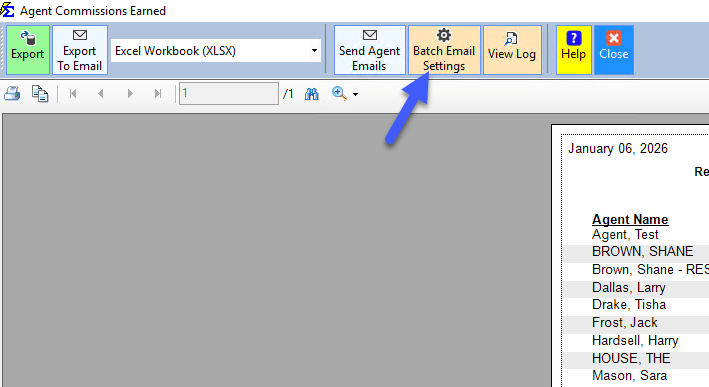
- Navigate to ACE Email Setup in the ACE Report.
- Enter your Sender address.
- (Optional) Enter a separate Copy To address.
- Select System Server for optimal delivery.
- Customize your Subject and Footer text.
- Click Save to apply the changes.
What Happens When You Save
- The system updates the metadata for all future outgoing commission emails.
- If the System Server is selected, the "From" headers are validated for delivery.
- Your custom branding (Header/Footer) will now appear on all Agent statements sent via ACE.
Troubleshooting
Q: Why are my emails going to the agents' SPAM folders? A: This often happens when using a custom SMTP server. We recommend switching to the System Server in the configuration settings to improve deliverability.
Q: Can I send an email even if the agent is owed $0? A: Yes. If you enable that option, the system will use the text entered in the No Report Message field.
Q: Can I use my agency logo in the email? A: Yes, via the Enable Custom Email HTML feature. Contact support for help setting up your HTML template.
Need help? Contact support@commission-tracker.com