Carrier Table Agent Splits: Agent Levels
Agent Levels allow you to create "smart" commission rules that automatically adjust based on the experience or rank of the Primary Agent. Instead of creating a unique split for every policy, you can define a single Carrier Table that pays a "Junior" agent differently than a "Senior" agent.
Prerequisite
Before using this advanced feature, ensure you are familiar with the standard Carrier Table Agent Splits logic.
💡 Why Use This
Use Agent Level splits when:
- Agents are compensated at different rates based on rank — Set up Junior, Senior, and other tiers once; the table applies the correct rate automatically based on who the Primary Agent is.
- Promotions should trigger automatic pay changes — When you promote a Junior agent to Senior, every policy they own that uses a Level-based table immediately pays at the Senior rate — no manual policy updates needed.
- Managers receive overrides tied to agent rank — Some agencies pay a higher manager override when a Junior agent makes a sale vs. a Senior agent.
🗺️ How to Access
Agent Levels are configured in two places:
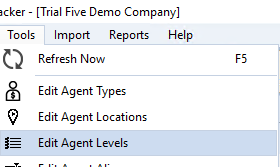
- Define levels — Tools → Edit Agent Levels
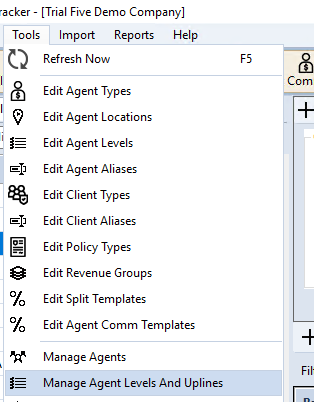
- Assign levels to agents — Tools → Manage Agent Levels and Uplines
- Build level-based split rules — Open a Carrier Commission Table, navigate to the Agent Splits tab, and click Manage Agent Split Templates....
Step 1: Define Your Agent Levels
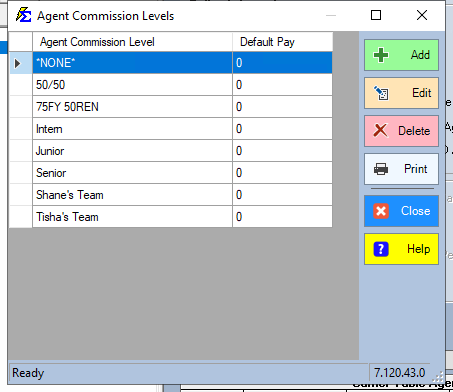
First, establish the naming conventions for your levels (e.g., Junior, Senior, Principal).
- Navigate to the Tools menu.
- Select Edit Agent Levels.
- Add your custom levels to the list.
Step 2: Assign Levels to Agents
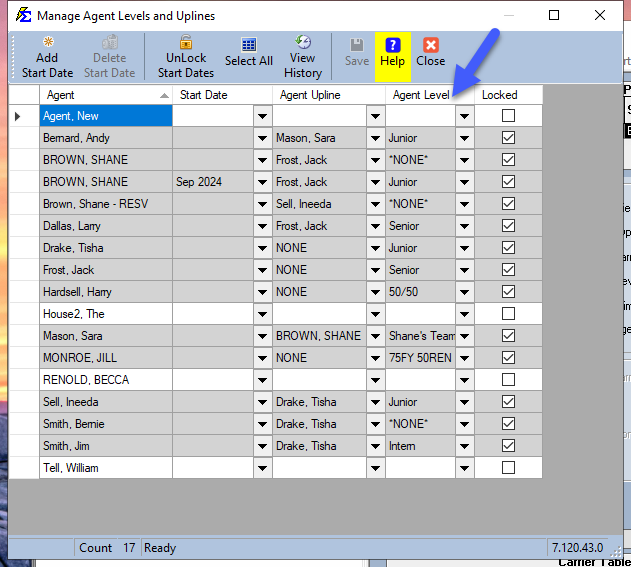
By default, all agents are set to level NONE. Manually assign your new levels to the appropriate team members.
- Navigate to the Tools menu.
- Select Manage Agent Levels and Uplines.
- Assign the correct level to each agent (e.g., Andy Bernard = Junior, Larry Dallas = Senior).
Step 3: Configure the Level-Based Split Table
Level-based split rules are built using the Agent Split Template Manager, then assigned to your Carrier Commission Table.
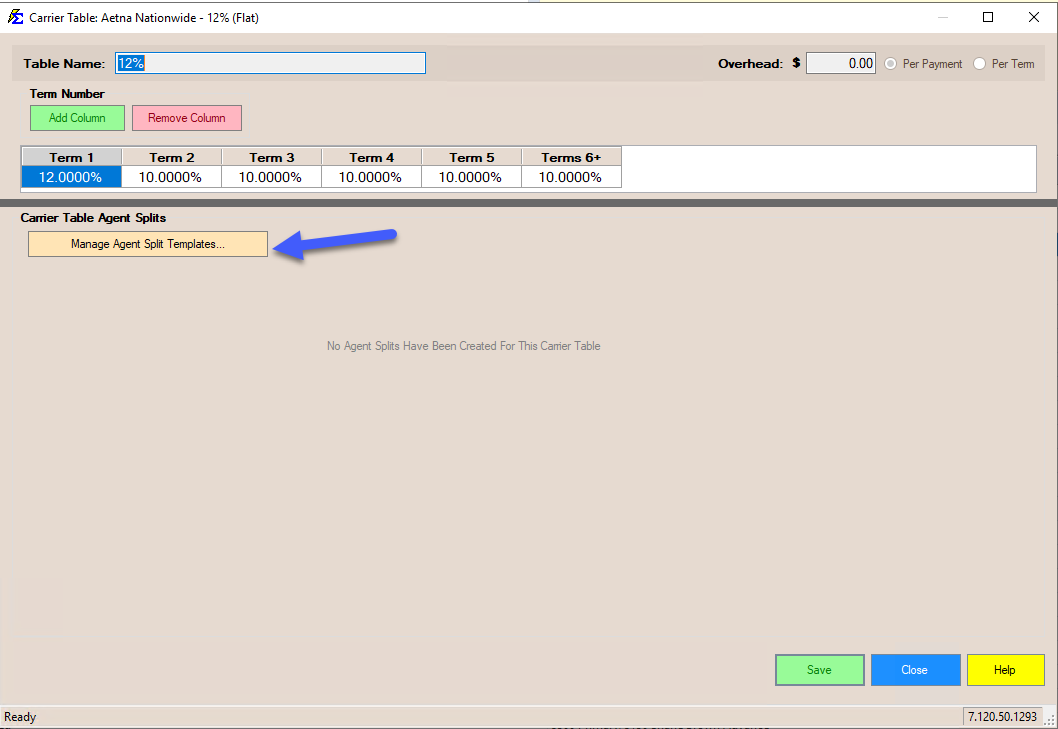
Opening the Template Manager
- Open your Carrier Commission Table.
- Click Manage Agent Split Templates....
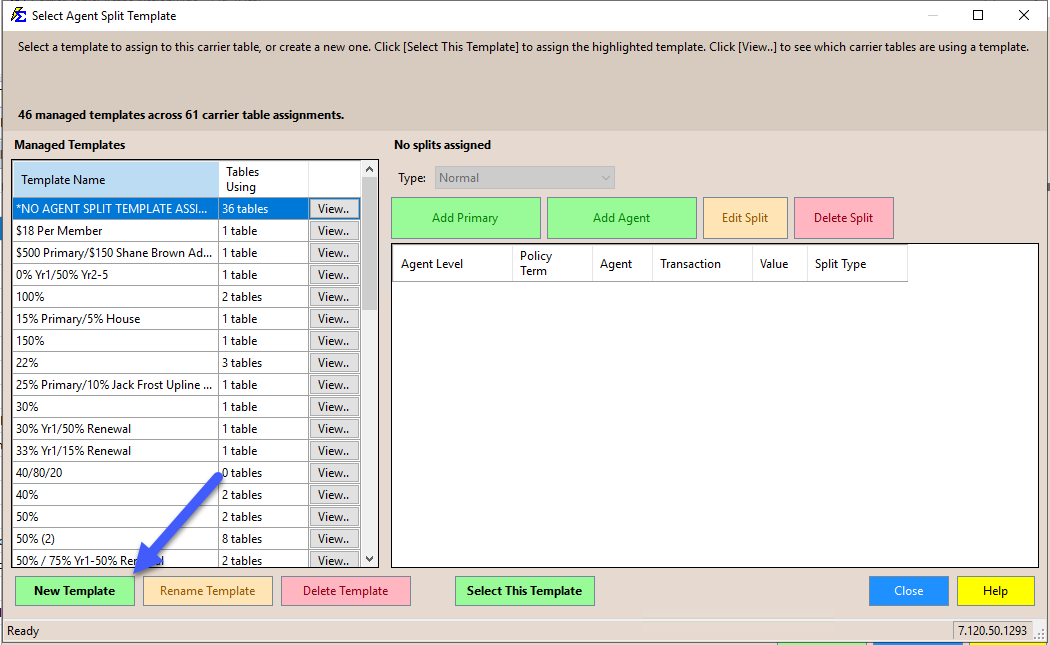
Creating a New Template
- In the Select Agent Split Template window, click New Template.
- Enter a name for the template and click OK.
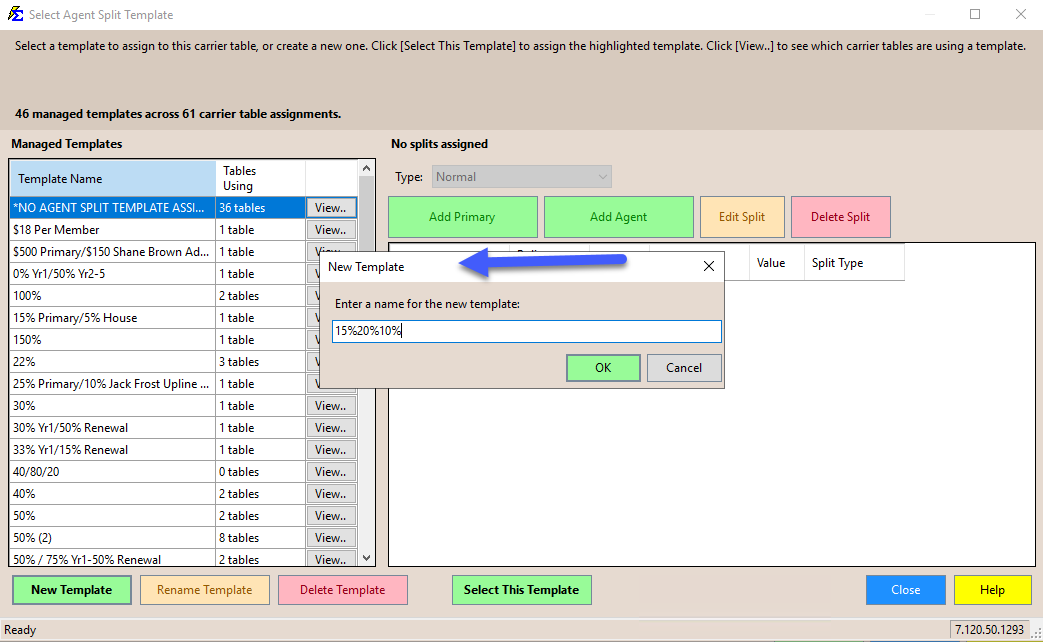
Naming Templates
Give the template a name that reflects its splits (e.g. 15%20%10%) — templates can be assigned to multiple Carrier Tables, so a clear name helps you identify it later. See Agent Split Template Manager for full details on managing templates.
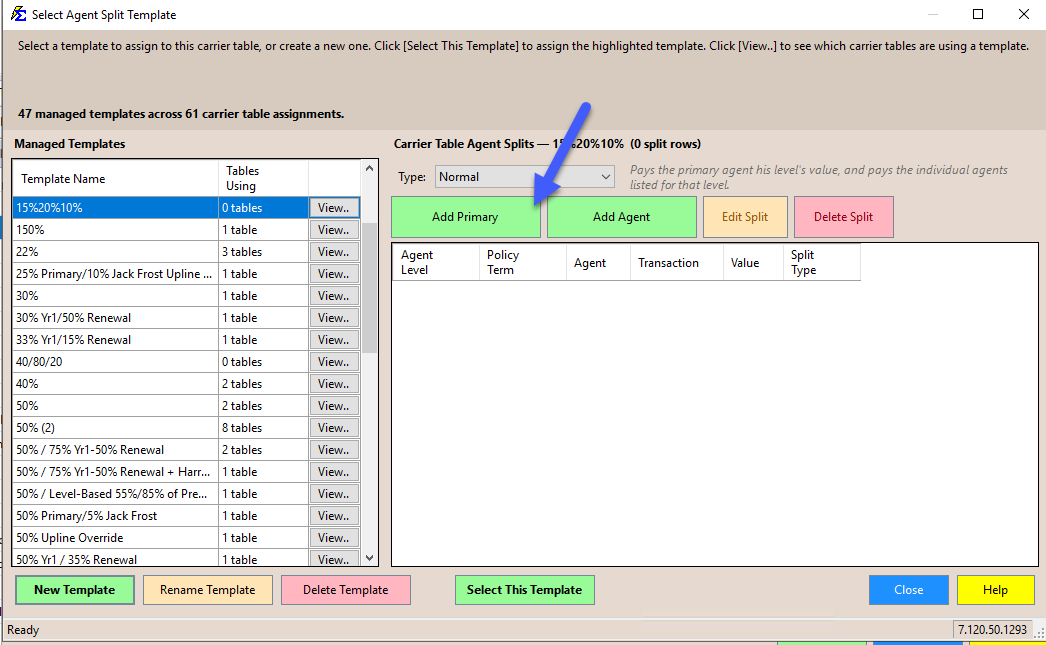
Adding Primary Agent Rules
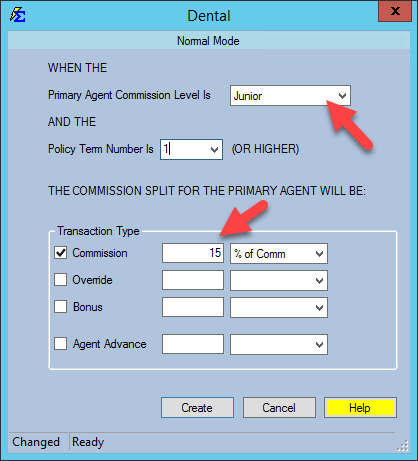
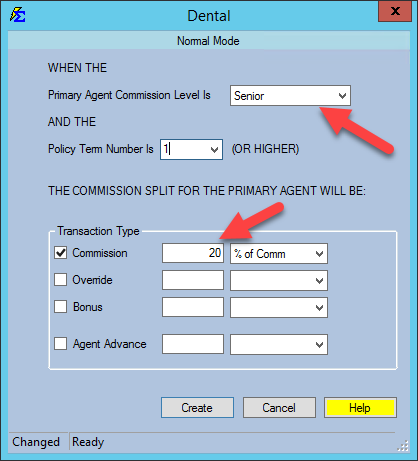
Use the Add Primary button to define what the Primary Agent receives based on their specific level.
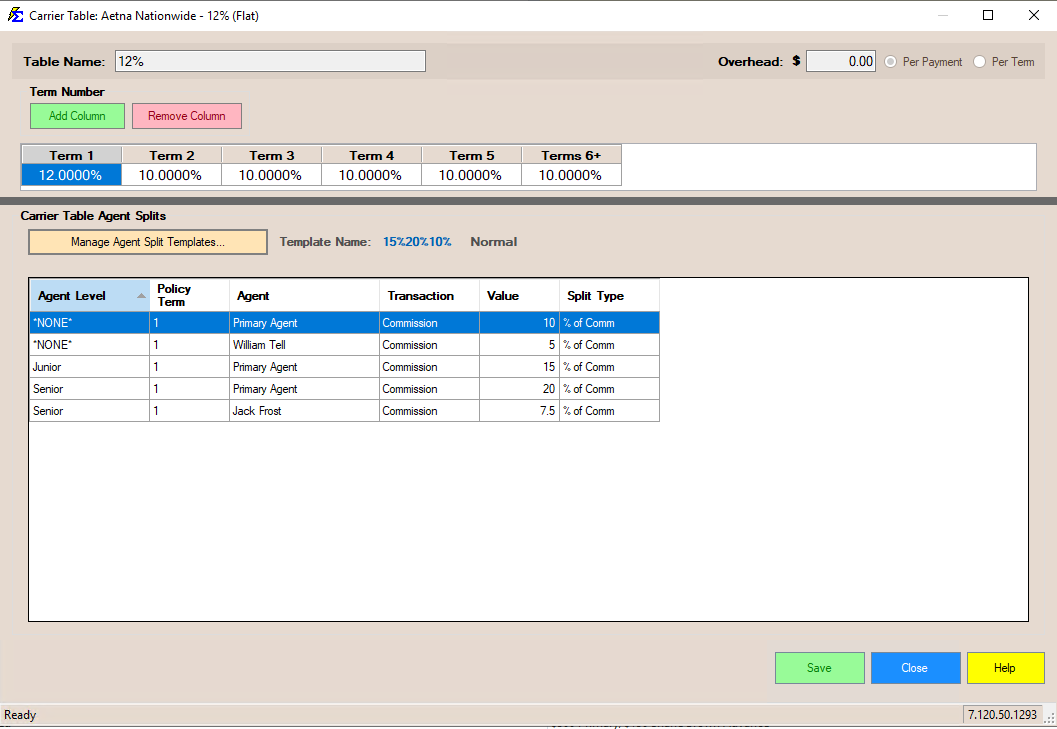
- Junior Level: 15% of Commission.
- Senior Level: 20% of Commission.
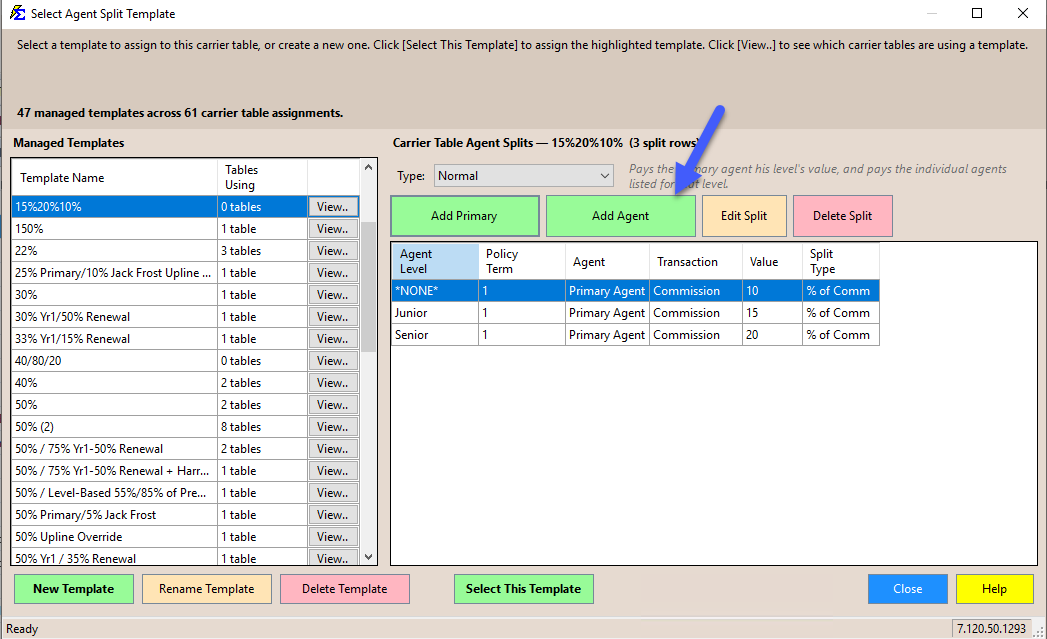
- NONE Level: 10% of Commission.
Adding Override/Manager Rules
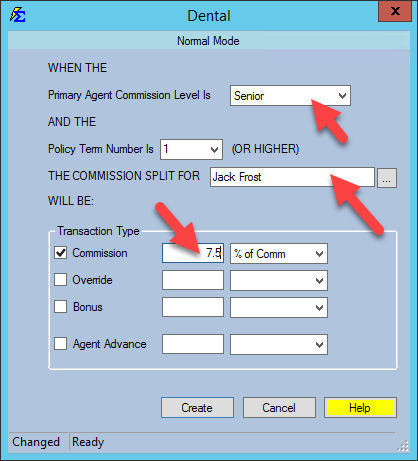
You can also define who else gets paid based on the Primary Agent's level. For example, pay a manager (Jack Frost) an override only when a Senior agent makes a sale.
- Click Add Agent.
- Select the recipient (Jack Frost).
- Associate his payout with the Senior level.
Final Table Review
Once the template is complete, select it and click Select This Template to assign it to the Carrier Commission Table. The table now acts as a dynamic engine: when a policy is linked to it, the software looks at the Primary Agent's level and automates the payouts:
| If Primary Agent Level is... | Primary Agent Receives | Additional Payouts |
|---|---|---|
| NONE (Standard) | 10% | William Tell (5%) |
| Junior | 15% | — |
| Senior | 20% | Jack Frost (7.5%) |
What Happens During Processing
- Automation — When you Receive a Payment, the system checks the Primary Agent on the policy, identifies their level, and calculates the exact dollar amounts for everyone in the split.
- Scalability — If you promote a Junior agent to Senior in the Manage Agent Levels screen, every policy they own that uses this table will automatically begin paying them at the Senior rate.
🔧 Troubleshooting
My agent is being paid at the NONE rate instead of their assigned level. Check the Manage Agent Levels and Uplines screen. If the agent is not explicitly assigned to a level, the system defaults to NONE.
I need multiple managers paid on the same level. Click Add Agent as many times as needed to add multiple override rules for a single level.
🔗 Related Topics
- Carrier Table Agent Splits — Standard split setup without levels.
- Carrier Table Agent Splits (Using Agent Uplines) — Pay managers dynamically based on agent hierarchy.
- Manage Agent Levels and Uplines — Assign and maintain agent levels.
- Agent Split Template Manager — Full reference for creating, editing, and assigning templates.
- Carrier Commission Tables — Overview of carrier table setup.
Need help? Contact support@commission-tracker.com