Agent Change History
Commission Tracker maintains a complete audit trail of modifications made to your agent records. The View History tool allows you to track exactly when changes occurred, what data was altered, and which user performed the action.
💡 Why Use This
Use Agent Change History when:
- Troubleshooting a commission payout discrepancy — Identify when an agent's level or upline was modified and whether it aligns with when the incorrect payment occurred.
- Audit compliance — Maintain a record of all commission level changes for internal or external audits.
- Accountability — See which staff member updated an agent's contact info, licensing status, or commission level.
🗺️ How to Access
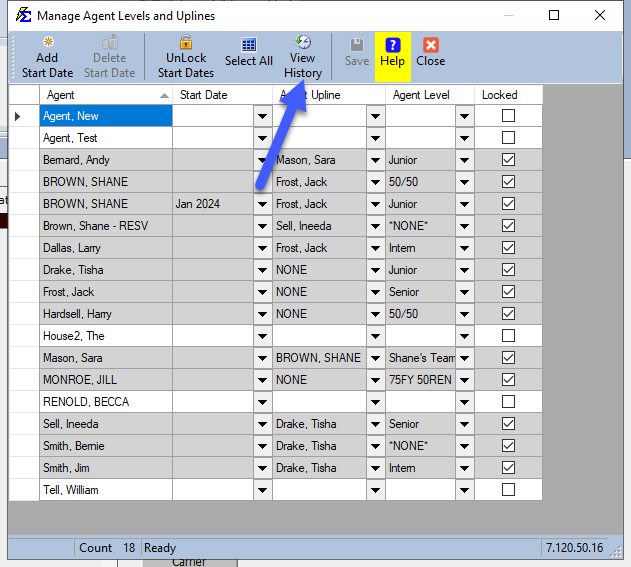
- Navigate to Tools → Manage Agent Levels and Uplines.
- Select the agent you wish to review.
- Click the View History button in the top menu bar.
Understanding the History Log
Once the log populates, you can review the chronological history of that agent.
Key Data Tracked
- Time Stamp — The exact date and time the change was saved.
- User — The username of the person who made the modification.
- Field Altered — Which specific piece of information was changed.
- Original vs. New Value — A side-by-side comparison of the data before and after the update.

Tips
- Check History First — Before contacting support regarding an agent's payout change, review the history log to see if a level was recently updated.
- Verify Users — If every change shows "Admin" as the user, consider creating individual user accounts to better track team activity.
🔧 Troubleshooting
I cannot find a specific change in the history log. The history log is sorted chronologically. Look for the date range when the payout changed and review the entries around that time.
The history log is empty for an agent. History is only recorded for changes made after the audit logging feature was enabled. Agents set up before logging was active may not have early change records.
🔗 Related Topics
- Manage Agent Levels and Uplines — Set up and modify agent levels and upline assignments.
- Carrier Table Agent Splits (Using Agent Levels) — How levels affect commission calculations.
Need help? Contact support@commission-tracker.com