Revenue Group
Revenue Groups provide a flexible way to categorize policies for financial reporting. They are used to aggregate revenue across multiple Policy Types or to track income by custom sectors like lead source or market segment.
💡 Why Use This
Use Revenue Groups when:
- Aggregating across policy types — Combine various "Group Health" policy types into a single "Group Health Insurance" Revenue Group for high-level reporting.
- Tracking by business segment — Group policies by referral source, market segment, or product line to see which areas generate the most revenue.
- Running revenue summary reports — Run the Agency Payments Received - Annualized report and choose Revenue Group under Group By to total commission income by group.
🗺️ How to Access
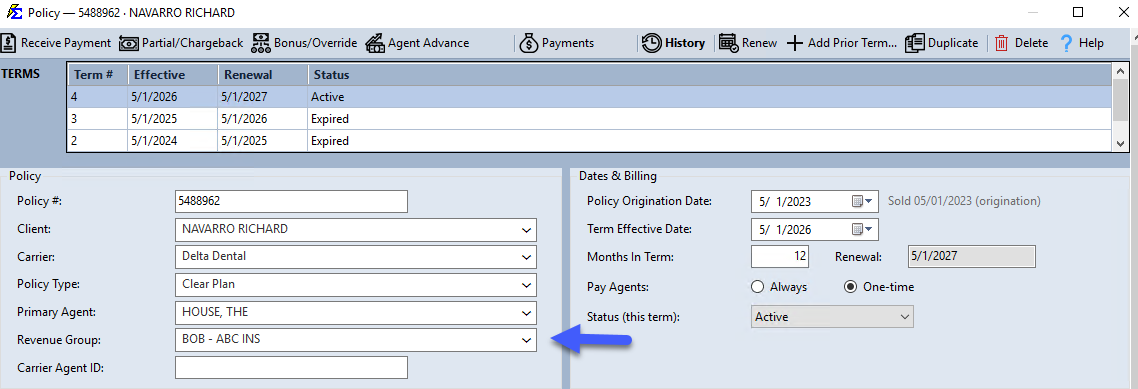
Revenue Groups are managed under Tools → Edit Revenue Groups. Assign a group to a policy with the Revenue Group dropdown in the Policy group of the Policy window.
Configuration
- Setup — Tools → Edit Revenue Groups.
- Assignment — Select a Revenue Group in the Policy group of any policy.
- Reporting — Run the Agency Payments Received - Annualized report and choose Revenue Group under Group By to see totals by group.
Managing the Revenue Group List
- Navigate to Tools → Edit Revenue Groups. The Revenue Groups window lists every group with its ID and Description.
- Use the buttons on the toolbar:
- Add — Opens the Edit Revenue Group window. Type the name in Revenue Group and click Accept.
- Edit — Select a group, click Edit, change the name, and click Accept. Every policy using that group shows the new name.
- Delete — Select a group and click Delete, then confirm. A group that is assigned to any policy cannot be deleted.
- Print — Print the list of revenue groups.
- Click Close when you are done.
Example Use Cases
- Aggregation — Combine various "Group Health" policy types into one "Group Health Insurance" Revenue Group.
- Analysis — Group policies by "Referral Source" to see which partners generate the most revenue.
🔧 Troubleshooting
The Revenue Group dropdown is empty when creating a policy. Go to Tools → Edit Revenue Groups and add at least one group. Once saved, it will appear in the policy dropdown immediately.
I can't delete a revenue group. The message "You Cannot Delete a Revenue Group That Is Currently In Use" means at least one policy is assigned to it. Change those policies to a different revenue group (for example with Update All Policies), then delete it.
My report is not grouping correctly by Revenue Group. Verify that all relevant policies have the correct Revenue Group assigned. Unassigned policies will not appear in the report totals for any group.
🔗 Related Topics
- Policy Information — Overview of all policy fields.
- Policy Type — Categorize policies by coverage type.
- Tools Menu — Access Revenue Group management and other global settings.
Need help? Contact support@commission-tracker.com