Scheduled Carrier Table
The Scheduled Carrier Table is used for fixed-dollar commission payouts. Rather than calculating a percentage of premium, the carrier pays a set dollar amount for each payment position. The number of rows in the table must match the number of payments expected per term.
💡 Why Use This
Use a Scheduled Carrier Table when:
- Your carrier pays a flat dollar amount per payment — Rather than a percentage of premium, the carrier pays a fixed fee per month or per policy.
- Commission varies by year — You can define different dollar amounts for Term 1, Term 2, and so on.
- You need to stop commission tracking at a specific milestone — Setting a term to $0.00 ends commission tracking after that point.
🗺️ How to Access
- Open the Carrier record.
- Click the Carrier Tables tab.
- Pick Scheduled in the list beside Create New, then click Create New (newer versions: click Create New, pick Scheduled in the New Carrier Table window, then click Next).
Configuration Example
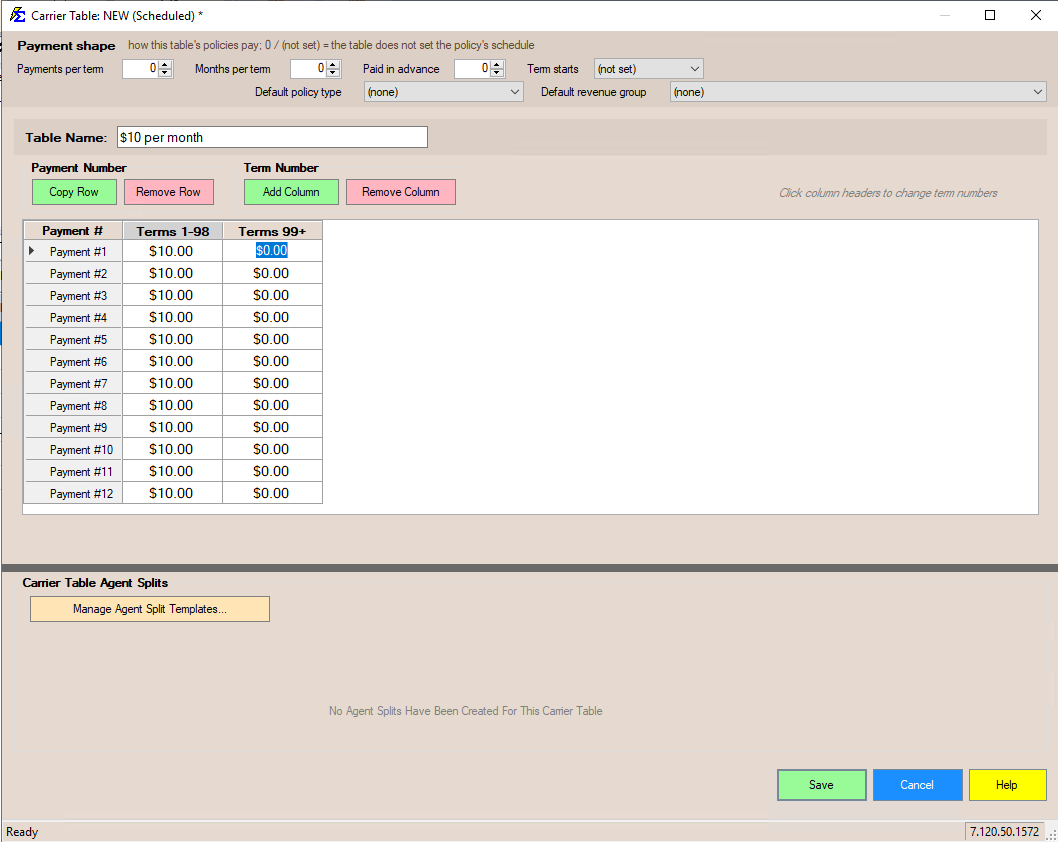
- Monthly Payout — Add 12 rows at $10.00 each for a monthly payment schedule.
- Renewal Logic — Add Term columns to define different amounts for Year 1, Year 2, etc.
- End Dates — Set a later term (e.g., Term 99) to $0.00 to stop commission tracking at that milestone.
Row Alignment
Always ensure the number of rows in your table equals the Number of Payments Per Term on the policy. A mismatch will cause incorrect expected commission calculations.
🔧 Troubleshooting
My expected commission is calculating incorrectly for a scheduled policy. Verify that the number of rows in the Scheduled Table matches the Number of Payments Per Term set on the policy screen. A mismatch between the row count and payment count is the most common cause of discrepancies.
Commission is still calculating after the policy should have stopped paying. Check that the final term column in your table is set to $0.00 for the terms where no commission is expected.
🔗 Related Topics
- Create Carrier Commission Tables — Overview of all table types.
- Flat Carrier Table — Percentage-based commission tables.
- Carrier Commission Table Versions — Manage rate changes over time without affecting history.
- Carrier Table Agent Splits — Define how agents are paid from carrier revenue.
Need help? Contact support@commission-tracker.com