Agent Licenses
To generate Agent Commissions Earned reports, an active license is required for each agent. These licenses ensure your system is scaled to your agency's size and allow for the secure distribution of commission data.
💡 Why Use This
Manage agent licenses when:
- Hiring new agents — Increase your capacity to generate payout reports.
- Offboarding agents — Free up license seats by marking agents as Inactive.
- Audit preparation — Ensure all active producers are eligible for commission statements.
🗺️ How to Access
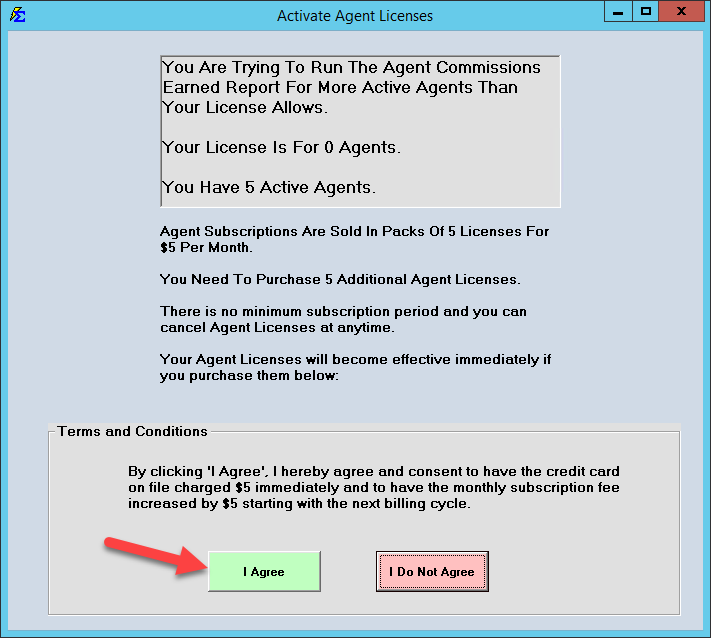
License activation is automatic. When you attempt to run an Agent Commissions Earned report and your agent count exceeds your current limit, the Activate Agent Licenses prompt appears.
To see your license count, click Agents at the top-left of the Policy List screen, then click Manage Agents on the agent toolbar. The window shows your Active Agents and Agent Licenses counts; click Refresh Agent Licenses to update them. (Help → Check Agent Licenses points you to this same window.)
To manage which agents occupy license seats, click Agents at the top-left of the Policy List screen, select the agent, click Edit, and check or uncheck Agent Is Inactive, then click Save.
License Pricing
Agent licenses are affordable and easy to scale as your agency grows:
- Cost: $1 per month per agent.
- Packs: Licenses are sold in packs of five ($5/month).
Adding New Licenses
- Attempt to run an Agent Commissions Earned report.
- If your agent count exceeds your current limit, the Activate Agent Licenses box will pop up.
- Review the terms and click the I Agree button.
- The $5 charge is applied to your card on file immediately, and your monthly billing will increase by $5 starting your next cycle.
- The licenses are added to your software instantly — no restart required.
Managing License Usage (Active vs. Inactive)
You only pay for the agents you need to report on. If an agent is no longer with the agency or doesn't require a monthly statement, free the license seat by changing their status.
Marking an Agent Inactive
- Click Agents at the top-left of the Policy List screen, select the agent, and click Edit.
- Check the Agent Is Inactive checkbox.
- The agent no longer occupies a license seat. Commissions are still tracked and assigned to them in the background, but you cannot generate an ACE Report for them until they are reactivated.

What Happens When an Agent is Inactive
- Data preservation — All historical commission data and current splits remain intact.
- Background tracking — The system continues to calculate what the agent would be owed based on your Split Tables.
- Reporting restriction — The agent will be hidden from the ACE Report filter screen until their status is returned to Active.
🔧 Troubleshooting
You have more agents than your current license count and need to stay within budget. Mark one or more agents as inactive by checking Agent Is Inactive in their agent details. You can swap which agents are active at any time to stay within your license count.
The Activate Agent Licenses prompt appeared and you clicked I Agree by mistake. Contact support@commission-tracker.com immediately to adjust your license count and billing cycle.
🔗 Related Topics
- Agent Commissions Earned Report — Run commission statements for licensed agents.
- ACE Email Setup — Configure automated commission statement delivery.
- Manage Agents — Create and manage agent profiles.
Need help? Contact support@commission-tracker.com