Detail (by Primary Agent)
The Detail (by Primary Agent) report groups an agent's commission earnings under the name of the Primary Agent listed on each policy. It is particularly useful for managers and override recipients who want to see which team members' policies are generating their earnings.
💡 Why Use This
Use this report format when:
- A manager receives overrides on policies written by their team — The report shows exactly which producer's policies are generating the override income.
- Two agents split a case — A secondary agent can track their earnings by the lead producer.
- You want team performance visibility — See which primary producers are driving the most residual income for a given recipient.
🗺️ How to Access
- Click the Agent Commissions button on the main toolbar, or navigate to Reports → Agent → Agent Commissions Earned.
- Select Detail (By Primary Agent) under Select Report Format:.
- Set your date range and click Show Report.
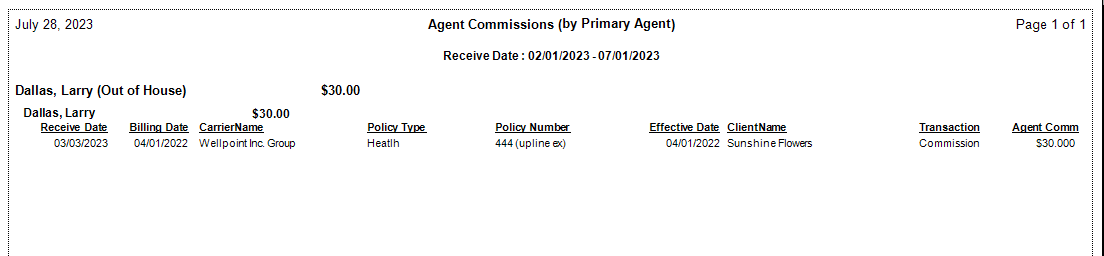
Report Layout
| Data Point | Description |
|---|---|
| Primary Agent | The "Writing Agent" listed as Primary Agent in the Policy group of the Policy window — the grouping header for each section. |
| Client Name | The specific policyholder associated with the transaction. |
| Date Paid | The date the carrier payment was posted. |
| Agent Commission | The final dollar amount earned by the agent viewing the report. |
| Subtotals | Total dollar amount earned for all business written by each Primary Agent. |
Agency gross commission is hidden in this format — agents see only their personal earnings and policy details.
Other ACE Report Formats
- Detail (Percent of Commission) — Alphabetical detail showing agent earnings as a percentage of agency commission.
- Detail (by Carrier) — Groups payments by carrier.
- Detail (Hybrid) — Shows both premium and agency gross for full transparency.
- Summary Only — Agent totals only, no policy-level detail.
🔧 Troubleshooting
Some policies show "Unknown" as the Primary Agent. The policy was created without a Primary Agent assigned. Open the policy and select the correct agent in the Primary Agent dropdown in the Policy group (see Policy Information). Future payments will group correctly after the assignment is saved.
If the recipient is the Primary Agent on their own policies. Their earnings simply group under their own name — the report works the same way regardless of whether the recipient and the Primary Agent are the same person.
🔗 Related Topics
- Agent Commissions Earned Report — Full ACE Report overview and email setup.
- Primary Agent — How Primary Agent is assigned on a policy.
- Preset Date Range — Quickly set the reporting period.
Need help? Contact support@commission-tracker.com