Primary Agent
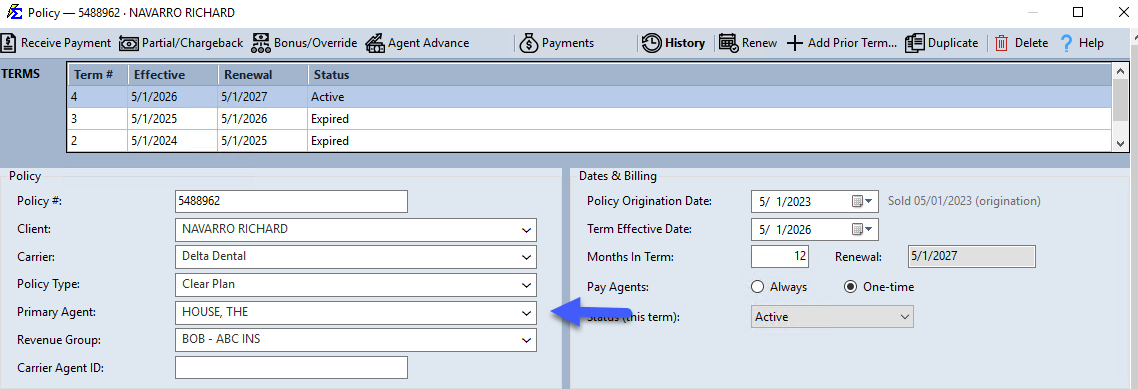
The Primary Agent is the agent responsible for the account — the Broker of Record. While commissions can be split among many agents, every policy requires exactly one Primary Agent. If none is selected, the system defaults to The House.
💡 Why Use This
Setting the Primary Agent correctly is important for:
- Reporting — The Primary Agent is the main filter for finding a broker's total book of business value or policy list.
- Automated Commission Splits — When combined with Carrier Table Agent Splits, the Primary Agent's commission level automatically generates the split rules.
- Import Matching — Correctly identifying the Primary Agent during a policy import allows the system to build commission split tables automatically.
🗺️ How to Access
Open any policy from the policy grid (select it and click Edit, or double-click it). The Primary Agent dropdown is in the Policy group.
Key Functions
- Reporting Filter — Click Agents at the top-left of the Policy List screen and select the agent to see every policy where they are the Primary Agent, or run the Book of Business report for their total value.
- Auto-Splits — When combined with Carrier Table Agent Splits, the Primary Agent's level automatically generates the commission rules for the policy.
🔧 Troubleshooting
I cannot find the agent I need in the Primary Agent dropdown. The agent must have an active record in the system. Check the Agent List to confirm the agent exists and is not marked as Inactive.
The Primary Agent is showing as The House even though I assigned an agent. If no Primary Agent is selected, the system defaults to The House. Open the policy, select the correct agent from the dropdown, and save.
🔗 Related Topics
- Policy Information — Overview of all policy fields.
- Create New Agent — Set up agent records.
- Carrier Table Agent Splits — Define how commissions are split using the Primary Agent's level.
- Agent ID Assigned By Carrier — Store the carrier's identifier for the agent on a policy.
Need help? Contact support@commission-tracker.com