Book of Business Report
The Book of Business (BOB) report calculates the total projected worth of your current policies by totaling both premium and commission values across your entire database. It is the primary tool for understanding agency valuation and agent production.
💡 Why Use This
Use this report when:
- Valuing your agency — Determine the total commission and premium currently under management.
- Evaluating agent performance — Calculate an individual agent's book value to assist with compensation reviews or buyouts.
- Analyzing carrier concentration — See which carriers represent the largest portion of your revenue.
- Tracking growth — Use the Effective Date filter to see the value of new business written within a specific timeframe.
🗺️ How to Access
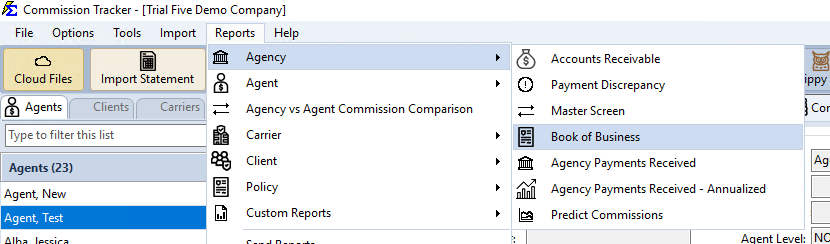
- Navigate to Reports → Agency → Book of Business.
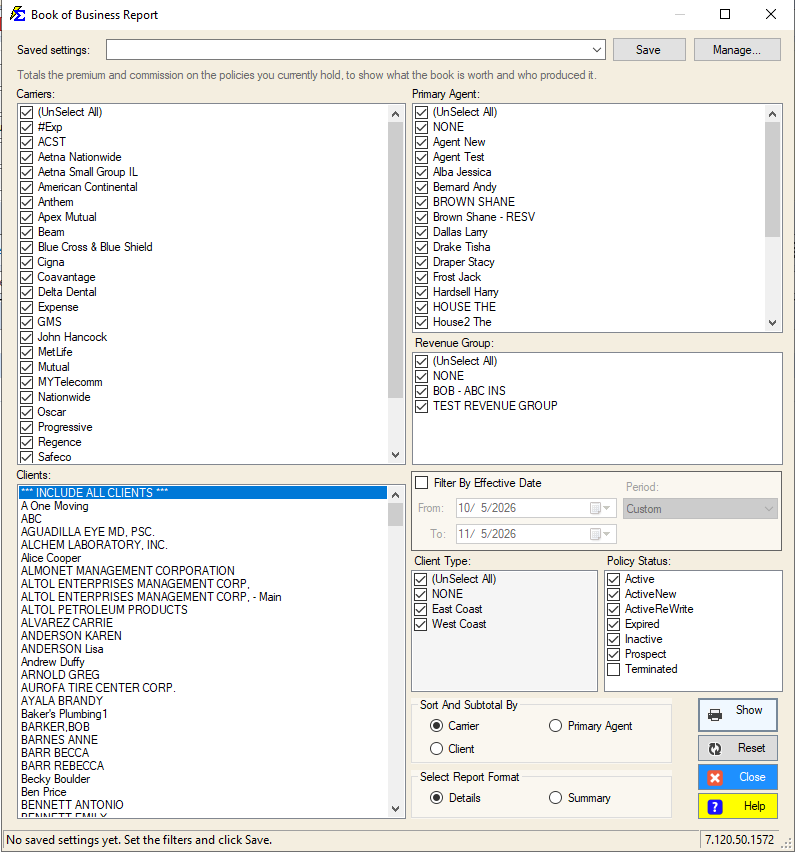
- Choose the grouping under Sort And Subtotal By (Carrier, Client, or Primary Agent).
- Set any status or date filters.
- Click Show Report.
Newer versions only
This is in newer versions of Commission Tracker. If you do not see it, your server has not been updated yet.
Instead of setting the filters by hand, pick a name from Saved settings at the top of the screen to fill them in (see Saved Report Settings).
Data Requirements for Accuracy
The BOB report relies on Expected Commission values. For the report to generate accurate figures, you must have one of the following configured on each policy:
- A Carrier Commission Table assigned to the policy.
- A Commission Per Payment value entered directly on the policy record.
Policies With No Expected Commission
If a policy has no expected commission or premium configured, it will calculate as $0.00 in the report totals and will understate your agency's true value.
Report Formats
Details View
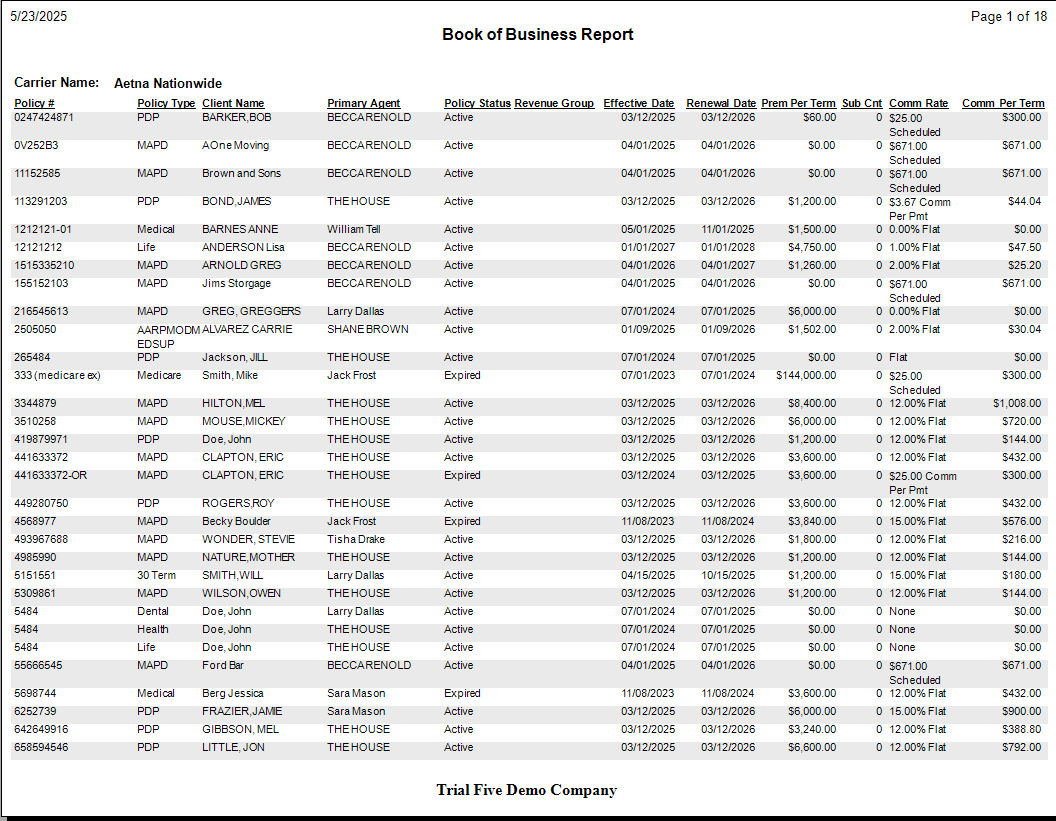
Provides a line-item breakdown of every policy. Use this for deep-dive audits where you need to see exactly which clients make up the totals.
- Includes: Client Name, Policy Number, Effective Date, Status, and individual Premium and Commission amounts.
- Status Filter: By default, Terminated policies are excluded to ensure you are looking at active revenue only.
Summary View
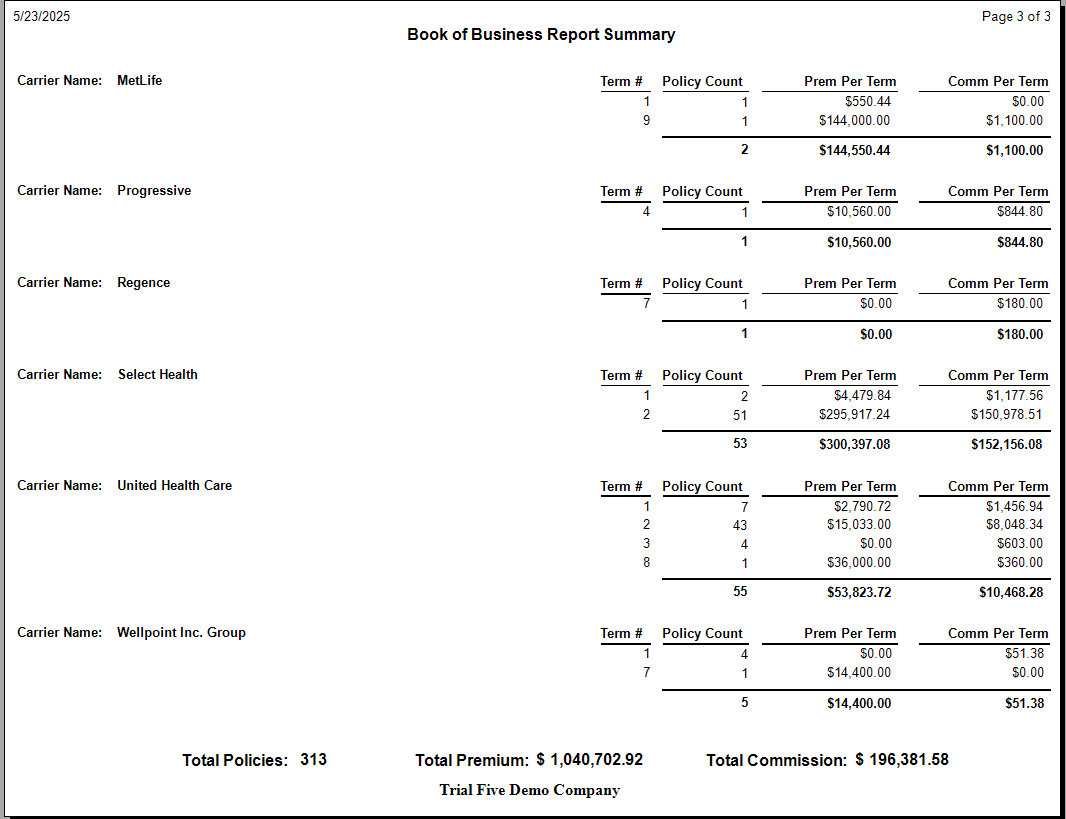
Provides a high-level executive overview by removing policy-specific detail and showing totals by Term Number.
- Includes: Policy Count, subtotaled Premium, and subtotaled Commission.
- Grand Totals: Every summary report concludes with a bottom-line total of your Policy Count and Agency Valuation.
How This Report Generates
- The system scans all policies matching your status and date filters.
- It looks at the current term of each policy.
- It pulls the expected values (Premium and Commission) and aggregates them based on your Group By selection.
- Results can be exported to PDF or Excel for further analysis.
🔧 Troubleshooting
My book value is lower than expected. Check your filters. If you have Active selected but some policies are in Prospect status, they will be excluded. Also verify that Commission Per Payment values or Carrier Commission Tables are filled in for all policies — missing values calculate as $0.00.
I want to see just one agent's book of business. Use the Primary Agent filter on the report selection screen to isolate a single producer's policies. Run the Details View to see the full policy list or the Summary View for a total valuation.
Terminated policies are showing in the results. The default filter excludes Terminated policies, but this filter can be changed. Confirm your status filter is set to Active (or your preferred active statuses) before running the report.
🔗 Related Topics
- Carrier Commission Tables — Set up the expected commission values this report depends on.
- Accounts Receivable — Track outstanding commissions by policy.
- Preset Date Range — Set the reporting period quickly.
Need help? Contact support@commission-tracker.com