Detail (Hybrid)
The Detail (Hybrid) report is the most transparent ACE Report format. It combines both the premium-based and commission-based perspectives in one view, showing each agent's earnings as a percentage of the client premium and as a percentage of the agency's gross commission received from the carrier.
💡 Why Use This
Use this report format when:
- You operate on a full-transparency model — Agents can see the entire financial flow, from what the client paid to what the agency received to what the agent earned.
- You need to audit complex splits — Agents with tiered or variable splits can verify the math at every level.
- An agent's check is lower than expected — The hybrid view quickly identifies whether the issue is with the carrier's payment to the agency or with how the agent's split was applied.
🗺️ How to Access
- Click the Agent Commissions button on the main toolbar, or navigate to Reports → Agent → Agent Commissions Earned.
- Select Detail (Hybrid) under Select Report Format:.
- Set your date range and click Show Report.
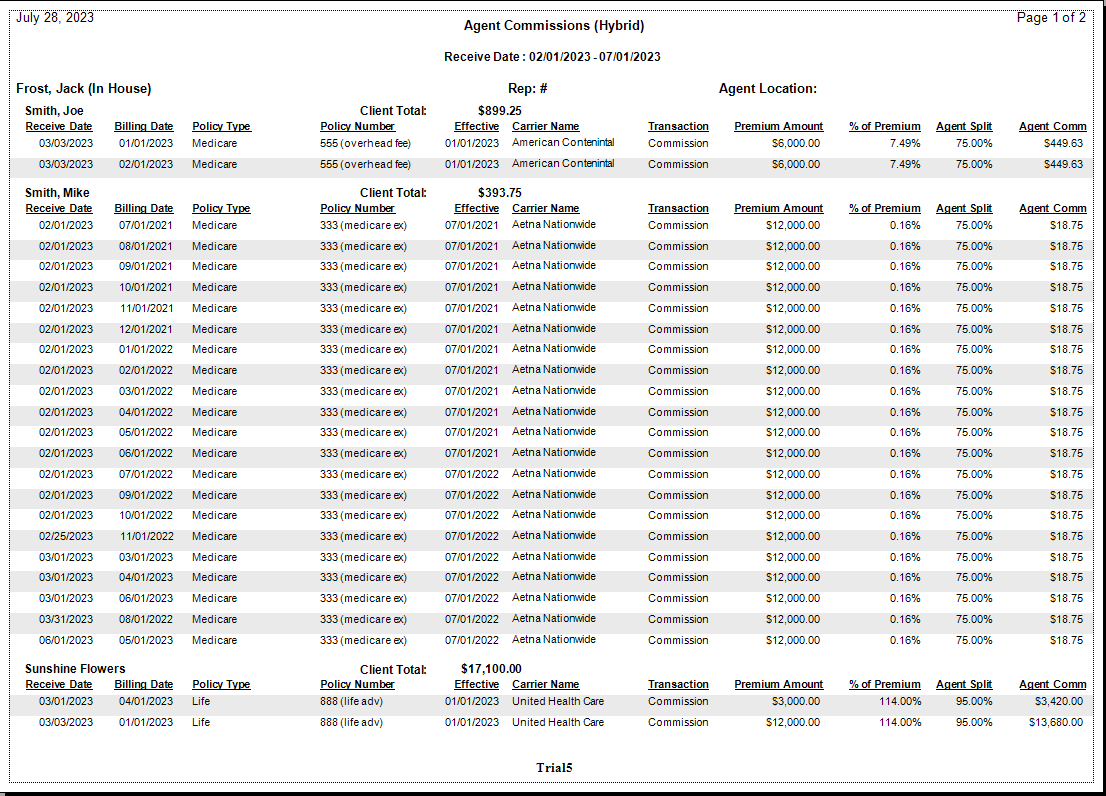
Report Layout
| Data Point | Description |
|---|---|
| Premium | The total payment made by the policyholder to the carrier. |
| Agency Commission | The gross amount received by the agency before splits are applied. |
| % of Premium | The mathematical relationship between the agent's earnings and the total premium. |
| % of Agency | The agent's actual split percentage — their share of what the agency received. |
| Agent Commission | The final net dollar amount paid to the agent. |
Format Comparison
| Feature | Detail (Hybrid) | Detail (by Carrier) | Summary Only |
|---|---|---|---|
| Shows Premium | Yes | No | No |
| Shows Agency Gross | Yes | Yes | No |
| Shows Split % | Yes | Yes | No |
| Grouping | Alphabetical | By Carrier | None |
Other ACE Report Formats
- Detail (Percent of Commission) — Shows agency gross; agent earnings as a percentage of agency commission.
- Detail (Percent of Premium) — Hides agency gross; shows agent earnings relative to client premium.
- Detail (by Carrier) — Groups payments by carrier.
- Summary Only — Agent totals only, no policy-level detail.
🔧 Troubleshooting
The "% of Agency" is different from the agent's contracted split. This can occur if Agent Advances are being recouped or if the Agent Commission Split Table was updated mid-period. Check Payment History to confirm whether adjustments or chargebacks were applied within the report date range.
An agent's total is lower than expected. Review the Agency Commission column to confirm the carrier paid the expected gross amount. If the gross is correct but the agent's total is still low, the split percentage may have been misconfigured — check the Carrier Table Agent Splits or Policy-Specific Agent Commission Split Table.
🔗 Related Topics
- Agent Commissions Earned Report — Full ACE Report overview and email setup.
- Agent Commission Split Table — Review policy-specific split configuration.
- Carrier Table Agent Splits — Review carrier-level split configuration.
- Preset Date Range — Quickly set the reporting period.
Need help? Contact support@commission-tracker.com