Detail (by Carrier)
The Detail (by Carrier) report groups an agent's commission earnings by insurance carrier, with a subtotal at the end of each carrier section. It is ideal for agents who need to verify payouts against specific carrier statements or track which carriers contribute most to their revenue.
💡 Why Use This
Use this report format when:
- An agent suspects a specific carrier is underpaying — The carrier grouping makes it easy to isolate and audit one carrier's transactions.
- You want to analyze production by carrier — Identify which carriers are most profitable for a specific agent or the whole agency.
- Providing supplemental monthly statements — Use as an attachment to commission checks for agents who want detailed carrier-level breakdowns.
🗺️ How to Access
- Click the Agent Commissions button on the main toolbar, or navigate to Reports → Agent → Agent Commissions Earned.
- Select Detail (By Carrier) under Select Report Format:.
- Set your date range and click Show Report.
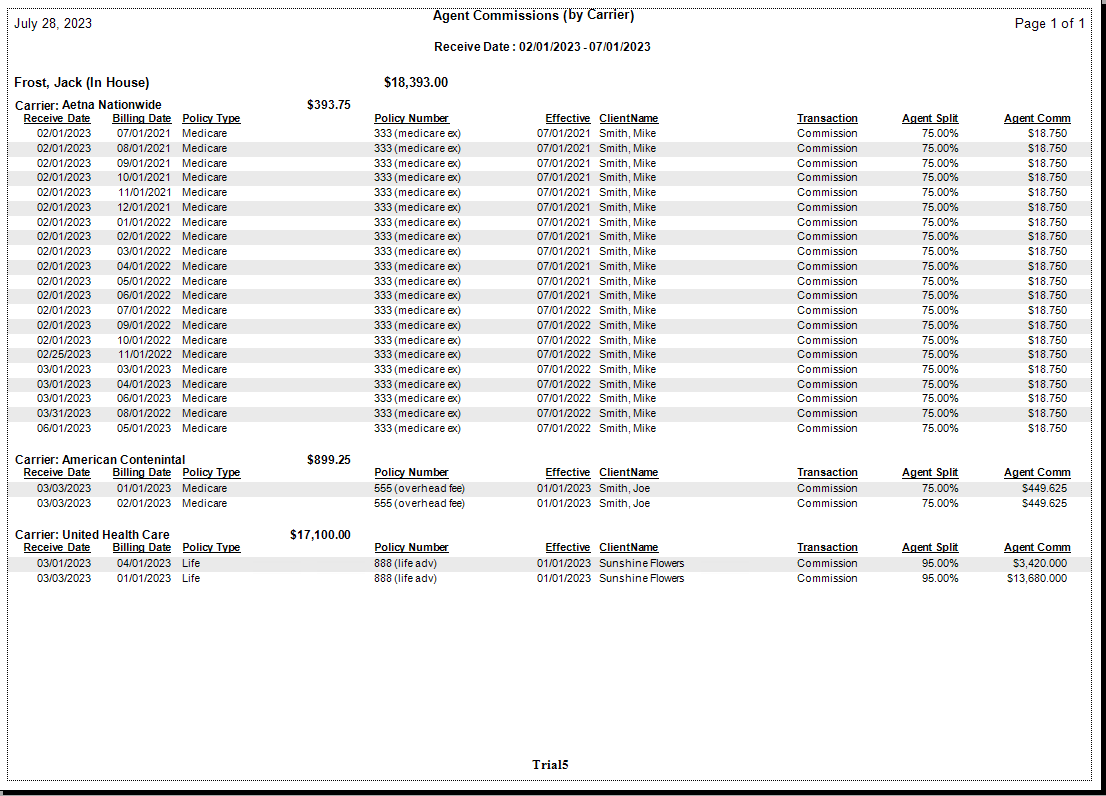
Report Layout
| Data Point | Description |
|---|---|
| Carrier Name | The primary grouping header for each section. |
| Client Name | The individual or group associated with the payment. |
| Commission Amount | The specific dollar amount allocated to the agent. |
| Total per Carrier | A bolded subtotal at the bottom of each carrier's section. |
Other ACE Report Formats
- Detail (Percent of Commission) — Alphabetical detail showing agent earnings as a percentage of agency commission.
- Detail (Hybrid) — Shows both premium and agency gross for full transparency.
- Detail (by Carrier with Premium) — Same carrier grouping but includes the premium column.
- Summary Only — Agent totals only, no policy-level detail.
🔧 Troubleshooting
The carrier totals don't match the Summary report. Confirm the date ranges are identical between both reports. If they match, check whether any policies are missing a Carrier assignment — those transactions may be grouped under "Unknown" or omitted entirely.
An agent wants to run this for the whole agency. Administrators can run this report for all agents at once to see a carrier-by-carrier breakdown of total agency payouts, not just individual agent earnings.
🔗 Related Topics
- Agent Commissions Earned Report — Full ACE Report overview and email setup.
- Preset Date Range — Quickly set the reporting period.
Need help? Contact support@commission-tracker.com