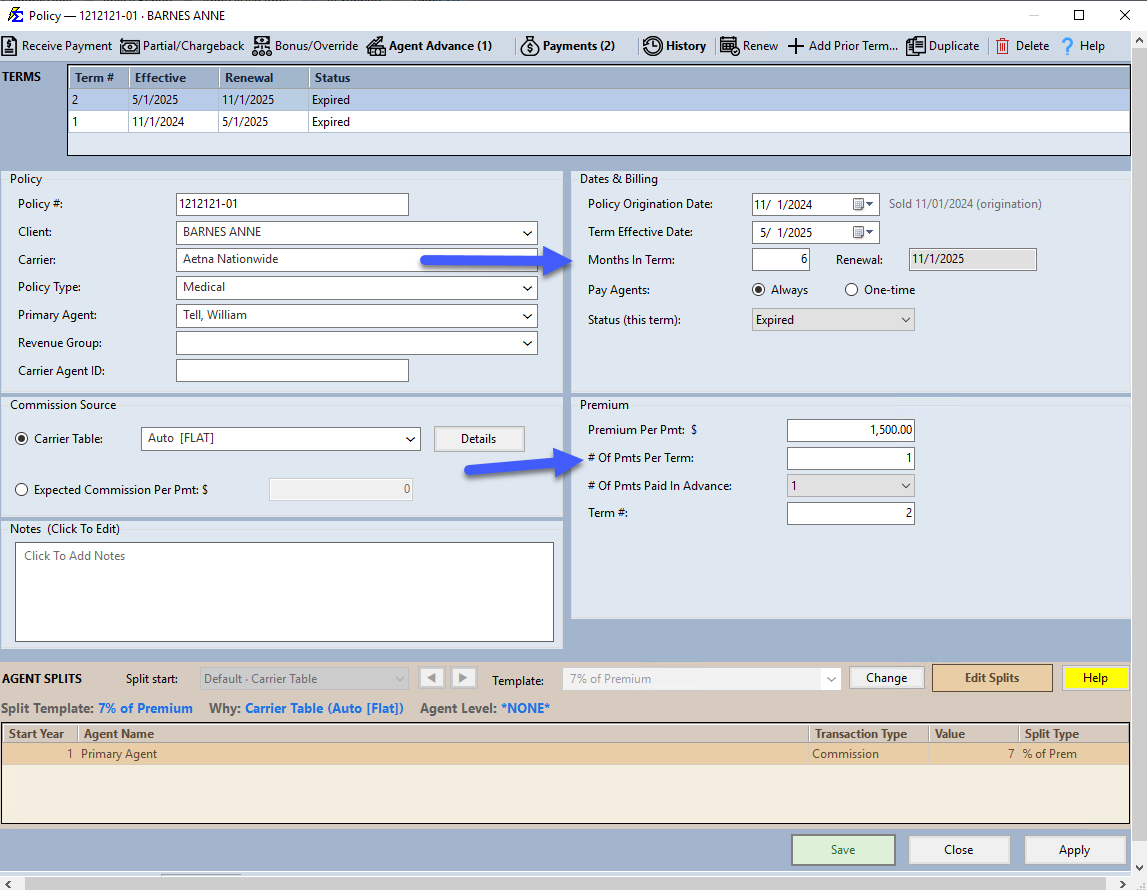
# of Payments Per Term
The # of Payments per Term defines exactly how many individual commission payments are expected between the Term Effective Date and the Months In Term.
While the term length tells the system how long the policy lasts, this field tells the system how often the money arrives (e.g., Monthly, Quarterly, or Annually).
💡 Why Use This
Setting this field correctly is essential for:
- Accurate Accounts Receivable — The system creates one billing slot per expected payment. An incorrect number results in a misleading A/R report.
- Commission math — The system divides your total expected commission across the number of payment slots to determine the per-payment expected amount.
- Matching the carrier's actual billing cycle — If the carrier pays monthly but this is set to 1, the A/R report will look incorrect for 11 months of the year.
🗺️ How to Access
The # of Payments Per Term field is the # Of Pmts Per Term: box in the Premium group of the policy window.
Common Payment Frequencies
Most insurance policies operate on a 12-month term, but the number of payments can vary based on the carrier's billing cycle:
| Billing Cycle | # of Payments per Term | Example |
|---|---|---|
| Monthly | 12 | The most common setup for Health and Life. |
| Quarterly | 4 | Payments arrive every 3 months. |
| Semi-Annual | 2 | Payments arrive twice a year. |
| Annual | 1 | One single payment for the entire term. |
How the Math Works
The system uses this number to divide your total expected commission across the term.
Example: Standard Monthly Policy
- Term Effective Date: 1/1/2022
- Term Length: 12 Months
- Premium Per Payment: $100
- # of Payments Per Term: 12
The Result: Commission Tracker creates 12 individual billing slots (January through December), each expecting a payment based on the $100 premium.
Important Considerations
- Term Length vs. Payments — Do not confuse the "Term Length" (in months) with "Payments per Term." A 12-month policy paid quarterly has a term length of 12 but only 4 payments per term.
- Annual policies — Setting this to
1means the system expects the entire year's commission in a single payment. Setting it to12means it looks for a smaller amount every month. - Prorated terms — If entering a policy mid-term, enter the standard number of payments for a full term. The system will show earlier months as open or missing.
🔧 Troubleshooting
My Accounts Receivable report shows many open periods that shouldn't be there. Verify that the # of Payments Per Term matches the carrier's actual billing cycle. If the carrier pays annually but this is set to 12, the system creates 11 open slots with no payments.
I'm not sure what to enter for an unusual billing cycle. Count how many times per year the carrier actually sends you a commission check for this policy and enter that number.
🔗 Related Topics
- Commission Source and Premium — Overview of all payment schedule fields.
- Number Of Payments Paid In Advance — Configure advance commission schedules.
- Term Effective Date — The start date the payment schedule is built from.
- Accounts Receivable — Track expected vs. received commission payments.
Need help? Contact support@commission-tracker.com