Carrier Agent ID
The Carrier Agent ID is an optional field in the Policy group of the Policy window used to store the specific identification number a carrier uses to identify an agent for a particular policy.
💡 Why Use This
While optional, this field is highly recommended when:
- Using Carrier Imports — Many carrier statements identify the agent by an ID number rather than a name. Storing that ID here enables accurate data matching during the import process.
- Auditing Statements — Quickly cross-reference the ID on a carrier statement with the data in Commission Tracker.
- Tracking Multiple Appointments — If an agent has different ID numbers for different carriers, this policy-level field ensures the correct ID is linked to the correct business.
🗺️ How to Access
The Carrier Agent ID field is in the Policy group of the Policy window, with Primary Agent and Revenue Group, when creating or editing a policy.
Adding or Editing the Agent ID
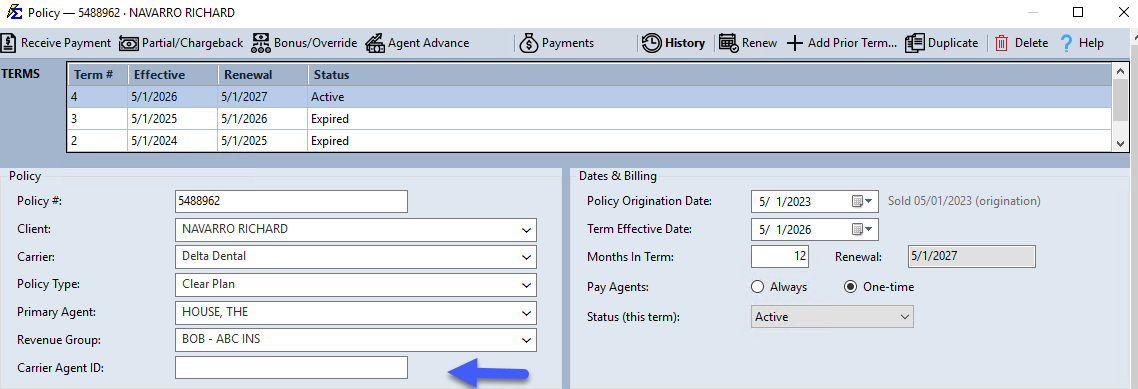
- Navigate to the Policy you wish to edit.
- Locate the Carrier Agent ID field.
- Enter the ID exactly as it appears on your carrier statements.
- Click Save.
What Happens When You Save
- The ID is stored as part of the policy's metadata.
- During a Carrier Statement Import, the system can use this ID to help verify that the commission is being attributed to the correct agent and policy combination.
- This field can be pulled into custom reports to assist with carrier-level reconciliation.
🔧 Troubleshooting
Is this the same as the agent's Social Security Number or Tax ID? No. This field is specifically for the ID assigned by the insurance carrier (e.g., a Writing Code or Agent Number). Tax IDs and license numbers should be stored in the main Agent Profile's Rep # field.
A carrier uses the same ID for all of an agent's policies — do I still need to enter it on each policy? Yes. Entering it on each policy ensures that automated matching features in the Import Carrier Statements process work correctly for every record.
🔗 Related Topics
- Primary Agent — Set the lead agent for a policy.
- Policy Information — Overview of all policy fields.
- Import Carrier Statements (Excel Statements) — How agent IDs are used during the import process.
Need help? Contact support@commission-tracker.com