Annual (by Carrier)
The Annual (by Carrier) format of the ACE Report provides a calendar-year view of an agent's earnings organized by insurance carrier. It displays a month-by-month grid for each policy, making it easy to track seasonal trends, compare carrier performance, and review annual production.
💡 Why Use This
Use this report format when:
- You want to track monthly trends by carrier — See how revenue from a specific carrier fluctuates over 12 months.
- Conducting year-end reviews — Provide agents with a single-page summary of their performance by carrier for the full year.
- Budgeting and forecasting — Identify which carriers provide consistent monthly renewals versus one-time or irregular payments.
🗺️ How to Access
- Click the Agent Commissions button on the main toolbar, or navigate to Reports → Agent → Agent Commissions Earned.
- Select Annual (By Carrier) under Select Report Format:.
- Set your date range (calendar year) and click Show Report.
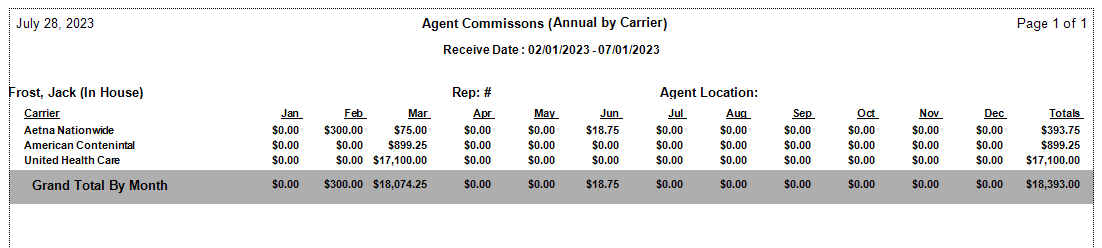
Report Layout
- Carrier Name — Primary grouping, listed alphabetically.
- Policy Number — Sub-sorted under each carrier.
- Monthly Columns (Jan–Dec) — Commission earned in each month based on Payment Received Date.
- Yearly Total — The rightmost column shows the sum of all commissions for that policy for the entire year.
How This Report Generates
- The system aggregates all commission records for the selected agent within the specified calendar year.
- Data is grouped first by the insurance carrier.
- Every payment is placed in its respective month column based on the Receive Date.
- The system calculates a horizontal sum for each policy row and a vertical sum for each monthly column.
Other ACE Report Formats
- Annual (by Client) — Same grid format grouped by client instead of carrier.
- Detail (with Year-To-Date Total) — Running YTD total alongside policy-level detail.
- Summary Only — Agent totals only, no carrier or policy detail.
🔧 Troubleshooting
A payment appears in the wrong month. The monthly column is determined by the Payment Received Date, not the Billing Date. If a payment was received in a different month than expected, check the Received Date in Payment History and correct it if needed.
The report shows $0.00 for a carrier where I know payments exist. Confirm that those payments are assigned to the correct carrier on the policy record. Payments with a missing or mismatched carrier may not appear under the expected carrier grouping.
The agency gross commission is not visible. This is an agent-facing report and shows only the agent's earned commission. To see agency gross, use a Detail report format such as Detail (Percent of Commission) or Detail (Hybrid).
🔗 Related Topics
- Agent Commissions Earned Report — Full ACE Report overview and email setup.
- Annual (by Client) — Same format organized by client.
- Preset Date Range — Set the calendar year date range quickly.
Need help? Contact support@commission-tracker.com