Retry Payments
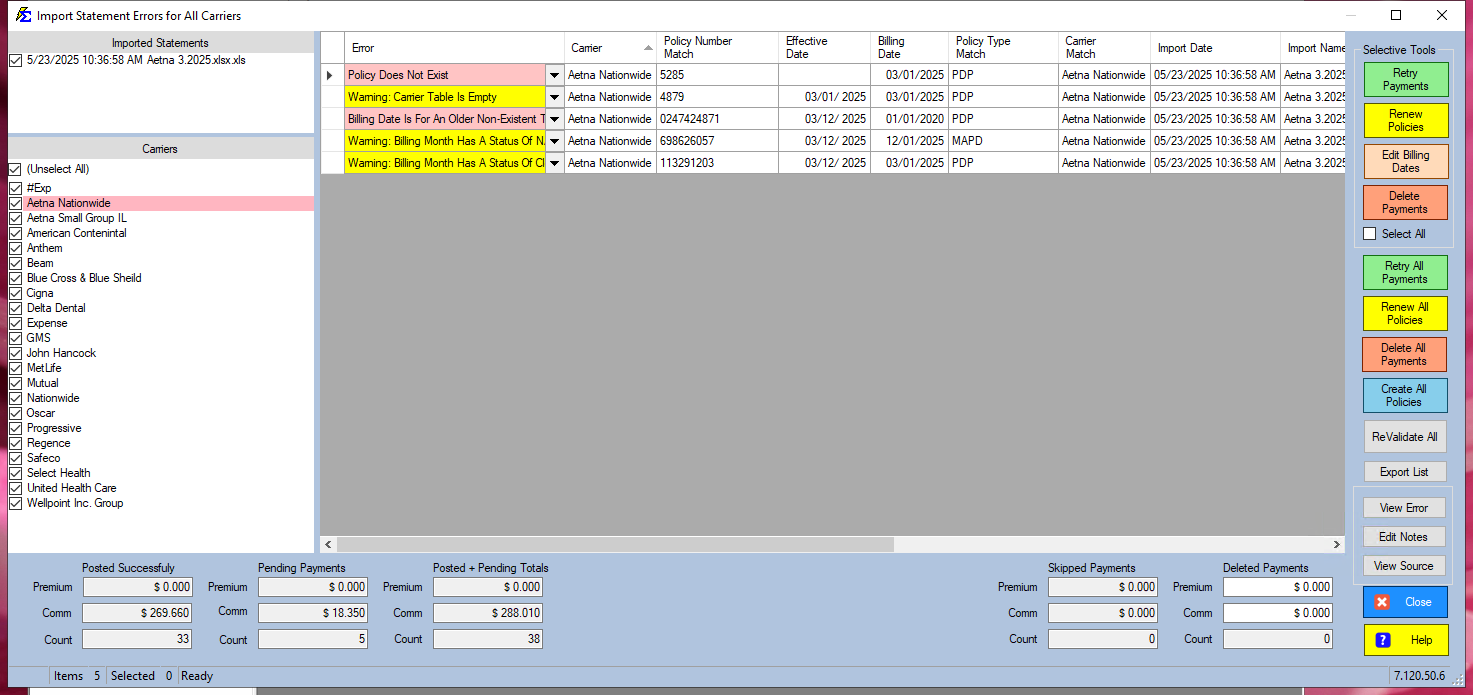
The Retry Payments button re-validates pending error records in the Import Carrier Statement Errors (ICSE) screen and posts them to Payment History if the underlying issue has been resolved.
💡 Why Use This
Use Retry Payments when:
- You have fixed an underlying error — After creating a missing policy, renewing a term, or editing a billing date, use Retry to attempt posting again.
- A payment shows a warning but is valid — Some warnings (such as Billing Month Status NA) allow a payment to post; Retry is how you proceed past them.
- You want to clear the error queue — Retrying all resolved rows moves them out of the error list and into Payment History.
🗺️ How to Access
The Retry Payments button is in the Selective Tools group, in the column of buttons on the right side of the ICSE screen. To retry every row at once, use Retry All Payments in the same column.
Step-by-Step: Retrying Payments
- Resolve the underlying error (create the missing policy, renew the term, or adjust the billing date).
- Select the row or rows you want to retry.
- Click Retry Payments.
- If the error is resolved, the payment moves to Payment History.
Warning Messages
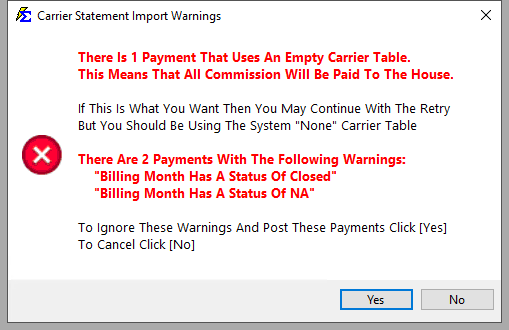
The following warnings allow a payment to post when you click Retry, but indicate a potential data issue to investigate:
| Warning | Meaning |
|---|---|
| Carrier Table Is Empty | No commission table is assigned to this policy. Payout defaults to 100% to The House; no expected commission is calculated. |
| Billing Month Status NA | The payment is being posted to a month that was not expected based on the policy's term schedule (e.g., mid-term on an annual policy). |
| Billing Month Status Closed | A payment already exists for this billing month. The new payment will post as an adjustment. |
Suppressing Repeated Warnings
If your carrier's reporting style routinely produces Closed or NA status warnings, use the checkboxes on the ICSE screen to suppress these warnings so they don't slow down your workflow.
🔧 Troubleshooting
After clicking Retry, the same error is still listed. The underlying issue was not fully resolved. Check the View Error dropdown on the row for the specific error detail, correct the problem, and retry again.
A payment posted but now shows up as an adjustment in Payment History. A previous payment for the same policy and billing month already existed. If the original payment was correct, delete the adjustment from Payment History. If the original was wrong, delete it and keep the new payment.
Retry Payments is not posting anything and no errors are shown. If the row shows a blank error status, the payment is ready to post — select it and click Retry to finalize it. Blank status means no errors were detected, not that the payment was already posted.
🔗 Related Topics
- Errors — Import Carrier Statement (ICSE) — Full error resolution workflow.
- Renew Policies — Advance a policy term before retrying.
- Edit Billing Date — Correct billing dates before retrying.
- Payment History — View payments after they post successfully.
Need help? Contact support@commission-tracker.com