Origination Date
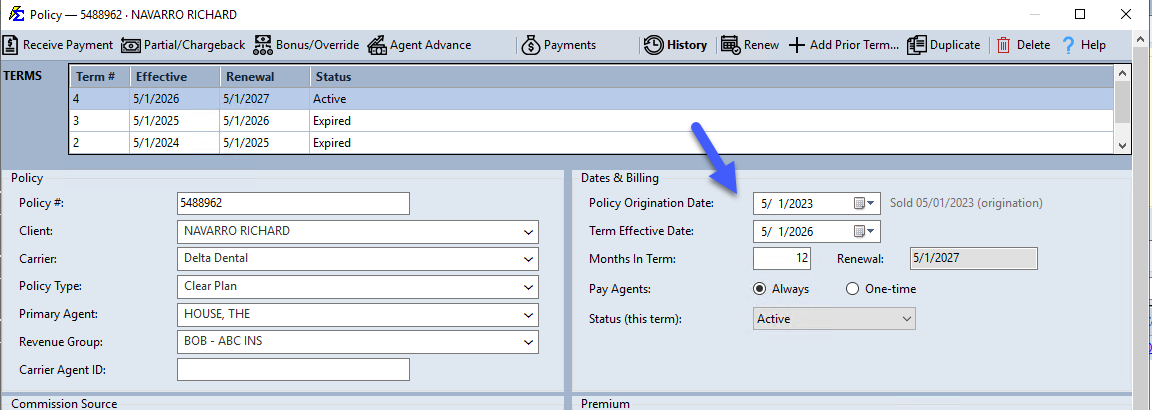
The Origination Date represents the start of the very first term of a policy. While the Term Effective Date changes every year upon renewal, the Origination Date remains constant for the life of the policy.
This field serves two primary purposes:
- Calculating Term Number — Helping the system determine if a policy is "New Business" or a renewal.
- Historical Reference — Tracking how long a policy has been in force, especially for policies migrated from a previous system.
💡 Why Use This
Set the Origination Date correctly when:
- Creating new business — Ensures the policy starts at Term 1 and the carrier table applies the correct new-business rate.
- Entering takeover business — Policies that have already renewed many times before you started using Commission Tracker must have the correct origination date so the system applies renewal rates, not new-business rates.
- Tracking writing dates — Some agencies use this field to record when the agent wrote the application, even if coverage hasn't started yet.
🗺️ How to Access
Open any policy from the policy grid (select it and click Edit, or double-click it). The Policy Origination Date field is in the Dates & Billing group.
Calculating the Term Number
The system compares the Origination Date to the Current Term Effective Date to estimate the Term Number. This is critical because your Carrier Commission Table typically pays different rates for Term 1 (New Business) versus Term 2+ (Renewal).
Example: A 7-Year-Old Policy
If a policy originated in 2016 but the current term begins in 2022, the system calculates this as Term 7.
| Calendar Year | Term Status |
|---|---|
| 2016 | Term 1 (Original Term) |
| 2017 – 2021 | Terms 2 through 6 |
| 2022 | Term 7 (Current Term) |
Takeover Business Logic
This logic allows you to enter takeover business — policies that have already renewed many times before you started using Commission Tracker — and still have them pay out at the correct renewal rate.
Use Cases
The "Writing Date"
Some agencies use this field as the "Application" or "Writing Date" — typically a few weeks prior to the actual Effective Date. This tracks when the agent performed the work, even though payments haven't started yet.
Takeover Business
When migrating data from another system, setting the correct Origination Date ensures the system doesn't treat an old policy as New Business when the first payment arrives.
Important Considerations
- Informational Only — Aside from estimating the Term Number, this date is primarily for records and reporting.
- Consistency — This date should remain identical across every renewal term of a specific policy.
- Effective Date vs. Origination Date — The Effective Date triggers the money; the Origination Date explains the history.
🔧 Troubleshooting
A renewal policy is paying out at the new-business rate instead of the renewal rate. Check whether the Origination Date was accidentally set to the same day as the current Term Effective Date. If so, the system calculates Term 1 and applies the new-business rate. Correct the Origination Date to the actual start of the first term.
I migrated policies from another system and the Term Numbers are wrong. Verify that the Origination Date on each migrated policy matches the date the very first term began in the previous system. Recalculate the expected Term Number using the table above to confirm.
🔗 Related Topics
- Policy Information — Overview of all policy fields.
- Term Number — How term numbers affect commission calculations.
- Term Effective Date — The start date for the current term.
- Flat Carrier Table — How term numbers determine which commission rate applies.
Need help? Contact support@commission-tracker.com