Create New Carrier
A Carrier represents the provider of coverage and, more specifically, the entity that pays commissions to your agency. Adding a carrier to Commission Tracker is the first step toward automating your revenue tracking, as the carrier selection determines which Carrier Commission Tables are available for a policy.
💡 Why Use This
Create a carrier record when:
- Setting Up a New Provider — Any carrier paying commissions to your agency must have a profile before policies or payments can be linked to it.
- Enabling Commission Automation — The carrier record is where you attach commission tables that drive automatic payout calculations.
- Organizing Statement Imports — Carrier records are used to match imported commission files to the correct provider.
🗺️ How to Access
Click the Carriers tab on the Policy List screen, then click + New.
Video Tutorial
If the video below does not play, please copy and paste this link into your web browser: https://www.youtube.com/watch?v=MBfShcdrooI
The Carrier Profile
The Carrier screen acts as a central hub for managing all data related to a specific insurance provider. From this screen, you can manage contact details, set up complex commission math, and perform bulk policy updates.
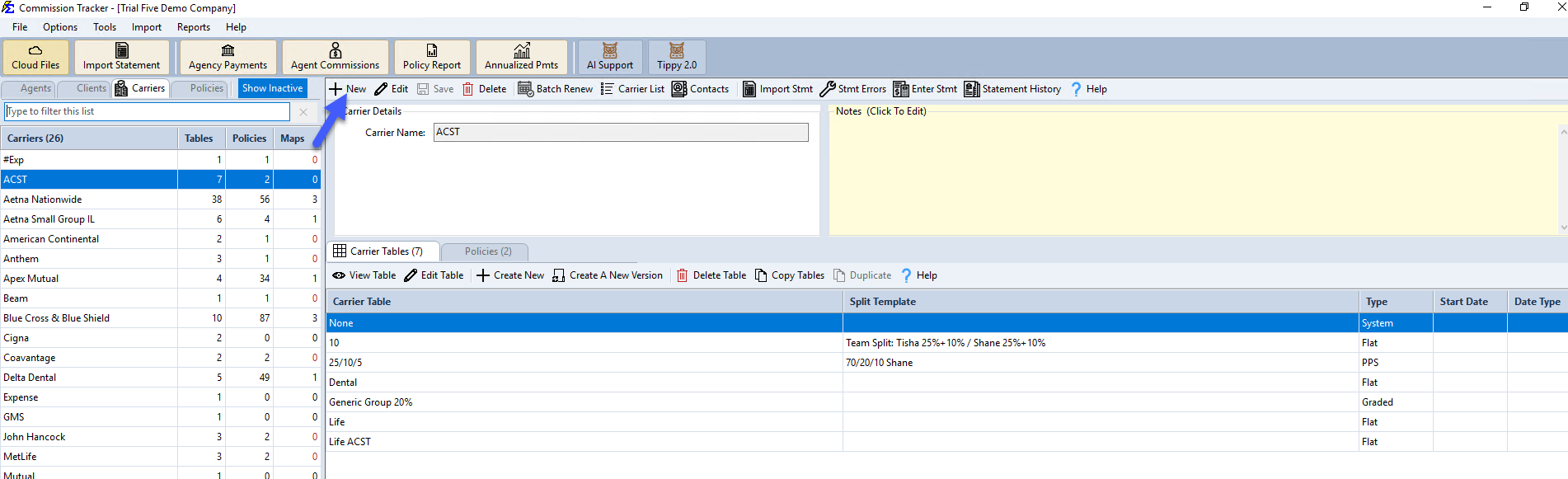
Core Functions
Once a carrier is created, you can access the following features:
- Carrier Commission Tables — Define how the carrier calculates your payouts.
- Import Statements — Digitally upload carrier commission files for automatic reconciliation.
- Reconcile Statements — Audit actual payments against expected revenue.
- Bulk Updates — Modify or Renew all policies associated with this carrier at once.
Key Fields
| Field | Description |
|---|---|
| Carrier Name | The primary name of the provider (Max 30 characters). Examples: Blue Cross & Blue Shield, Aetna. |
| Contacts | Contact names, addresses, and phone numbers are kept in the Contacts window — click Contacts on the carrier toolbar. See Contacts. |
Step-by-Step Instructions
- Click the Carriers tab on the Policy List screen, then click + New.
- Enter the Carrier Name (ensure this matches the name used on your commission statements for easier importing).
- Populate any optional contact information, such as address and primary phone number.
- Click Save.
- Click the Carrier Tables tab below the carrier's details to begin defining your contract rates.
🔧 Troubleshooting
I need two carriers with the same name (e.g., different branches). Carrier names must be unique. If you have different branches of a carrier (e.g., Aetna Life vs. Aetna Health), include a suffix to differentiate them.
I need to change a carrier's name after policies have been linked. You can edit the name at any time. The system will automatically update all policies linked to that carrier record.
🔗 Related Topics
- Carrier Contact Info — Add contact name, address, and phone details to a carrier profile.
- Contacts — Full walkthrough of the Contacts window.
- Create Carrier Commission Tables — Define how commissions are calculated for this carrier.
Need help? Contact support@commission-tracker.com