Annual (by Client)
The Annual (by Client) format of the ACE Report provides a calendar-year view of an agent's earnings organized alphabetically by client. It displays a month-by-month grid for each policy, making it easy to identify which clients generate the most consistent revenue and where commission gaps exist.
💡 Why Use This
Use this report format when:
- You want to analyze the value of individual client relationships — See the total annual commission generated per client across all their policies.
- You need to identify retention gaps — Spot months where an expected commission is missing, which may indicate a lapse or cancellation.
- Conducting agent reviews — Help agents visualize their book based on client relationships rather than carrier lists.
🗺️ How to Access
- Click the Agent Commissions button on the main toolbar, or navigate to Reports → Agent → Agent Commissions Earned.
- Select Annual (By Client) under Select Report Format:.
- Set your date range (calendar year) and click Show Report.
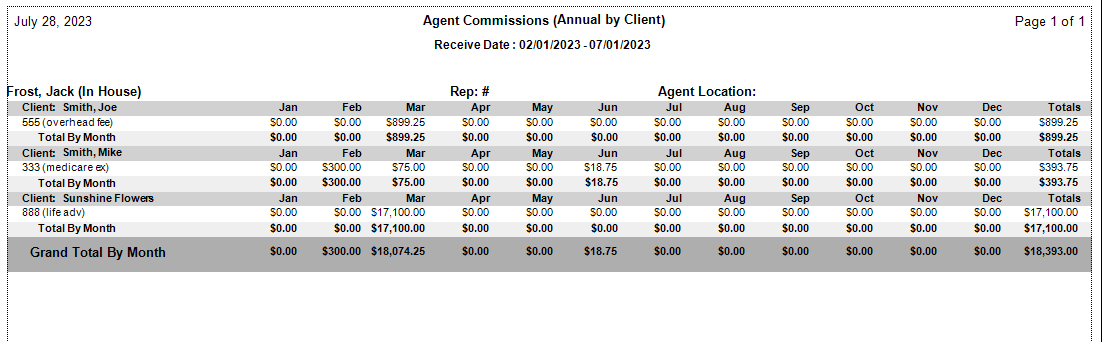
Report Layout
- Client Name — Primary grouping, listed A-Z.
- Policy Number — Sub-sorted under each client.
- Monthly Columns (Jan–Dec) — Commission earned in each month based on Payment Received Date.
- Yearly Total — The rightmost column shows the sum of all commissions for that policy for the entire year.
How This Report Generates
- The system pulls all commission records for the selected agent within the specified calendar year.
- Data is grouped by the Client Name associated with each policy.
- Earnings are placed in columns based on the Receive Date of the commission.
- The system calculates a total for each row (Policy Total) and each column (Monthly Total).
Other ACE Report Formats
- Annual (by Carrier) — Same grid format grouped by carrier instead of client.
- Detail (with Year-To-Date Total) — Running YTD total alongside policy-level detail.
- Summary Only — Agent totals only, no client or policy detail.
🔧 Troubleshooting
A client appears multiple times on the report. If a client has multiple policies (for example, Medical, Dental, and Vision), each policy appears as a separate row under that client's name. This is expected — each row shows the breakdown by policy.
The report shows columns for the full year but only some months have data. The report always displays columns for January through December, but only populates months within your selected date range. Months outside the range will show blank or $0.00.
A commission is appearing in the wrong month. The monthly column is determined by the Payment Received Date, not the Billing Date. If a payment was received in a different month than expected, check the Received Date in Payment History.
🔗 Related Topics
- Agent Commissions Earned Report — Full ACE Report overview and email setup.
- Annual (by Carrier) — Same format organized by carrier.
- Preset Date Range — Set the calendar year date range quickly.
Need help? Contact support@commission-tracker.com