Pay Agents (Payout Frequency)
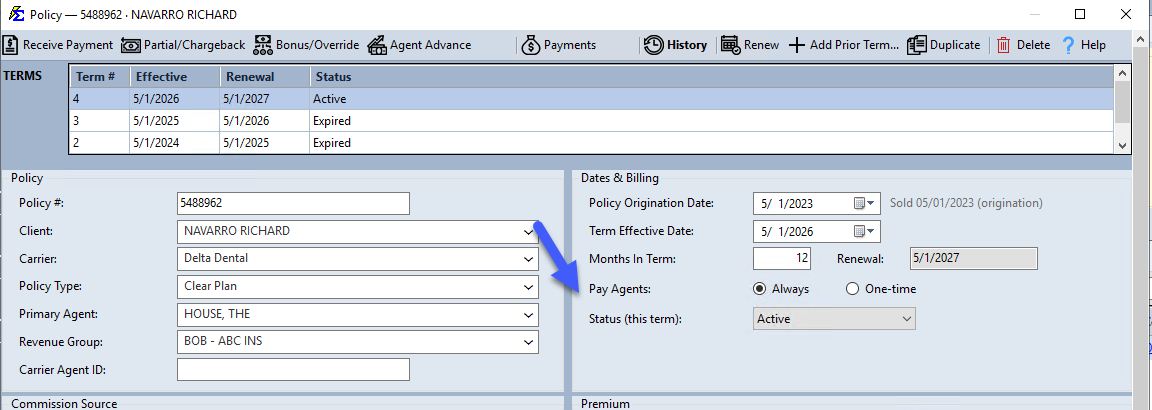
By default, whenever your agency receives a commission payment from a carrier, the system automatically triggers a payout to the assigned agents. The Pay Agents setting allows you to override this behavior for specific policy types or contracts where agents only receive a flat fee or a single annual commission.
💡 Why Use This
Adjust the Pay Agents setting when:
- Agents earn a one-time upfront commission — Set to "One-time" so the system only pays the agent on the first payment of each term, not every subsequent payment.
- A policy pays as-earned monthly — The default "Always" setting handles standard monthly commission structures automatically.
- Commissions are missing from a report — A policy accidentally set to "One-time" after the first payment has passed will show no agent splits going forward.
🗺️ How to Access
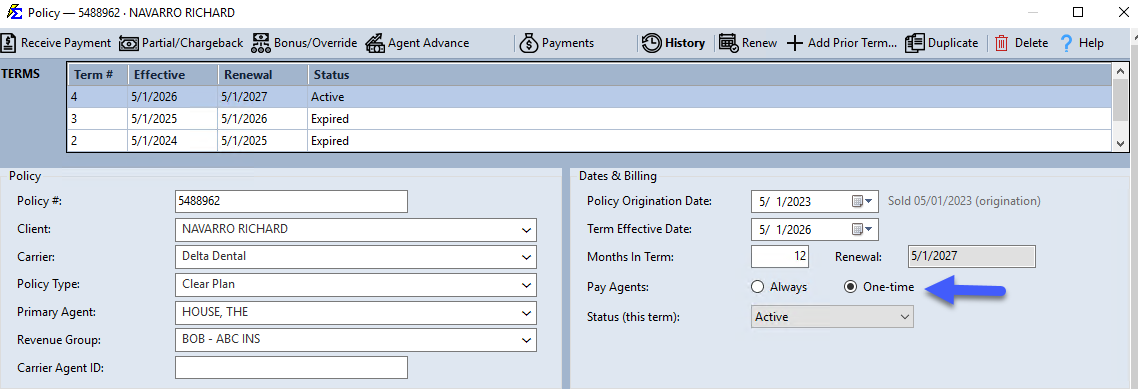
Open any policy from the policy grid (select it and click Edit, or double-click it). The Pay Agents: setting is in the Dates & Billing group, with two choices: Always and One-time.
Payout Logic Options
Pay Agents = Always (Default)
This is the standard setting for most insurance products.
- Behavior — Every time a payment is posted to the policy (monthly, quarterly, etc.), the system calculates and distributes splits to all assigned agents.
- Use Case — Standard as-earned commission structures.
Pay Agents = One-time
This setting restricts payouts to the very first payment of each policy term.
- Behavior — The system only calculates agent splits when the Billing Date of the received payment matches the Effective Date of the policy term.
- Renewals — When the policy renews, the agent will be paid once for the new term when the first payment for that year arrives.
- Use Case — High-upfront commissions where the agent is not entitled to trailing payments for the rest of the year.
Critical Rules
The "All or Nothing" Rule
The Pay Agents setting applies to the entire policy. It is not possible to have one agent on a "One-time" schedule while another agent stays on "Always" for the same policy record.
Impact on The House
If you set a policy to One-time, the House account will also only show revenue for that first payment.
The Workaround
If you must pay an outside agent a one-time fee but want the agency (The House) to track monthly as-earned revenue:
- Create two separate policy records for the same client.
- Set one to Always (for House/Agency tracking).
- Set the other to One-time (for the agent payout).
🔧 Troubleshooting
An agent is missing from a commission report. Check whether the policy is set to One-time and whether the first payment of the term has already been posted. If so, the agent will not appear on subsequent payments for that term.
One-time payouts are not triggering on the first payment. Verify that your statement's billing date matches the policy's Term Effective Date exactly. The system uses this match to identify the "first payment" for a One-time policy.
🔗 Related Topics
- Policy Information — Overview of all policy fields.
- Agent Commission Splits — Define how commissions are divided between agents.
- Term Effective Date — The date used to identify the first payment of a term.
Need help? Contact support@commission-tracker.com