Policy Information
The Policy and Dates & Billing groups on the Policy window capture the essential characteristics of a policy. While much of this data remains constant, several fields are "Term-Specific," meaning they can change each time a policy renews to reflect new contract dates or status updates.
💡 Why Use This
Review and complete these two groups when:
- Creating a new policy — These fields are required for accurate commission tracking.
- Renewing a policy — Term-specific fields such as the Term Effective Date must be updated each renewal to keep your commission schedule correct.
- Updating agent assignments — Changes to the Primary Agent take effect in the current term and forward, preserving your historical audit trail.
🗺️ How to Access
Open any policy from the policy grid on the Policy List screen: select the policy and click Edit, or double-click it. To create a policy, see Create New Policy.
- The Policy group holds Policy #, Client, Carrier, Policy Type, Primary Agent, Revenue Group, and Carrier Agent ID.
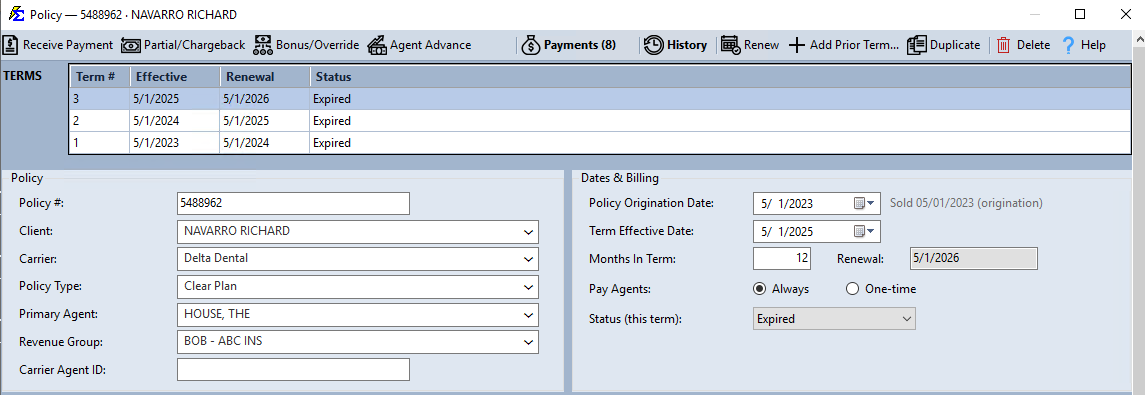
- The Dates & Billing group holds Policy Origination Date, Term Effective Date, Months In Term, Renewal, Pay Agents, and Status (this term).
The TERMS band at the top of the window lists every term of the policy. Click a term to view or edit that term's fields.
The Power of the Term Effective Date
The Term Effective Date is the most critical field in the Dates & Billing group. It serves as the anchor for your entire commission schedule:
- It determines the Billing Date of your very first expected payment.
- It sets the starting point for the policy's current active year.
Understanding Term Lengths & Renewals
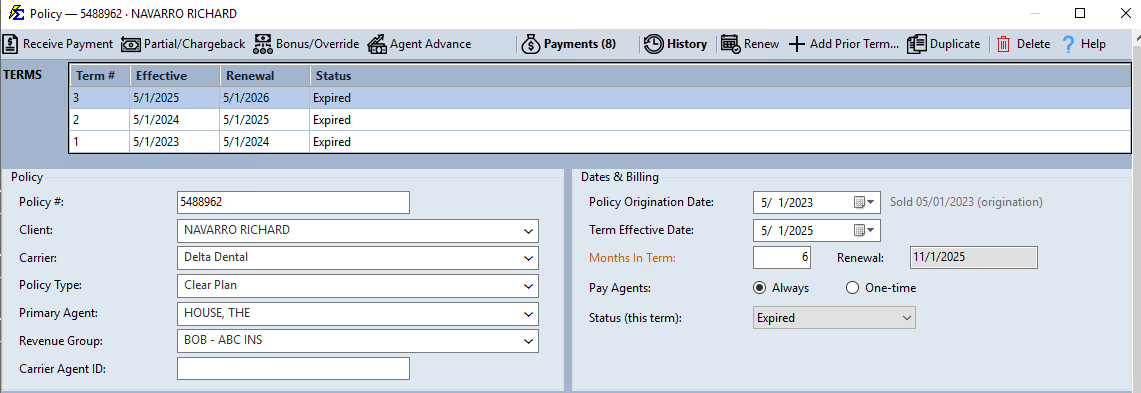
The Months In Term field is used by the system to automatically calculate the Renewal date shown directly below it. This ensures your reports accurately reflect when a policy is up for a new contract.
Example 1: 12-Month Standard Term
- Term Length: 12 Months
- Effective Date: May 1, 2025
- Schedule: Payments are expected from May 2025 through April 2026.
- Next Renewal: May 1, 2026.
Example 2: 6-Month Short Term
- Term Length: 6 Months
- Effective Date: May 1, 2025
- Schedule: Payments are expected from May through October 2025.
- Next Renewal: November 1, 2025.
Field Definitions
| Field Name | Group | Description |
|---|---|---|
| Policy # | Policy | The unique identifier for the policy. |
| Primary Agent | Policy | The lead agent assigned to this policy. |
| Carrier Agent ID | Policy | The agent's ID as assigned by the carrier. |
| Policy Origination Date | Dates & Billing | The original date the very first term began. |
| Term Effective Date | Dates & Billing | The start date for the term being viewed. |
| Months In Term | Dates & Billing | Duration of the contract (usually 12, 6, or 1). |
| Pay Agents | Dates & Billing | Always pays agents on every payment; One-time pays them only on the first payment of each term. |
| Status (this term) | Dates & Billing | The term's current state (Active, Inactive, Prospect, etc.). |
Tips
- Check Your Dates — Ensure the Term Effective Date matches the carrier's records exactly, as this dictates when the system looks for money.
- Monitor Renewals — Use the Renewal Date on your reports to proactively reach out to clients before their policy expires.
Term Logic
If you change the Primary Agent or Policy Type in the current term, it will not automatically change that information in past terms. This preserves your historical audit trail.
🔧 Troubleshooting
My expected payments are not appearing on the correct dates. Verify that the Term Effective Date matches the carrier's billing start date exactly. A one-day discrepancy can shift the entire payment schedule.
I need to change information across multiple policies at once. Use the Update All Policies feature to make bulk changes.
🔗 Related Topics
- Policy # — The unique policy identifier.
- Policy Status — Manage active, inactive, and terminated policies.
- Term Effective Date — Set the start date for the current term.
- Commission Source and Premium — Configure the commission math engine.
- Update All Policies — Bulk update policies across a carrier.
Need help? Contact support@commission-tracker.com