Detail (Percent of Premium)
The Detail (Percent of Premium) report shows each agent's earnings as a percentage of the client's total premium, intentionally hiding the agency's gross commission from the carrier. It is designed for agencies that pay agents at "street level" rates and want to preserve confidentiality around agency-level overrides and bonuses.
💡 Why Use This
Use this report format when:
- Agent contracts reference premium percentages — Agents can verify their payout against the premium the client paid without seeing what the agency received.
- You want to protect agency-level override rates — The gross commission column is hidden so agents cannot calculate the agency's margin.
- Sales transparency is a priority — Agents see the "Premium under management" metric, which is commonly used for production awards.
🗺️ How to Access
- Click the Agent Commissions button on the main toolbar, or navigate to Reports → Agent → Agent Commissions Earned.
- Select Detail (% of Premium) under Select Report Format:.
- Set your date range and click Show Report.
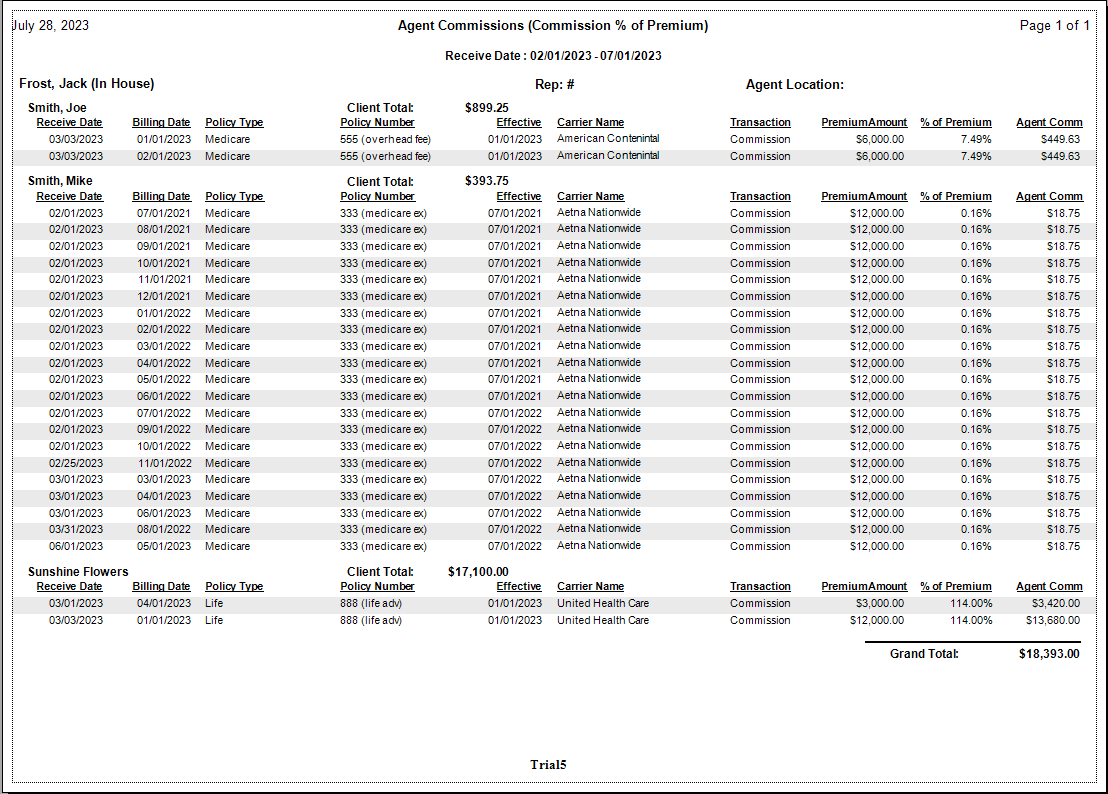
Report Layout
| Data Point | Description |
|---|---|
| Client Name | The individual or group policyholder. |
| Premium | The total amount the client paid for that coverage period. |
| % of Premium | The calculated percentage of premium paid to the agent. |
| Agent Commission | The final net dollar amount the agent receives. |
| Date Paid | The date the transaction was finalized in the system. |
Other ACE Report Formats
- Detail (Percent of Commission) — Shows agency gross; agent earnings are a percentage of what the agency received.
- Detail (Hybrid) — Shows both premium and agency gross for full transparency.
- Detail (by Carrier) — Groups payments by carrier.
- Summary Only — Agent totals only, no policy-level detail.
🔧 Troubleshooting
The "% of Premium" looks very low. This typically happens on policies where the agent receives a small split of a large group premium. Confirm the Carrier Table Agent Splits are configured correctly for the specific policy type, and check whether the agent's split is a percentage of commission rather than a percentage of premium.
The Premium column is blank for some policies. The system cannot calculate this report without premium data. Ensure premiums are entered when importing carrier statements. If premiums were not mapped during import, you may need to re-import the affected statements with premium data included.
🔗 Related Topics
- Agent Commissions Earned Report — Full ACE Report overview and email setup.
- Carrier Table Agent Splits — Review split configuration if percentages look incorrect.
- Preset Date Range — Quickly set the reporting period.
Need help? Contact support@commission-tracker.com