Term Effective Date
The Term Effective Date marks the beginning of a policy term. It is used to calculate the expected commission schedule and drive the Accounts Receivable report.
💡 Why Use This
The Term Effective Date is a required field on every policy. Set it correctly when:
- Creating a new policy — This date defines when the first payment is expected and anchors the entire billing schedule.
- Renewing a policy — Update this date each renewal so the new term's payment schedule is calculated correctly.
- Investigating A/R discrepancies — An incorrect Effective Date is a common cause of false positives or missing entries in the Accounts Receivable report.
🗺️ How to Access
The Term Effective Date is a field in the Dates & Billing group of the policy window. Open any policy and locate the Term Effective Date field.
Key Concepts
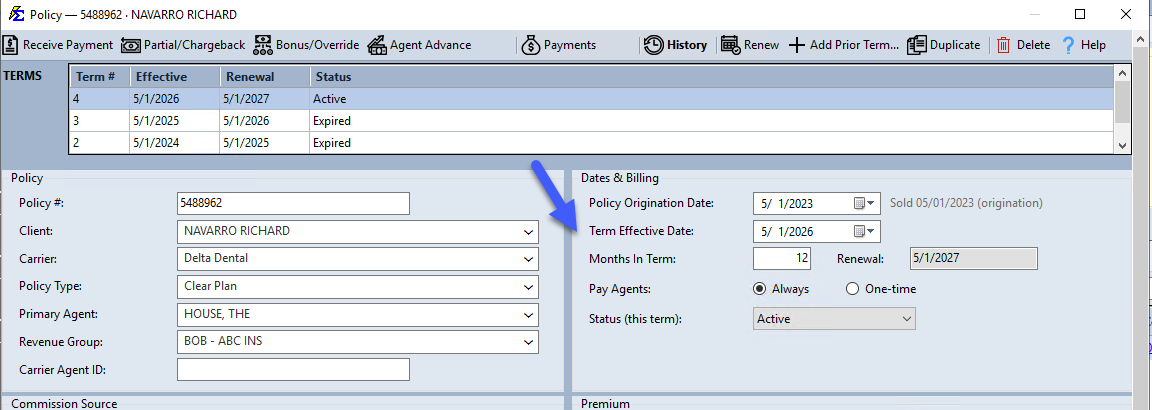
- Billing months — The month of the Term Effective Date is the term's first billing month. It is about when the money is earned, regardless of when the check physically arrives (see Billing Date vs Receive Date below).
- Payment Expectations — Combined with Months In Term and # Of Pmts Per Term, this date defines the window of time Commission Tracker expects to see revenue for this policy.
Billing Date vs Receive Date
Every payment carries two dates, and they are easy to mix up:
- Billing Date — the month the payment is for. Commission Tracker lays out one billing month for every month of the term, starting with the month of the Term Effective Date. A term that starts 03/15/2026 has the billing months 03/01/2026, 04/01/2026, 05/01/2026 and so on. When you post a payment by hand, you pick its month in the Billing Date: list of the Receive Payment window.
- Receive Date — the day the money arrived. It is the Payment Received Date: you enter when you post the payment.
A March payment that arrives in May has the Billing Date 03/01/2026 and a Receive Date in May.
Reports let you choose which date to use:
- Agent Commissions Earned and Agency Payments Received — in the Date Range: box, Receive Date, Billing Date or All Payments.
- Payment Discrepancy — Receive Date or Billing Date in the Date Range: box.
- Agency Payments Received - Annualized — Billing Date or Receive Date under Period Start.
- Accounts Receivable — tick Filter By Billing Date to limit the report to a range of billing months.
A payment is in the wrong month on a report
Check which date the report uses. The May payment for March above shows in May when the report runs by Receive Date, and in March when it runs by Billing Date.
🔧 Troubleshooting
Payments are appearing on the wrong dates in the Accounts Receivable report. Verify the Term Effective Date matches the carrier's billing start date. Billing months follow the month of the Term Effective Date, so a date on the wrong side of a month boundary (03/31/2026 instead of 04/01/2026) shifts the entire expected payment schedule by a month.
I need to change the Effective Date on a policy that already has payment history. Use caution — changing this date on a policy with existing payments can cause those payments to appear orphaned or misaligned. Contact support before modifying the date on a policy with a long payment history.
🔗 Related Topics
- Policy Information — Overview of all policy fields.
- Origination Date — The permanent start date of the policy's first term.
- Months In Term — Controls the renewal date calculation.
- Accounts Receivable — Track expected vs. received commission payments.
Need help? Contact support@commission-tracker.com