Detail (with Year-To-Date Total)
The Detail (with Year-To-Date Total) report combines the current pay period's payment details with a running cumulative total for each client since January 1st. It gives agents a clear view of both their short-term earnings and their year-to-date performance in one report.
💡 Why Use This
Use this report format when:
- Agents are tracking progress toward annual production bonuses — The YTD total shows exactly how close they are to their annual income targets.
- You want to identify high-value client relationships — See which clients have generated the most commission throughout the year, not just in the current period.
- Agents need an estimated tax-planning view — The cumulative earnings total helps with quarterly tax estimates.
🗺️ How to Access
- Click the Agent Commissions button on the main toolbar, or navigate to Reports → Agent → Agent Commissions Earned.
- Select Detail (With YTD total) under Select Report Format:.
- Set your date range and click Show Report.
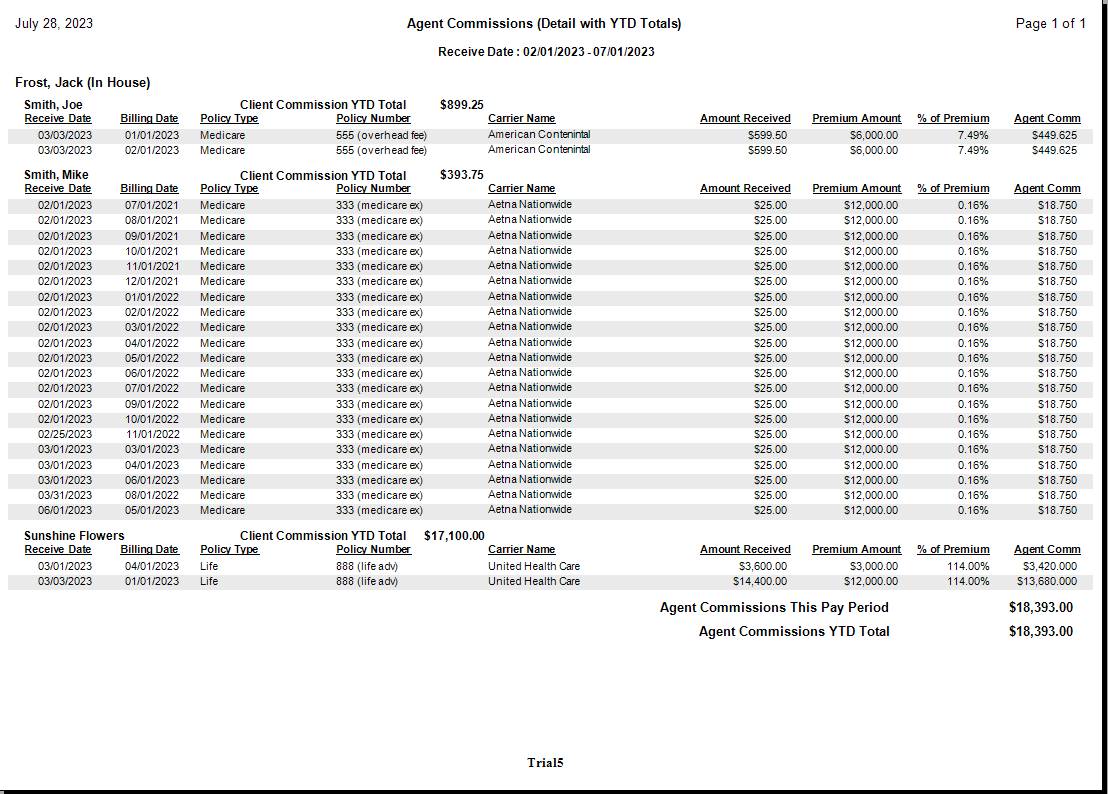
Report Layout
| Data Point | Description |
|---|---|
| Current Premium | The premium for the specific transaction in this pay period. |
| Agency Commission | The gross amount received by the agency for the transaction. |
| Agent Commission | The net amount paid to the agent for this specific entry. |
| Client YTD Total | Cumulative commissions the agent has earned from this client since January 1st. |
| Grand Totals (Footer) | Total for the current report period and total earnings for the full year across all clients. |
Other ACE Report Formats
- Detail (Percent of Commission) — Standard alphabetical detail without YTD totals.
- Detail (Percent of Premium) — Hides agency gross; shows earnings relative to client premium.
- Detail (Hybrid) — Shows both premium and agency gross.
- Summary Only — Agent totals only, no policy-level detail.
🔧 Troubleshooting
The YTD total doesn't match the agent's own calculations. The YTD total is calculated from January 1st of the current year based on the Payment Received Date. Payments with a Received Date outside the calendar year will not be included. If a payment was entered with an incorrect Received Date, correct it in Payment History and rerun the report.
The Grand Total footer is different from what I expected. The footer shows total earnings for the current report period AND year-to-date totals separately. Confirm you are reading the correct row — the current period total and the YTD total are listed on separate lines.
🔗 Related Topics
- Agent Commissions Earned Report — Full ACE Report overview and email setup.
- Preset Date Range — Quickly set the reporting period.
- Payment History — Correct Received Dates if YTD totals are off.
Need help? Contact support@commission-tracker.com