Policy Import and Create Policy Sessions
Commission Tracker keeps a session for every batch of policies you create in bulk. There are two ways to create policies in bulk, and each has its own session list: Section A covers policies imported with Import Policies, and Section B covers policies created from a carrier statement with Create Policies (ICS).
💡 Why Use This
Use the session lists when you need to:
- Verify a bulk import was completed correctly — Review which file and mapping were used for a specific session.
- Reopen a session — Open a session to continue working with the policies in it.
- Clean up old sessions — Delete sessions you no longer need to keep the list manageable.
🗺️ How to Access
Both lists are on the Import menu:
- Import → List Policy Import Sessions — policies created through Import Policies (the Policy Importer). See Section A.
- Import → List ICS Create Policy Sessions — policies created from a carrier statement through Create Policies. See Section B.
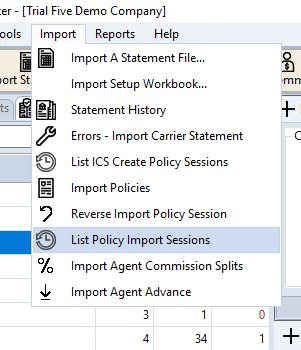
Two ways to create policies
Policies created from a carrier statement (Import Carrier Statement → Create Policies) only appear in List ICS Create Policy Sessions. Policies created with the Policy Importer (Import → Import Policies) only appear in List Policy Import Sessions. A session never appears in both lists.
Section A: Import Policies
Import → List Policy Import Sessions lists the sessions created by the Import Policies bulk Excel utility that are still in progress. It lets administrators track import events, identify who ran specific batches, and reopen a session to manage it further. Sessions whose policies have all been created (status Created) are finished and no longer appear in the list. The window title reads Policy Sessions (Imported).
Understanding the Session List
Every time you run a bulk import through Import Policies, a session record is generated.
| Column | Description |
|---|---|
| Source | Where the session originated (e.g., "Import"). |
| Import Date | The timestamp of when the file was imported. |
| Import Name | The source Excel filename. |
| Status | The current state of the session (e.g., "Populated"). |
| Items | The number of policy rows contained in the session. |
| Map | The saved Mapping Data template used for this import. |
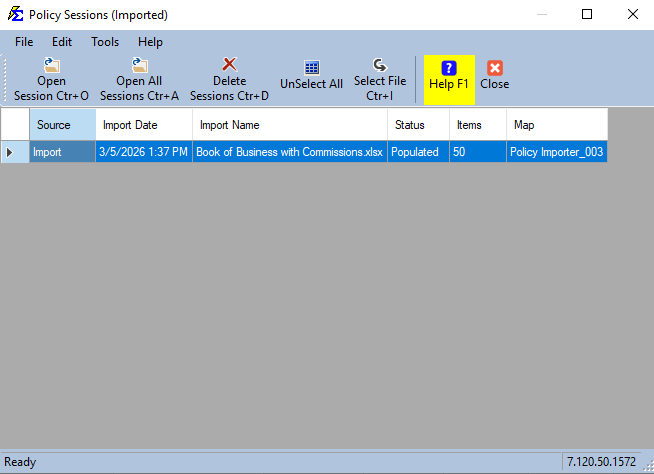
Toolbar Reference
| Button | Function |
|---|---|
| Open Session | Reopen the selected session to continue working with it. |
| Open All Sessions | Reopen every session in the list at once. |
| Delete Sessions | Remove the selected session(s) from the list. |
| Select All / UnSelect All | Select every session in the list. Once every session is selected, the button changes to UnSelect All — click it to clear the selection. |
| Select File | Browse for and select a source Excel file. |
Opening a session takes you to the Policy Importer. See Importing Policies.
Section B: ICS Create Policies
Import → List ICS Create Policy Sessions lists the in-progress sessions created when you create policies from a carrier statement — the Create Policies step of the Import Carrier Statement workflow. The window title reads Policy Sessions (ICS). As in Section A, sessions whose policies have all been created (status Created) are finished and no longer appear.
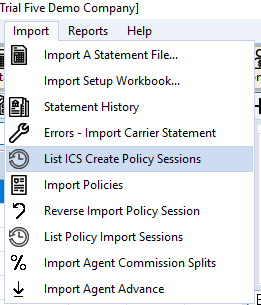
Understanding the Session List
Each row is one Create Policies session from a carrier statement import.
| Column | Description |
|---|---|
| Source | Always ICS on this list. |
| Import Date | When the carrier statement was imported. |
| Import Name | The carrier statement file the policies came from. |
| Status | The current state of the session (e.g., "Populated"). |
| Items | The number of policy rows in the session. |
| Map | The carrier statement map used for the import (usually named after the carrier). |
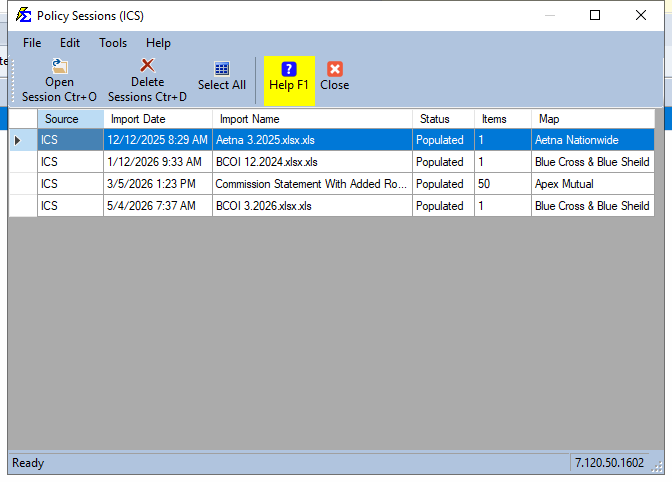
Toolbar Reference
| Button | Function |
|---|---|
| Open Session | Reopen the selected session in the Create Policies screen to continue creating its policies. |
| Delete Sessions | Remove the selected session(s) from the list. |
| Select All / UnSelect All | Select every session in the list. Once every session is selected, the button changes to UnSelect All — click it to clear the selection. |
The Select File and Open All Sessions buttons from Section A are not shown on this list. To start a new Create Policies session, import the carrier statement with Import Stmt on the carrier's toolbar — see Import Carrier Statements.
Opening a session takes you to the Create Policies screen. See Create Policies.
🔧 Troubleshooting
I need to undo an entire session's worth of policies. This screen manages sessions, but it does not reverse policies already created. For policies from Import Policies, use Reverse Import Policy Session from the Import menu to remove policies created in a specific session.
Policies I created from a carrier statement aren't in List Policy Import Sessions. That list only shows sessions from the Import Policies bulk Excel tool. Policies created from a carrier statement are in Import → List ICS Create Policy Sessions (Section B).
Policies I imported with Import Policies aren't in List ICS Create Policy Sessions. That list only shows sessions created from a carrier statement. Use Import → List Policy Import Sessions (Section A).
Manual policies I created aren't showing in either list. Policies added one at a time on the Policy window are not created in a session, so they do not appear in either list.
The Select File and Open All Sessions buttons are missing. You are in List ICS Create Policy Sessions (the title reads Policy Sessions (ICS)). Those buttons are only on List Policy Import Sessions.
I can't find the session I'm looking for. Check that you opened the right list (Section A or Section B), then sort by Import Date to narrow it down. A session no longer appears once all of its policies have been created (it is finished), or if it was deleted.
🔗 Related Topics
- Importing Policies — The bulk Excel import utility that creates Section A sessions.
- Create Policies — The carrier statement workflow that creates Section B sessions.
- Import Carrier Statements — Import a carrier statement and start Create Policies.
- Mapping Data — Configure the Map used for an import session.
- Reverse Import Policy Session — Remove policies created in a Policy Importer session.
Need help? Contact support@commission-tracker.com