Database Backup
Commission Tracker automatically backs up your data every 60 minutes as part of the core service. The manual backup feature lets you request and download an encrypted local copy at any time — useful as an extra layer of protection before major administrative tasks.
💡 Why Use This
Request a manual backup before:
- Mass imports — Importing a large volume of new policies or clients via ICS.
- Bulk deletions — Removing significant amounts of historical data using the Delete Policies utility.
- Global rate changes — Updating multiple Carrier Commission Tables at once.
- Monthly maintenance — Many agencies perform a manual backup once a month before importing carrier statements.
🗺️ How to Access
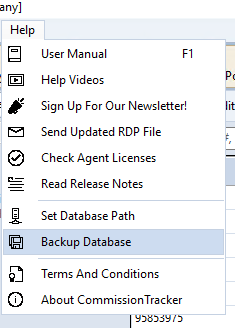
- Navigate to Help → Backup Database.
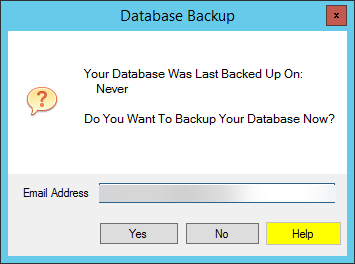
- Review the prompt, which displays the date and time of your last request.
- Enter your Email Address and click Yes.
Receiving and Storing the File
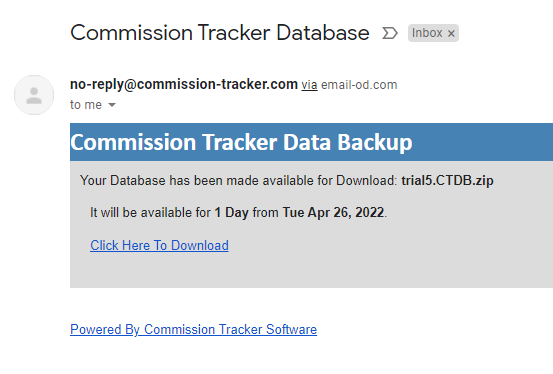
- Check your inbox — Within minutes, you will receive an email containing a secure download link. If the email does not arrive, check your spam or junk folders.
- Download promptly — The secure link expires 24 hours after the email is sent.
- Encrypted file — The downloaded file is encrypted and cannot be opened by standard software. This protects sensitive client and agency data.
Store your downloaded backup files in a secure, password-protected folder on your local network to maintain compliance and data privacy standards.
Restoring Data
If you need to roll back major changes or recover from a data emergency:
- Locate the encrypted backup file on your local machine.
- Email the file to support@commission-tracker.com.
- The technical team will verify and restore the database to the cloud servers.
🔧 Troubleshooting
I did not receive the backup email. Check your spam or junk folder. If it is not there, verify that the email address you entered was correct and try the request again. Contact support if the issue persists.
The download link expired before I could download the file. Request a new backup — the process takes only a minute and generates a fresh encrypted file. Links expire after 24 hours.
I need to restore a backup after accidental deletion. Email your most recent backup file to support as described above. If you did not have a local backup, the automated 60-minute cloud backup may still be available — contact support immediately after discovering the issue.
🔗 Related Topics
- Delete Policies Utility — Always backup before running bulk deletions.
- Import Carrier Statement — Consider backing up before large imports.
- User Management — Control who can request backups.
Need help? Contact support@commission-tracker.com