Preset Date Range
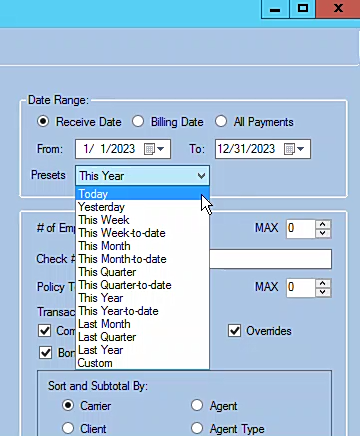
The Preset Date Range selector automatically sets the From and To dates on commission reports using 13 common time periods such as "Last Month," "This Year," or "Last Quarter." It also remembers your previous settings so you don't have to reconfigure each time.
💡 Why Use This
Use Preset Date Ranges to:
- Speed up monthly reporting — Select "Last Month" once and the correct dates populate automatically.
- Ensure date accuracy — Let the system calculate period boundaries rather than entering them manually.
- Maintain consistency — Saved preferences keep your report settings the same from session to session.
🗺️ How to Access
The Preset Date Range selector appears at the top of supported reports before you run them.
Compatible Reports
The preset and saved preference features are available on these reports:
- Accounts Receivable (saves preferences only — no preset date selection)
- Payment Discrepancy Report
- Book of Business
- Agency Payments Received
- Agent Commissions Earned Report
- Agency vs Agent Commission Comparison
- Policy List Report
Smart Filter Memory
The seven reports above remember your Date Range, Sort and Subtotal, and Report Format settings from your previous session. The next time you open the same report, your last settings load automatically.
🔧 Troubleshooting
The preset isn't setting the dates I expect. Verify today's date is correct in your system. Presets like "Last Month" and "This Quarter" calculate relative to the current date — if the system clock is wrong, the dates will be off.
My settings aren't being remembered between sessions. Confirm you are logging in with the same Commission Tracker user account each time. Report preferences are saved per user, so a different login will not inherit another user's settings.
🔗 Related Topics
- Reports — Overview of all available reports.
- Agent Commissions Earned Report — Most commonly run with monthly preset ranges.
- Agency Payments Received — Use presets for carrier reconciliation.
Need help? Contact support@commission-tracker.com