Disable Policy Edit Warning Message
When you manually edit a policy that already has a Payment History, Commission Tracker normally displays a warning. This safety feature ensures you are aware that changes to policy details — such as Effective Dates or Carrier Tables — may impact historical auditing or future expectations.
If you are performing routine administrative updates across multiple policies, this recurring prompt can slow down your workflow.
💡 Why Use This
Use this setting when:
- Bulk administrative cleanup — You are updating non-financial fields (such as Notes or Custom Fields) across many policies and the prompts are disruptive.
- Status updates in batches — You are manually changing policy statuses from Prospect to Active across a large group of records.
- Experienced administrators — You are already familiar with how policy edits affect payment history and do not need the extra confirmation step.
🗺️ How to Access
- Click Options on the menu bar at the top of the main window (it is its own menu, between File and Tools).
- Locate the checkbox labeled Show The Policy Edit Warning.
- Uncheck the box to suppress the alert (it is checked, meaning shown, by default).
- Click Save.
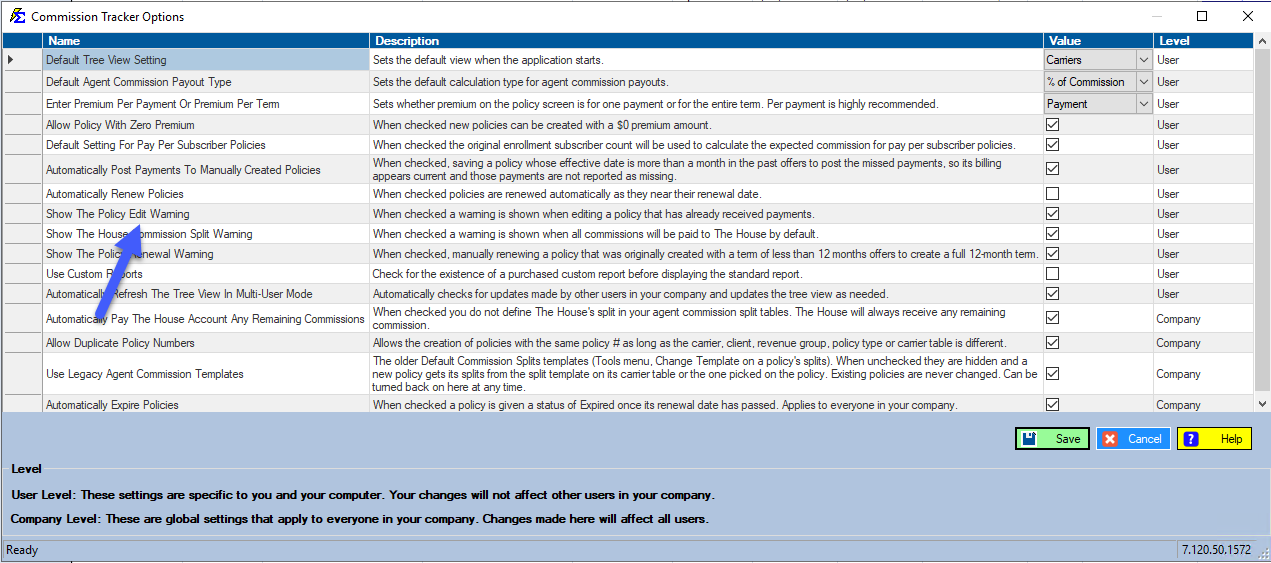
About the Warning
The standard alert is designed to prevent accidental changes that could lead to discrepancies in your Carrier Reconciliation. It acts as a confirmation step before saving changes to policies with existing payments.
Caution
Disabling this warning means you will no longer be prompted to confirm changes on policies with existing payments. All changes are still logged in the system's audit trail, but no in-app prompt will appear.
🔧 Troubleshooting
You disabled the warning and want to confirm audit trails are still active. All changes to policy records are logged in the system's background audit trails regardless of whether the warning is displayed. Disabling the message does not affect recordkeeping.
You disabled the warning and are unsure if it affects ICS imports. This setting applies only to manual editing of existing policies on the Client or Policy screens. It does not affect the Import Carrier Statement workflow.
The warning needs to be re-enabled. Click Options on the menu bar again, check the Show The Policy Edit Warning box, and click Save. The prompt will reappear on your next policy edit.
🔗 Related Topics
- Options Menu — All available Options Menu settings.
- Update Policies (by Carrier) — Bulk editing policies across a carrier.
- Payment History — Review existing payment records before editing a policy.
Need help? Contact support@commission-tracker.com