Parent Company & Sub-Client Structure
The Parent Company feature allows you to group multiple subsidiaries or sub-clients under a single umbrella entity. This hierarchical structure is ideal for managing corporate accounts with various branches or divisions.
💡 Why Use This
Use the Parent/Sub-Client structure when:
- A corporation has multiple subsidiaries — Each branch has its own policies, but you need a consolidated view of the entire organization's book of business.
- Reporting by organization — The Parent Company record provides totals across all sub-clients while keeping individual subsidiary data separate.
- Managing large group accounts — Group clients with distinct divisions can be organized under a parent to avoid commingling data.
🗺️ How to Access
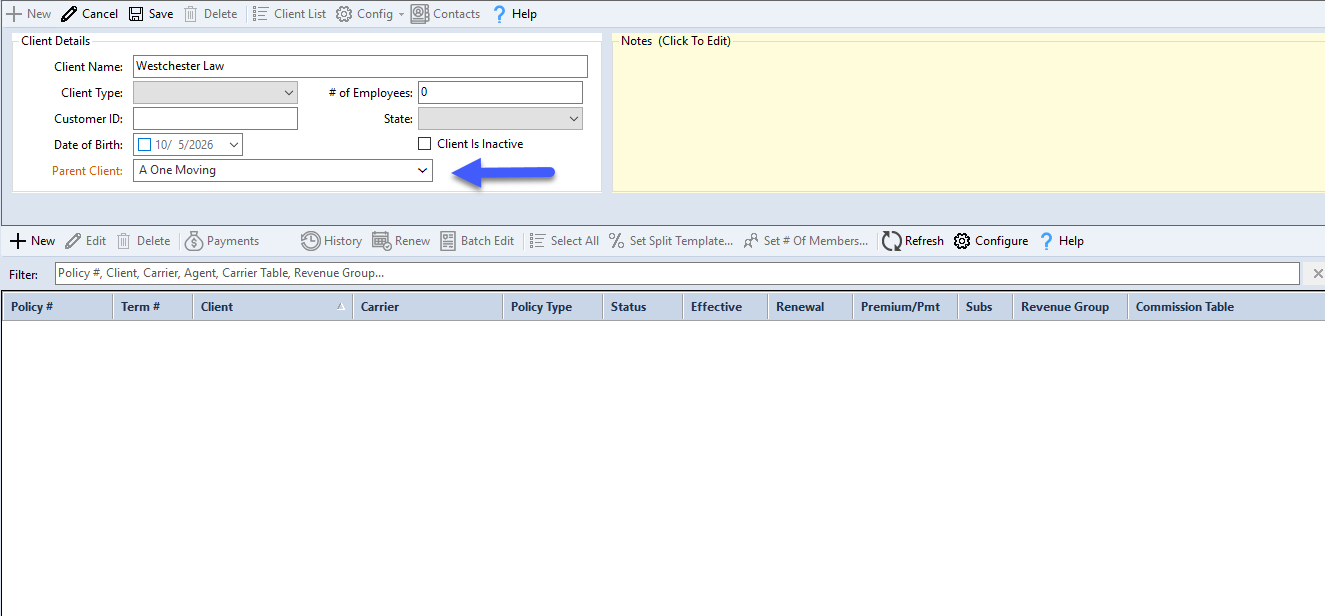
Click Clients at the top-left of the Policy List screen, select the client, and click Edit. The parent company assignment is the Parent Client: dropdown in the client's details.
Structural Rules
Critical Rule: The 'One or the Other' Logic
A client record can have either Policies or Sub-Clients attached to it — not both at the same time.
Setting Up a Parent Company
- Clear Existing Policies — If your intended Parent Company already has policies, move them to another client record first.
- Assign Subsidiaries — Once the parent record has no policies, you can begin attaching sub-clients to it.
- Attach Policies to Subs — All individual insurance policies should be attached to the specific Sub-Client record, not the Parent.
Setting the Hierarchy
On the Client screen, designate the hierarchy by selecting the appropriate Parent Client from the dropdown menu for any subsidiary.
Tips
- Standardize Naming — Use a naming convention like "ABC Corp (Parent)" to make searching easier.
- Check for Policies First — Before building a hierarchy, ensure your parent records have no policy data attached.
- Move, Don't Delete — If you need to turn a policy-holding client into a parent, use the Edit Policy tool to move their policies to a new sub-client record rather than deleting them.
🔧 Troubleshooting
I cannot add a sub-client to a company. Select the parent client in the Clients list and check the policy grid beside its details — even one inactive policy will block the parent-client relationship. Move or reassign any policies before attempting to attach sub-clients.
The consolidated view is not showing all sub-client data. Verify that each subsidiary has the correct parent company selected in their client profile. Sub-clients that are not linked will not appear under the parent.
🔗 Related Topics
- Create New Client — Initial client profile setup.
- Client Contact Info — Add contact details to a client profile.
- Edit Policies — Move policies between client records.
Need help? Contact support@commission-tracker.com