Tools Menu
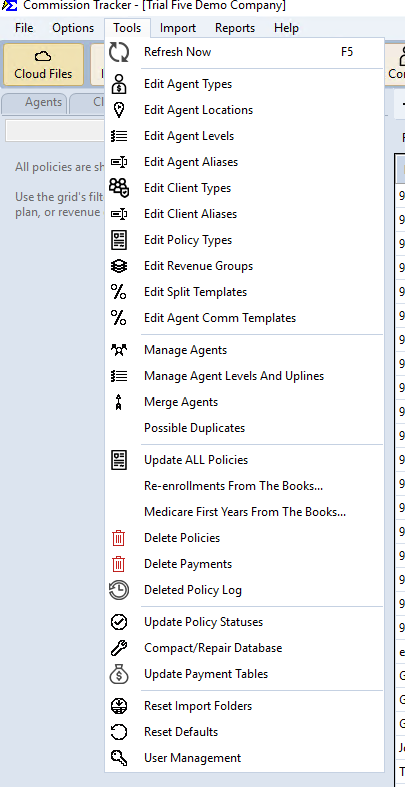
The Tools Menu houses the administrative functions of Commission Tracker, including data maintenance, user security, and system configuration options.
💡 Why Use This
Access the Tools Menu when:
- Maintaining data accuracy — Run Update Payment Tables after changing commission rates to push new rates to active policies.
- Managing access — Add, edit, or deactivate user accounts to control who can access your Commission Tracker data.
- Auditing removals — Check the Deleted Policy Log when a policy appears to be missing from your system.
🗺️ How to Access
Navigate to Tools from the main menu bar.
Available Functions
Options Menu Is Separate
The Options Menu is not part of the Tools menu — it has its own top-level Options menu on the main menu bar (File, Options, Tools, Import, Reports, Help). See Options Menu.
| Function | Purpose |
|---|---|
| Edit Agent Types | Add and edit the Agent Type labels used on agent profiles. |
| Edit Agent Locations | Add and edit the Agent Location labels used on agent profiles. |
| Edit Agent Levels | Add and edit Agent Levels used for level-based commission splits. |
| Edit Agent Aliases | Map carrier name variations to existing Agent records. |
| Edit Client Types | Add and edit the Client Type labels used on client profiles. |
| Edit Client Aliases | Map carrier name variations to existing Client records. |
| Edit Policy Types | Add and manage the Policy Type codes used when creating policies. |
| Edit Revenue Groups | Add and manage Revenue Group categories. |
| Edit Agent Comm Templates | Manage agent commission templates. |
| Manage Agents | Bulk updates, license monitoring, batch edits, and Agent Web Portal access. |
| Manage Agent Levels And Uplines | Assign agent levels and upline relationships. |
| Merge Agents | Merge duplicate agent records into one. |
| Update ALL Policies | Apply bulk changes across policies from all carriers and agents. |
| Delete Policies | Permanently remove policy records from the system. |
| Delete Payments | Permanently remove posted payment records. |
| Deleted Policy Log | Audit trail for all policy records that have been permanently removed. |
| Update Policy Statuses | — |
| Compact/Repair Database | Maintenance tool for the local database file. |
| Update Payment Tables | Synchronize policies with current carrier commission structures for accurate reporting. |
| Reset Import Folders | — |
| Reset Defaults | — |
| User Management | Control user accounts and each user's access permissions (Restrict Access, set per user; there are no roles). |
Newer versions only
These are in newer versions of Commission Tracker. If you do not see them, your server has not been updated yet.
- Edit Split Templates — Opens the Agent Split Template Manager. On your current version, open it from a carrier table's Agent Splits tab with Manage Agent Split Templates....
- Possible Duplicates — Identify potential duplicate agent records.
- Re-enrollments From The Books...
- Medicare First Years From The Books...
Unverified Items
Several items above (marked "—") are visible in the menu but not yet documented — their exact behavior hasn't been confirmed. See HELP_TODO.md.
🔧 Troubleshooting
A function I expect to see in the Tools Menu is not visible. Access to individual Tools Menu functions may be restricted based on your user role. Contact your Commission Tracker administrator to verify your permissions. See User Management for details on role-based access.
I need to audit who deleted a policy. Use the Deleted Policy Log — it records the date, user, and details for every policy removed from the system.
🔗 Related Topics
- Options Menu — Display and workflow customization settings.
- User Management — Manage user accounts and permissions.
- Deleted Policy Log — Audit trail for removed policy records.
Need help? Contact support@commission-tracker.com