Update Payment Tables
Update Payment Tables is a maintenance utility under the Tools Menu that rebuilds the expected payments of every policy in your database. You do not need to run it after changing a carrier table's rates: saving the carrier table already recalculates the policies on that table.
💡 Why Use This
- You changed a Carrier Commission Table's rates — You do not need this utility. Clicking Save on the carrier table recalculates every policy on that table right away (see What Happens When You Save a Carrier Table).
- Rebuilding every policy at once — This utility works on every policy in the database, not just the policies on one carrier table. It can take from a few minutes to a few hours, depending on the size of your database.
🗺️ How to Access
- Navigate to Tools → Update Payment Tables.
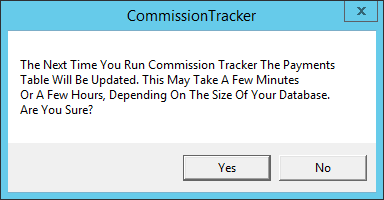
- Answer the confirmation box.
The confirmation box says the payments table will be updated the next time you run Commission Tracker. Choosing Yes only records that request: nothing runs it, except in newer versions (see the note below). You do not need it after changing rates: saving a carrier table already recalculates the policies on that table (see What Happens When You Save a Carrier Table). For a full rebuild of every policy, contact support@commission-tracker.com.
Newer versions only
This is in newer versions of Commission Tracker. If you do not see it, your server has not been updated yet.
The Update Payment Tables window asks when to run the update:
- Run Now — Runs the update right away. Every other user must be out of your company's database; if someone else is in, the update waits for your next login instead.
- Next Login — Runs the update the next time you start Commission Tracker.
- Cancel — Closes the window without changing anything.
Tick Also re-price each receipt's expected commission to also rewrite the expected commission stored on each payment already received, from the policy's current carrier table.
What Happens When You Save a Carrier Table
When you click Save on a carrier table and its rates, terms or tiers changed, Commission Tracker recalculates the payments of every policy that uses that table before the window closes. A Payment Creation Utility window shows the progress. Changing only the table's name does not recalculate anything.
🔧 Troubleshooting
The Payment Creation Utility window is taking a very long time. This is normal on a carrier table with many policies. Do not close the application or interrupt the process. Let it complete before running reports.
My A/R report totals changed after I saved a carrier table. This is expected. Saving the carrier table applied the new rates to the policies on that table, which recalculated their expected commission values. Verify the new rates match your carrier contracts.
I changed a carrier table's rates, but my expected commissions did not change. Open the carrier commission table again and confirm your new rates are there, then click Save. The recalculation runs only when the save includes a change to the rates, terms, or tiers.
I clicked Tools → Update Payment Tables and restarted, but nothing changed. In the current version, that menu item does not run the update. To update every policy on a carrier table, open the carrier commission table and save a change to it. To update a single policy, open the policy and click Save.
A policy still shows as Undefined in the Policy Error Report. Check that the policy has a Carrier Commission Table selected or an Expected Commission amount entered in its Commission Source group, then click Save on the policy and refresh the Policy Error Report. Policies with no expected commission configuration cannot be evaluated.
A warning said the carrier table was saved but there was an error updating policy payments. The table's rates were saved, but the recalculation did not finish, so some policies on that table may still show their old expected commissions. Saving the table again without changing its rates does not re-run the recalculation. To update an individual policy, open it and click Save. To update every policy on the table, contact support@commission-tracker.com.
🔗 Related Topics
- Policy Error Report — Identify policies with configuration errors.
- Carrier Commission Tables — Manage the commission rates this utility synchronizes.
- Accounts Receivable — A/R accuracy depends on current payment table values.
- Commission Source and Premium — The policy fields that drive its expected payments.
Need help? Contact support@commission-tracker.com