Receiving Commission Payments
There are three interchangeable ways to enter the commission payments you receive each month. Choose the method that best fits the format of the statement you receive from your carrier.
💡 Why Use This
Recording commission payments is how Commission Tracker tracks what you've actually received vs. what you expected. Each payment method serves a different workflow:
- Import Carrier Statements — The fastest method for statements provided in Excel, CSV, or XLS format.
- Reconcile Carrier Statement — An efficient way to manually enter an entire short or paper statement on one screen. For a PDF statement, try converting it to Excel with PDFx first and importing it instead.
- Receive Payment Button — Ideal for entering small or miscellaneous payments for a single policy.
🗺️ How to Access
Each method is accessed differently:
- Import Carrier Statements — Click Carriers in the navigator strip, select the carrier, and click Import Stmt on the carrier's toolbar. (Newer versions only: also the Import Statement button on the main toolbar, or Import > Import A Statement File.... If you do not see them, your server has not been updated yet.)
- Reconcile Carrier Statement — Select the carrier and click Enter Stmt on the carrier's toolbar.
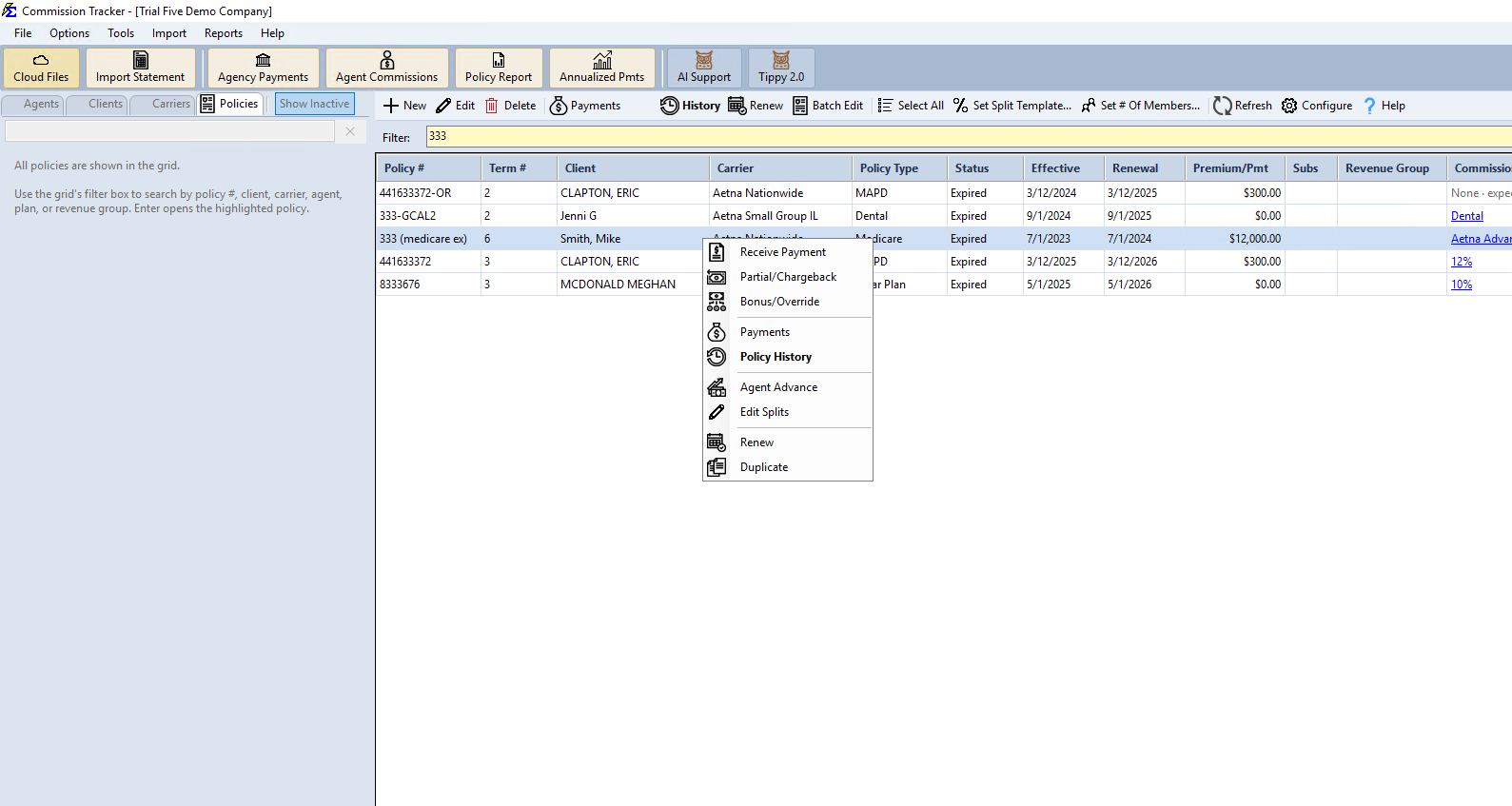
- Receive Payment Button — Located on the individual Policy screen, or right-click a policy directly in the Policies grid.
- Partial/Chargeback (Adjustments) — Click Partial/Chargeback on the Policy window's toolbar, or right-click the policy in the grid. Use it when the commission received doesn't match what was expected — a partial payment, or a chargeback of commission the carrier already paid. See Partial Payments and Chargebacks.
Choosing the Right Method
| Scenario | Recommended Method |
|---|---|
| Carrier provides an Excel/CSV file | Import Carrier Statements |
| Carrier provides a PDF statement | Convert it with PDFx (in Cloud Files), then Import Carrier Statements |
| Short statement, paper statement, or a PDF that PDFx cannot convert | Reconcile Carrier Statement (Enter Stmt) |
| Single policy or miscellaneous payment | Receive Payment Button |
| Partial payment or chargeback | Partial/Chargeback |
You Can Mix Methods
You are not required to stick to just one method. Use whichever is most efficient for the data at hand, even for the same carrier month to month.
🔗 Related Topics
- Import Carrier Statements (Excel Statements) — Bulk import from Excel or CSV files.
- Reconcile Carrier Statement — Manual statement entry and PDF reconciliation.
- Receive Payment Button — Single-policy payment entry.
- Partial Payments and Chargebacks — Record partial payments, chargebacks, and adjustments.
- Payment History — View and manage all posted payments.
Need help? Contact support@commission-tracker.com