Multiple Primary Agents (Agent Sharing)
The Multiple Primary Agents feature allows two or more agents to share a policy. While only one agent is listed as the "Primary Agent" on the main screen, both agents receive commissions based on their own specific contract levels and uplines.
💡 Why Use This
Use Agent Sharing when:
- Two agents co-wrote a policy — Each agent receives their portion of the commission based on their agreed share percentage.
- Agents have different levels or uplines — The system calculates each agent's commission individually using their own level and upline rules before applying the share percentage.
- A standard single-agent split doesn't reflect your agreement — Sharing lets you define the exact percentage each co-writer receives.
🗺️ How to Access
Open the policy and click Agent Sharing on the Policy window's toolbar. You can also:
- Click Mult Primary Agents in the Agent Commission Splits window (click Edit Splits in the policy's AGENT SPLITS band).
- Right-click the policy in the policy grid and select Agent Sharing.
Requirements
- You must be using Carrier Table Agent Splits (Using Agent Uplines).
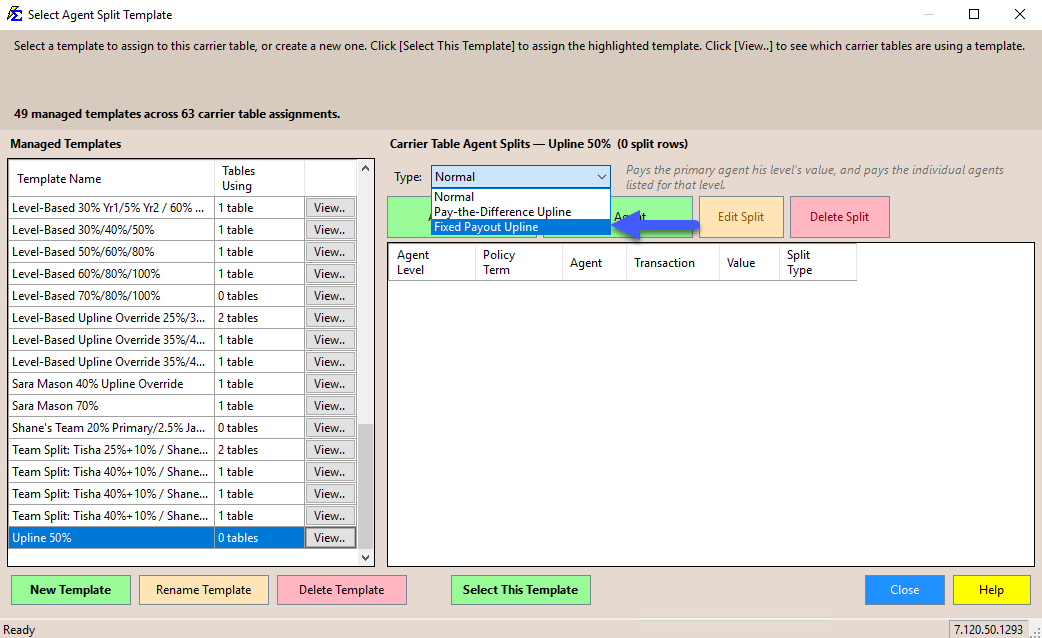
- The Agent Split Template assigned to the policy's Carrier Commission Table must have its Type set to Pay-the-Difference Upline or Fixed Payout Upline.
- The policy must be using its carrier table's splits, not a Policy-Specific Agent Commission Split Table.
Configuration
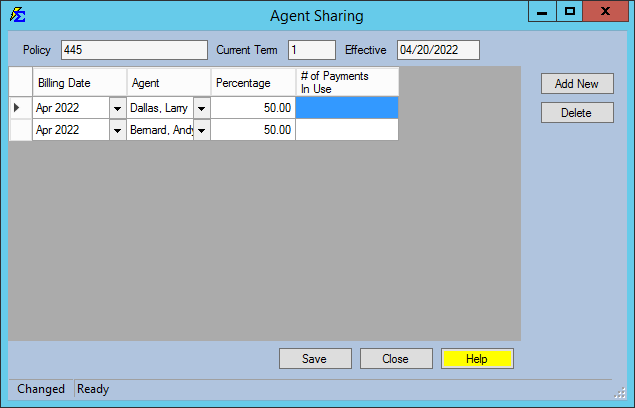
- Open the policy and click Agent Sharing on the toolbar.
- In the Agent Sharing window, click Add New for each agent and choose the Billing Date, the Agent, and their Percentage (e.g., Andy 50% / Larry 50%).
- Click Save.
The system will calculate each agent's earnings based on their individual Upline and Level rules, then apply the shared percentage.
Example Result
If Andy and Larry share a policy 50/50:
- Andy receives 50% of his standard 20% commission (10%).
- Larry receives 50% of his standard 30% commission (15%).
- Uplines (William and Jack) each receive 50% of their standard override amounts.
🔧 Troubleshooting
The Agent Sharing button is not visible on the Policy window. The button only appears when the policy's carrier table splits use an upline template. Check two things:
- Open the policy's Carrier Commission Table and confirm the Agent Split Template assigned to it shows Pay-the-Difference Upline or Fixed Payout Upline next to its name. A Normal template does not support agent sharing.
- Click Edit Splits on the policy. If the policy has its own Policy-Specific split table for the current date, agent sharing is not available. Add a new split with Use Carrier Table Agent Split to return the policy to its carrier table's splits.
One of the shared agents is not receiving their commission. Confirm that both agents are active in the system and that the share percentages add up correctly. Also verify each agent has the correct Level and Upline assignments in Tools → Manage Agent Levels and Uplines.
🔗 Related Topics
- Agent Commission Splits — Overview of all split methods.
- Carrier Table Agent Splits (Using Agent Uplines) — Required for agent sharing to work.
- Manage Agent Levels and Uplines — Set up and maintain agent hierarchy.
Need help? Contact support@commission-tracker.com