Summary Only
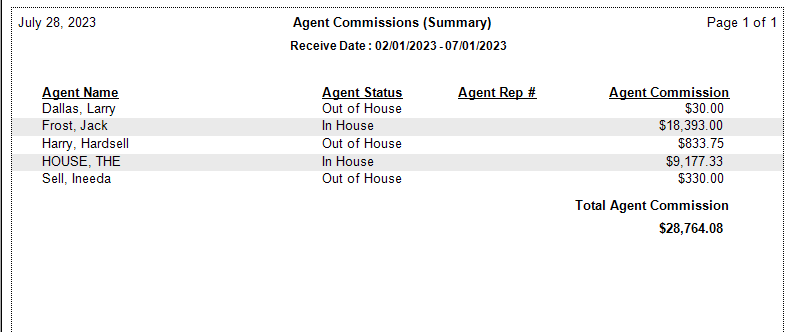
The Summary Only format of the Agent Commissions Earned Report shows total commissions earned by each agent without any policy-level detail. It is the most concise way to see what each agent is owed for a pay period.
💡 Why Use This
Use the Summary Only format when:
- You need payroll totals quickly — Get a single dollar amount per agent without sorting through individual policy entries.
- Sharing totals with accounting or payroll staff — Provide payout figures without exposing client names, policy numbers, or carrier details.
- Running a quick monthly balance check — Compare your total payout commitments against your bank deposits at a glance.
🗺️ How to Access
- Click the Agent Commissions button on the main toolbar, or navigate to Reports → Agent → Agent Commissions Earned.
- Under Select Report Format:, select Summary Only.
- Set your date range and click Show Report.
Payroll Integration
- Excel/CSV Export — Export this view to Excel or CSV to feed manual or automated payroll entry systems.
- QuickBooks — Use the agent's Rep # field (in the agent's details on the Agents view) to ensure seamless data mapping during a QuickBooks Payroll import.
See Email or Export Reports for export instructions.
Other ACE Report Formats
- Detail (Percent of Commission) — Policy-level detail showing agent earnings as a percentage of agency commission.
- Detail (Percent of Premium) — Policy-level detail hiding agency gross; shows earnings relative to client premium.
- Detail (Hybrid) — Full transparency with both premium and agency gross.
- Detail (by Carrier) — Groups payments by carrier.
🔧 Troubleshooting
An agent's total is lower than expected. Switch to a detail format such as Detail (Percent of Commission) to review the individual policy payments that make up the total. Look for missing payments, adjustments, or chargebacks within the date range.
I don't see all my agents in the Summary. Confirm each agent has an Agent License and that payments for the period are posted within the selected date range.
🔗 Related Topics
- Agent Commissions Earned Report — Full ACE Report overview and email setup.
- Email or Export Reports — Export the summary to Excel or PDF.
- Preset Date Range — Quickly set the reporting period.
- Agent Licenses — Required for each agent in the report.
Need help? Contact support@commission-tracker.com