Detail (by Carrier with Premium)
The Detail (by Carrier with Premium) report groups an agent's commission earnings by carrier and includes the premium column, showing how much the client paid alongside what the agent earned. It hides the agency's gross commission, making it suitable for agents paid on a percentage of premium basis.
💡 Why Use This
Use this report format when:
- Agents are paid on a percentage of premium — They can verify the premium figure used to calculate their commission.
- You want carrier-level production tracking without disclosing agency overrides — The agency's gross commission and House splits are hidden.
- Agents need to reconcile Pay Per Subscriber or Graded accounts — Premium is the primary driver of the commission calculation for these policy types and needs to be visible.
🗺️ How to Access
- Click the Agent Commissions button on the main toolbar, or navigate to Reports → Agent → Agent Commissions Earned.
- Select Detail (By Carrier Premium) under Select Report Format:.
- Set your date range and click Show Report.
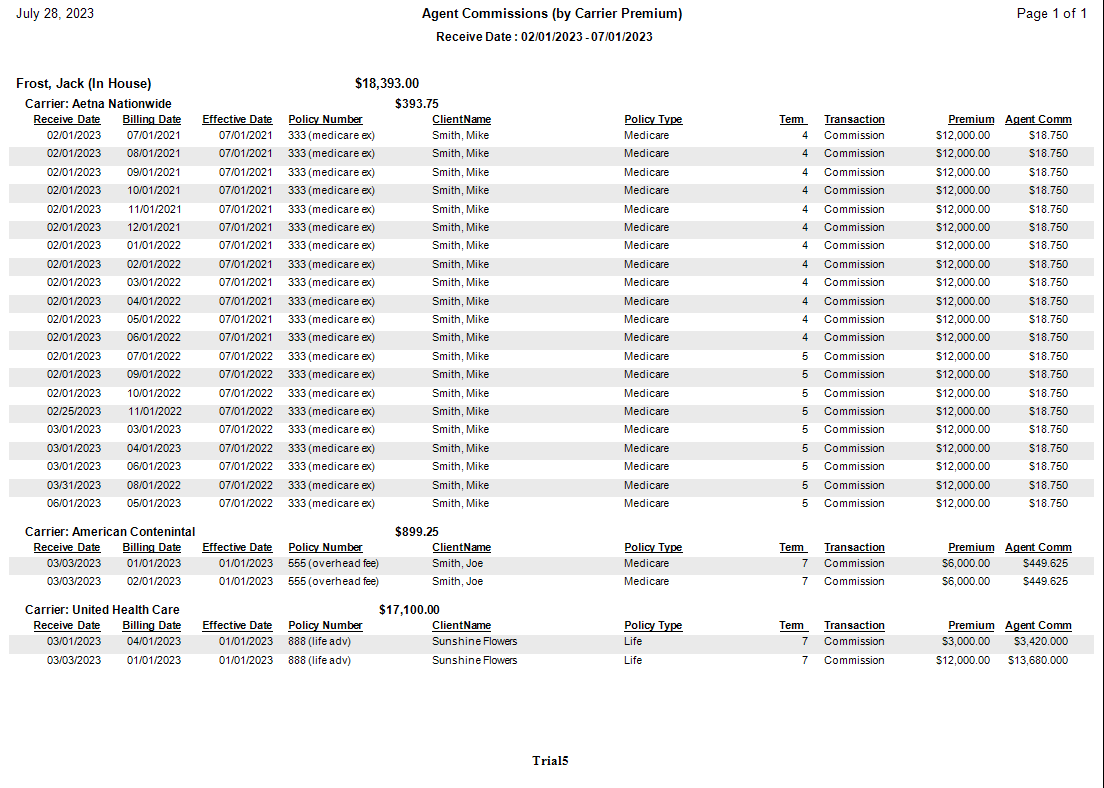
Report Layout
| Data Point | Description |
|---|---|
| Premium | The total dollar amount the client paid to the carrier for the period. |
| Agent Split (%) | The percentage of commission or premium assigned to the agent. |
| Agent Commission | The final dollar amount the agent earned from the transaction. |
| Carrier Subtotals | A summation of both Premium and Agent Commissions per carrier. |
Format Comparison
| Report Type | Shows Premium | Shows Agency Gross | Best Used For |
|---|---|---|---|
| Detail (by Carrier) | No | Yes | Full transparency of agency revenue by carrier. |
| Detail (by Carrier with Premium) | Yes | No | Production tracking and premium-based auditing. |
| Detail (Hybrid) | Yes | Yes | Maximum transparency including both figures. |
Other ACE Report Formats
- Detail (by Carrier) — Same carrier grouping without the premium column.
- Detail (Percent of Premium) — Alphabetical grouping with premium, hides agency gross.
- Summary Only — Agent totals only, no policy-level detail.
🔧 Troubleshooting
The Premium column shows $0 for some rows. This occurs when premium was not entered during payment posting or statement import. Ensure the Premium field is populated when importing carrier statements. If premiums were missed, re-import the affected statements with premium data included.
Carriers are not in the order I want. Carriers are sorted alphabetically by default. If you prefer grouping by client instead, use the Detail (Percent of Premium) or Detail (Hybrid) format.
🔗 Related Topics
- Agent Commissions Earned Report — Full ACE Report overview and email setup.
- Preset Date Range — Quickly set the reporting period.
Need help? Contact support@commission-tracker.com