Create New Policy Type
Policy Types are used to categorize the specific lines of coverage or products your agency sells (e.g., Dental, Vision, Group Health, Life). Assigning a Policy Type is required whenever you create a new policy, as it allows you to filter your book of business and revenue reports by product line.
💡 Why Use This
Manage Policy Types when:
- Adding a new product line — Any coverage type your agency sells must have a Policy Type code before it can be selected on a policy.
- Standardizing your database — Centralized management prevents duplicate variations of the same product name (e.g., "Health" vs. "Med").
- Improving report filtering — Policy Types are a primary filter in almost every Carrier and Client report.
🗺️ How to Access
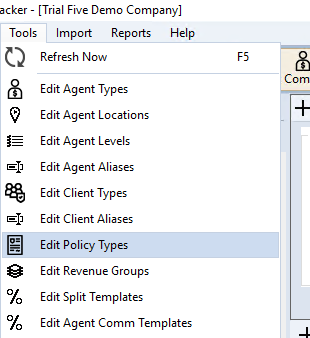
- Navigate to the Tools menu.
- Select Edit Policy Types.
Managing Policy Types
Policy Types are managed globally from the Tools menu, ensuring consistency across your entire database.
Adding a New Policy Type
- Navigate to Tools → Edit Policy Types.
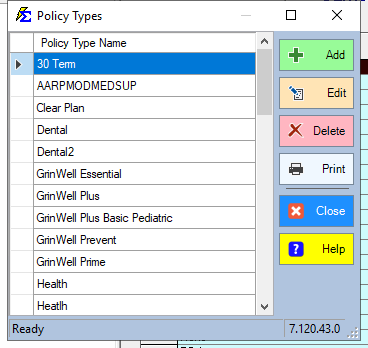
- Click Add.
- Type the name in the Policy Type box.
- Click Accept.
Renaming a Policy Type
- Navigate to Tools → Edit Policy Types.
- Select the Policy Type in the list and click Edit (or double-click it).
- Change the name in the Policy Type box.
- Click Accept.
Every policy that uses that Policy Type shows the new name.
Changing the Policy Type on a Policy
Edit Policy Types only manages the list of names. To change which Policy Type a policy has:
- One policy — Open the policy, pick the new type in Policy Type: (in the Policy group), and click Save.
- Many policies — Select the carrier, agent or client, click Batch Edit on the policy grid, select the policies, pick the new type in Policy Type, and click Update. See Update Policies (by Carrier).
Strategic Categorization
When creating your codes, consider how you want your final reports to look. Clear, concise naming conventions produce clean Commissions by Carrier Table reports.
- Broad Categories — Health, Life, Dental, Vision.
- Specific Segments — Group Health, Individual Health, Medicare Supp.
Best Practices
- Consistency is Key — Before creating a new type, check the existing list to avoid duplicates.
- Editing Existing Types — You can rename a Policy Type at any time (select it, click Edit, change the name, click Accept). Every policy currently linked to that type shows the new name.
🔧 Troubleshooting
I need to delete a Policy Type that is no longer in use. You can delete a Policy Type only if no active or historical policies are currently assigned to it. Reassign any linked policies to a different type first, then return to delete the code.
I can't find the Policy Type field when creating a policy. Policy Type is a mandatory field on the Create New Policy screen. If the type you need is not in the dropdown, add it via Tools → Edit Policy Types first.
🔗 Related Topics
- Create New Policy — Create a policy using your policy types.
- Commissions by Carrier Table Report — Filter commission data by policy type.
- Tools Menu — Access Policy Types and other global settings.
Need help? Contact support@commission-tracker.com