Options Menu
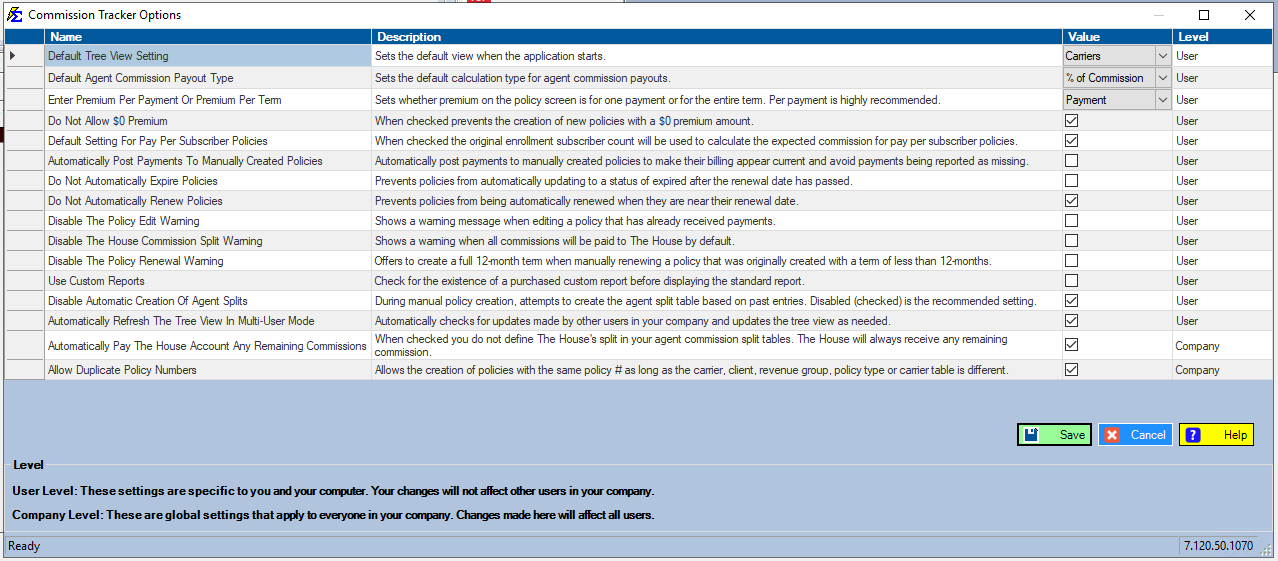
The Options Menu lets you customize system behavior in Commission Tracker. Settings control how policies are displayed, how commissions are calculated, how warnings behave, and more. Changes take effect after clicking Save.
💡 Why Use This
Use the Options Menu when:
- Cleaning up your daily workspace — Choose which view (Agents, Carriers, Clients or Policies) the main screen opens on.
- Speeding up bulk edits — Turn warning prompts off temporarily when performing large administrative updates.
- Configuring House calculations — Set the system to automatically retain unallocated commission for the House without a manual split entry.
- Setting premium and commission defaults — Choose whether premium is entered per payment or per term, and set the default payout type for agent commissions.
- Managing policy automation — Control whether policies automatically renew or expire.
🗺️ How to Access
Click Options on the menu bar at the top of the main window. It is its own menu, between File and Tools (there is no Options item under Tools). The Commission Tracker Options window opens.
Setting Levels
Each setting is labeled either User or Company in the Level column:
- User Level — Applies only to your account and workstation. Other users are not affected.
- Company Level — Applies to all users in your company. Changes here affect everyone.
Warning
Use caution with Company Level settings. Changes will affect all users in your organization immediately after saving.
User Level Settings
| Setting | Description |
|---|---|
| Default Tree View Setting | Sets the view the main screen opens on: Agents, Carriers, Clients or Policies. |
| Default Agent Commission Payout Type | Sets the default calculation type for agent commission payouts (e.g., % of Commission). |
| Enter Premium Per Payment Or Premium Per Term | Sets whether premium on the policy screen is entered as a single payment amount or the full term total. Per payment is recommended. |
| Allow Policy With Zero Premium | When checked (the default), new policies can be created with a $0 premium amount. Uncheck it to block $0 premium on new policies. |
| Default Setting For Pay Per Subscriber Policies | When checked, the original enrollment subscriber count is used to calculate expected commission for Pay Per Subscriber policies. |
| Automatically Post Payments To Manually Created Policies | Automatically posts payments to manually created policies so billing appears current and payments are not reported as missing. |
| Automatically Expire Policies | When checked (the default), a policy is given a status of Expired once its renewal date has passed. Uncheck it to stop policies from expiring automatically. |
| Automatically Renew Policies | When checked (the default), policies are renewed automatically as they near their renewal date. Uncheck it to stop automatic renewals. |
| Show The Policy Edit Warning | When checked (the default), a warning is shown when editing a policy that has already received payments. Uncheck it to turn that warning off. |
| Show The House Commission Split Warning | When checked (the default), a warning is shown when all commissions will be paid to The House by default. Uncheck it to turn that warning off. |
| Show The Policy Renewal Warning | When checked (the default), manually renewing a policy that was originally created with a term shorter than 12 months offers to create a full 12-month term. Uncheck it to turn that prompt off. |
| Use Custom Reports | When checked, the system looks for a purchased custom report before displaying the standard report. |
| Automatically Refresh The Tree View In Multi-User Mode | When checked, automatically updates the main screen's lists when other users in your company make changes. |
Company Level Settings
Warning
These settings apply to all users in your company. Coordinate with your administrator before making changes.
| Setting | Description |
|---|---|
| Automatically Pay The House Account Any Remaining Commissions | When checked, The House automatically receives any commission not allocated to an agent split. You do not need to add a House row to your agent commission split tables. |
| Allow Duplicate Policy Numbers | When checked, allows creation of policies with the same policy number as long as the carrier, client, revenue group, policy type, or carrier table differs. |
Newer versions only
This is in newer versions of Commission Tracker. If you do not see it, your server has not been updated yet.
- Automatically Expire Policies is a Company Level setting, so it applies to everyone in your company.
- Use Legacy Agent Commission Templates (Company Level) shows or hides the older Default Commission Splits templates. When unchecked, a new policy gets its splits from the split template on its carrier table or the one picked on the policy. Existing policies are never changed.
Important Considerations
Warning Message Settings
The Show warning settings are on when the box is checked. Uncheck a box to turn that warning off. Turn warnings off only when performing bulk administrative work where repeated prompts are disruptive — keep them on during normal daily use.
Automatic Policy Lifecycle
Automatically Expire Policies and Automatically Renew Policies give you control over the policy lifecycle. Uncheck them in agencies that manage renewals manually or use custom renewal workflows. When both are checked, the system handles expiration and renewal automatically based on renewal dates.
Custom Reports
A custom report is a version of a standard Commission Tracker report that has been built specially for your agency. Custom reports are a paid add-on.
- Use Custom Reports — When checked, each time you run a report Commission Tracker first looks for a purchased custom version of that report in your database folder. If it finds one, it shows the custom version; if not, it shows the standard report. Leave it unchecked if your agency has not purchased a custom report.
- Reports → Custom Reports — In the current version, the Custom Report #1 menu item only shows the message "You Have Not Purchased A Custom Report". A purchased custom report does not open from this menu; it appears in place of the standard report it replaces when Use Custom Reports is checked.
To ask about a custom report, contact support@commission-tracker.com.
🔧 Troubleshooting
Changes I make in the Options Menu are not saving. Confirm you clicked Save after making changes. Settings will not persist until the save step is completed.
I checked Use Custom Reports but I still see the standard report. Commission Tracker shows the custom version only when a purchased custom report for that report is in your database folder. If your agency has not purchased one, the standard report is shown. Contact support@commission-tracker.com to confirm what was installed.
A User Level setting I changed seems to affect another user. User Level settings apply only to your account and workstation. If another user sees different behavior, they may have different settings configured on their own account.
A Company Level setting I changed affected all users unexpectedly. Company Level settings apply to everyone in your organization immediately after saving. If a change was made in error, return to the Options Menu and revert the setting, then click Save.
Options I change reset after I log out. Some User Level settings are tied to your workstation. If settings reset on login, your administrator may have configured system-level defaults that override your preferences — contact your administrator to investigate.
🔗 Related Topics
- Disable The Policy Edit Warning Message — When and how to suppress the policy edit warning.
- Disable Agent Commission Split Warning Message — When and how to suppress the split warning.
- Automatic House Commission Calculation — How The House receives remaining commissions automatically.
- Allow Duplicate Policy Numbers — Details on the duplicate policy number setting.
- AutoRenew Policies — How automatic policy renewal works.
- Predictive Data Entry / Agent Split AutoFill — How agent split auto-creation works.
- Tools Menu — Overview of all tools available in Commission Tracker.
Need help? Contact support@commission-tracker.com