Accounts Receivable (A/R)
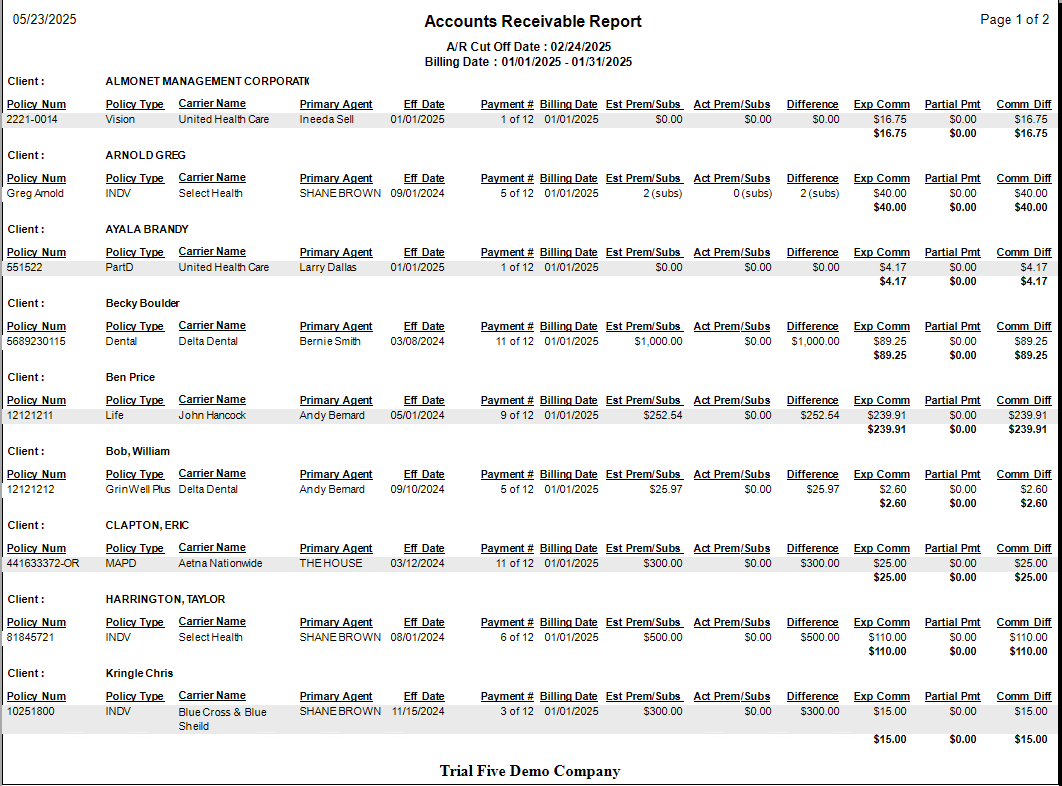
The Accounts Receivable (A/R) report itemizes exactly how much commission is outstanding for each policy. Use it to track delinquent carrier payments and ensure your agency is paid what it is owed.
💡 Why Use This
Use this report when:
- Tracking delinquent payments — Identify which carriers have not sent expected commissions.
- Auditing outstanding balances — View an itemized list of commissions due by policy.
- Monitoring aging — Use the Months Overdue filter to see how long payments have been outstanding.
This report is different from the Payment Discrepancy report, which tracks payments that were received but for the wrong amount.
🗺️ How to Access
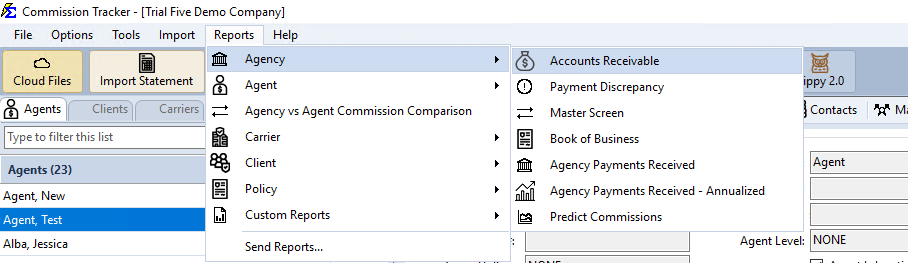
- Navigate to Reports → Agency → Accounts Receivable.
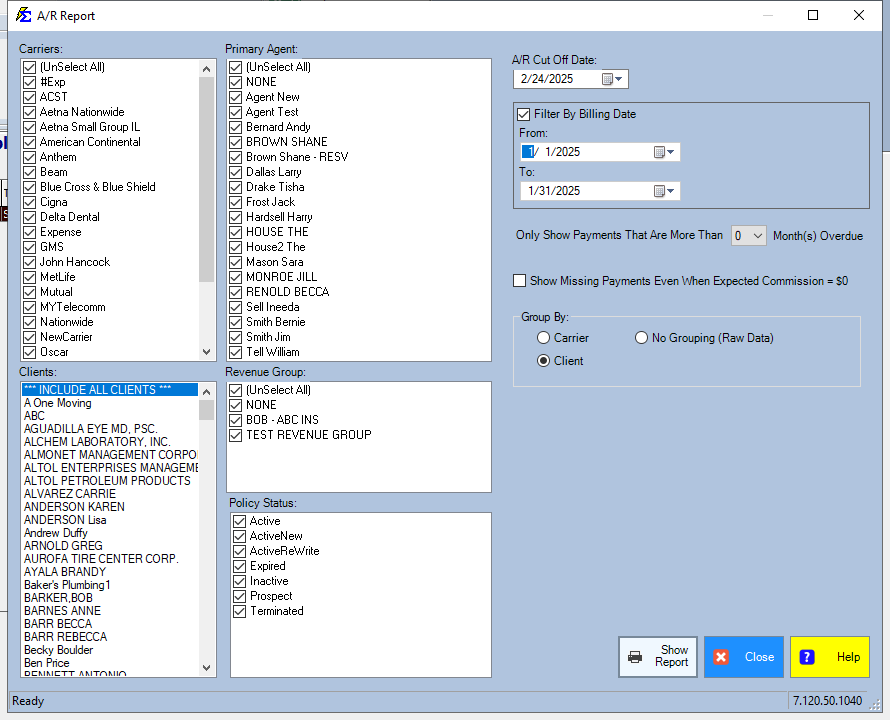
- Choose your Filter Options (Carrier, Agent, Revenue Group, etc.).
- Set Months Overdue if you are looking for older outstanding debt.
- Click Show Report.
Training Video
If the video below does not play, please copy and paste this link into your browser: Watch on YouTube
Report Options and Filters
- Primary Groups — Filter by Carrier, Client, or Primary Agent.
- Revenue Group — Limit the report to specific business units or revenue types.
- Months Overdue — Filter by the age of the balance to surface the oldest outstanding debt first.
- Show Missing Payments Even When Expected Commission = $0 — Also lists unpaid billing months whose expected commission is $0. Leave it unticked and those months are left off the report.
Newer versions only
This is in newer versions of Commission Tracker. If you do not see it, your server has not been updated yet.
Click Reset to put the whole filter screen back to the way it opens.
Saved Settings
Newer versions only
This is in newer versions of Commission Tracker. If you do not see it, your server has not been updated yet.
The filter screen has a Saved settings row at the top. Set the filters the way you run this report each cycle, type a name and click Save; next time, pick the name and the whole screen fills in. Saved settings are shared by everyone in your company, and the report remembers the last one you used.
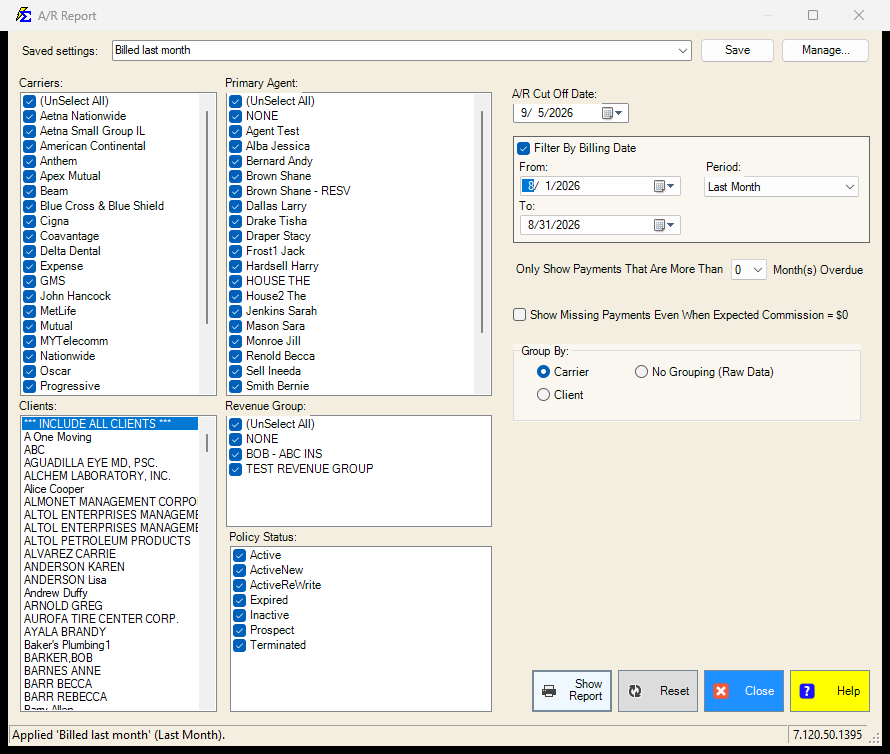
- The A/R Cut Off Date is saved as "today" when you leave it at today's date, so the setting means "as of the day you run it". Any other date is saved as typed.
- The Period box beside the Filter By Billing Date range (Last Month, This Year-to-date, ...) is what a saved setting remembers when the range is ticked. Choose Custom to save fixed dates.
- Everything else on the screen is remembered: the carriers, primary agents, client, revenue groups, policy statuses, the months overdue, the $0 expected commission box and the grouping.
- Lists left at (Select All) stay "all", so a carrier or agent added later is included automatically.
See Saved Report Settings for saving, renaming and deleting.
Key Requirements and Logic
Expected Commission Logic
The A/R report relies entirely on Expected Commission values.
- Setup required — If you have not set up a Carrier Commission Table or set the Commission Per Payment value directly on the policy, the system cannot calculate what is owed: its expected commission is $0, so the policy does not appear in this report unless you tick Show Missing Payments Even When Expected Commission = $0.
- Partial payments — If a partial payment is recorded, the system automatically deducts it from the Expected Commission and shows only the remaining balance.
Termination Rules
Policies with a status of Terminated have specific behavior on this report. Commission Tracker goes by the month of the Termination Date, not the day:
- The termination month and later — Billing months that are the same month as the Termination Date, or later, are marked as no longer owed and do not appear on the report.
- Earlier months — A payment due in a month before the termination month still appears as outstanding until it is paid.
Coverage that ended on the last day of a month
Enter the first day of the following month as the Termination Date, so the last covered month stays owed. A member covered through 07/31 gets a Termination Date of 08/01: July stays on the report until it is paid, and August onward drop off. With 07/31 as the date, July would drop off too.
What Happens When a Payment Is Received
- The amount received is applied against the Expected Commission.
- If paid in full, the policy is removed from the A/R report.
- If partially paid, the remaining balance continues to show as outstanding.
🔧 Troubleshooting
A policy is missing from the A/R report. The most likely cause is that the policy's expected commission is $0, and the report leaves out $0 months unless Show Missing Payments Even When Expected Commission = $0 is ticked. Tick that box to list the policy anyway. To have the report show what is owed, open the policy and confirm a Commission Per Payment value or a Carrier Commission Table is assigned.
The report includes Bonus or Override payments. It should not — the A/R report focuses on regular recurring commissions only. If bonus amounts are appearing, verify that those entries were not posted as standard commission payments. Bonuses should be entered using the Bonus/Override function.
I need to see the total outstanding for a specific carrier. Use the Carrier filter to limit the report to that carrier, then look at the report footer for the grand total of outstanding commissions.
A terminated policy is still showing on the report. Check the policy's Termination Date. A payment due in a month before the termination month remains on the report until it is recorded. Once the payment is posted, the balance clears automatically.
The last month of coverage is missing from the report on a terminated policy. The Termination Date falls inside that month, so Commission Tracker treats the month as no longer owed. Set the Termination Date to the first day of the following month (see Changing the Termination Date) and the month returns to the report.
🔗 Related Topics
- Payment Discrepancy Report — Tracks payments received for the wrong amount.
- Payment History — Review and correct individual payment records.
- Preset Date Range — Set the reporting period quickly.
Need help? Contact support@commission-tracker.com