# of Payments Paid In Advance
An Advance occurs when a carrier pays several months of commission upfront rather than waiting for the client to make each monthly premium payment. This setting allows Commission Tracker to accurately predict your cash flow and reconcile large initial commission checks.
💡 Why Use This
Configure this field when:
- Your carrier front-loads commission — Life insurance carriers commonly pay 9 or 12 months of commission upfront on new business.
- Reconciling large first payments — The advance schedule tells the system exactly when to expect the initial lump sum and when regular monthly payments resume.
- Identifying missing as-earned payments — The system will flag periods covered by the advance as paid and only look for new payments once the advance period ends.
🗺️ How to Access
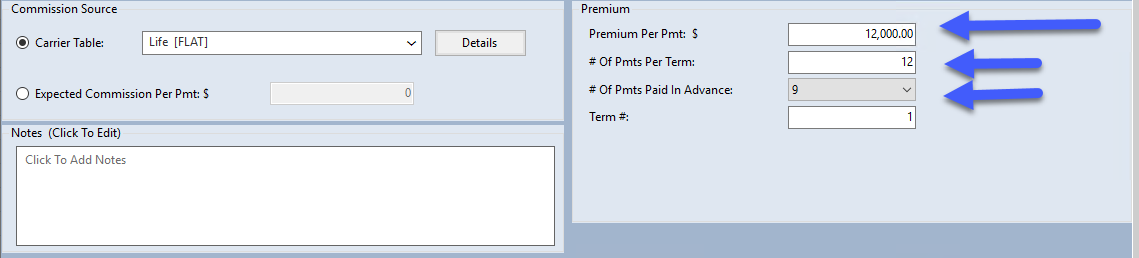
The # of Payments Paid In Advance field is the # Of Pmts Paid In Advance: box in the Premium group of the policy window.
How Advances Work: The 9-Month Example
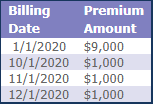
In many Life insurance contracts, carriers pay a 9-month advance. The system expects one large payment followed by a waiting period before regular monthly payments resume.
Example Scenario
- Policy Effective Date: 1/1/2020
- Payments per Term: 12 (Monthly)
- Payments in Advance: 9
| Billing Date | Payment Type | Status |
|---|---|---|
| 1/1/2020 | Advance (9 Months) | Paid Upfront |
| 2/1/2020 — 9/1/2020 | None | Covered by Advance |
| 10/1/2020 | As-Earned (1 Month) | Monthly Payment Resumes |
| 11/1/2020 | As-Earned (1 Month) | Monthly Payment |
| 12/1/2020 | As-Earned (1 Month) | Final Term Payment |
Renewal Behavior: The Reset Rule
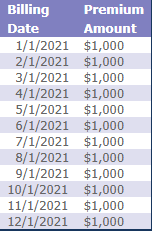
When a policy renews and a new term is created, Commission Tracker follows standard industry logic — advances are typically for new business only.
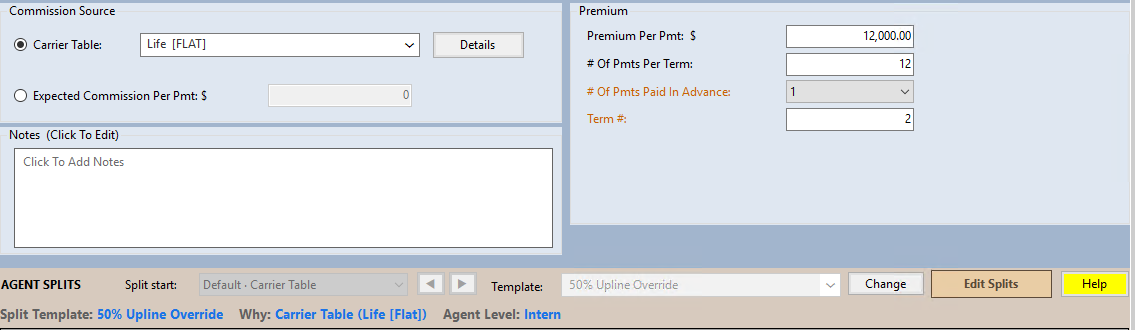
- Term 1 (New Business) — Uses the advance number you entered (e.g., 9).
- Term 2+ (Renewals) — The system automatically resets the # of Payments Paid in Advance to 1.
- Result — The policy moves to a standard as-earned monthly schedule for all subsequent years.
Carrier Table Defaults
If your Carrier Commission Table is configured with a standard advance number, every new policy attached to that table will inherit the advance setting automatically — no manual entry needed.
🔧 Troubleshooting
The system is not showing expected payments after the advance period. Verify that the # of Payments Per Term is set correctly. For a 9-month advance on a 12-month term, the system expects as-earned payments beginning at month 10.
A renewal policy needs an advance this year (rare). The system automatically resets advances to 1 on renewal. If your carrier pays an advance on a renewal, manually update the # of Payments Paid in Advance on the new term after renewal is processed.
🔗 Related Topics
- Commission Source and Premium — Overview of all payment schedule fields.
- # of Payments Per Term — How many payments the carrier sends per term.
- Commission Per Payment — The expected dollar amount per individual payment.
Need help? Contact support@commission-tracker.com