Renew Policies
The Renew Policies button is used within the Import Carrier Statement Errors (ICSE) screen to resolve term mismatch errors. It automatically advances a policy to the next term so a pending payment can be posted without leaving the import workflow.
💡 Why Use This
Use Renew Policies when:
- A payment has a "Billing Date Is For The Next Term" error — The current policy term has been exhausted and the payment belongs to the next renewal term.
- You want to renew in bulk during an import — Select multiple policies at once and renew them all without navigating to each policy individually.
🗺️ How to Access
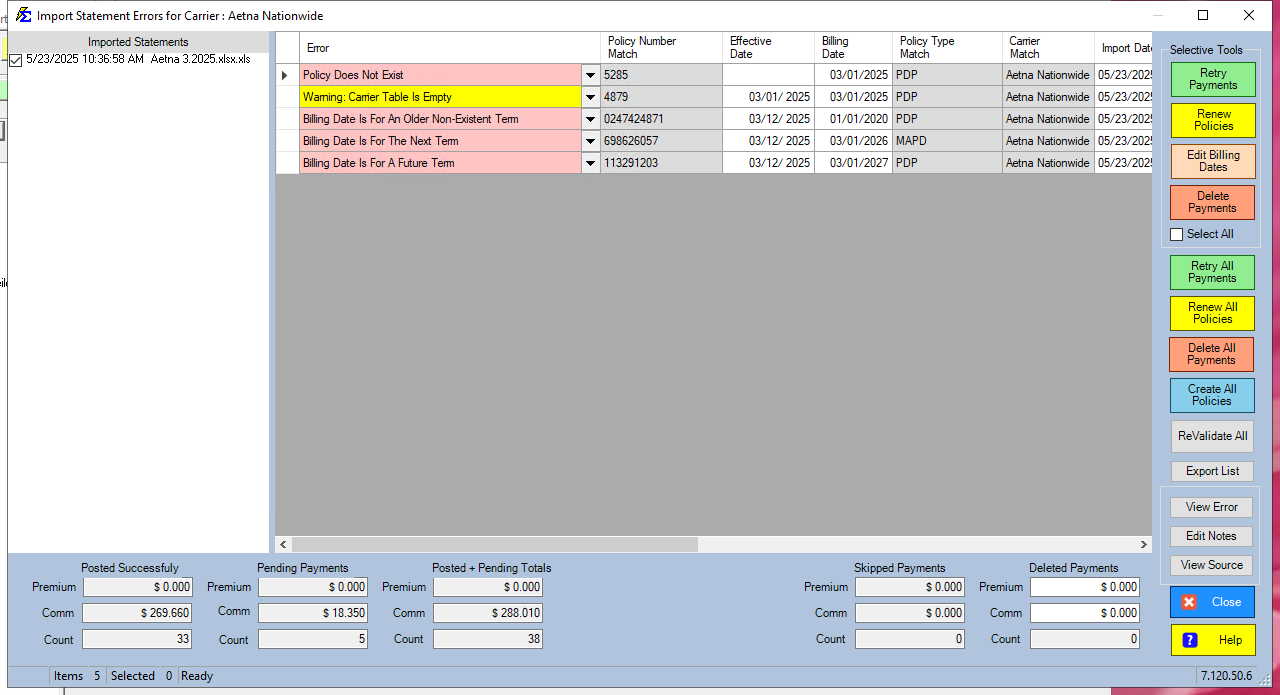
The Renew Policies button is in the Selective Tools group, in the column of buttons on the right side of the Import Carrier Statement Errors (ICSE) screen. Renew All Policies is in the same column.
Step-by-Step: Renewing from the Error Screen
- Open the ICSE screen after your import.
- Identify rows showing a "Billing Date Is For The Next Term" error.
- Select those rows (or check Select All — the system will only renew policies with the Next Term error).
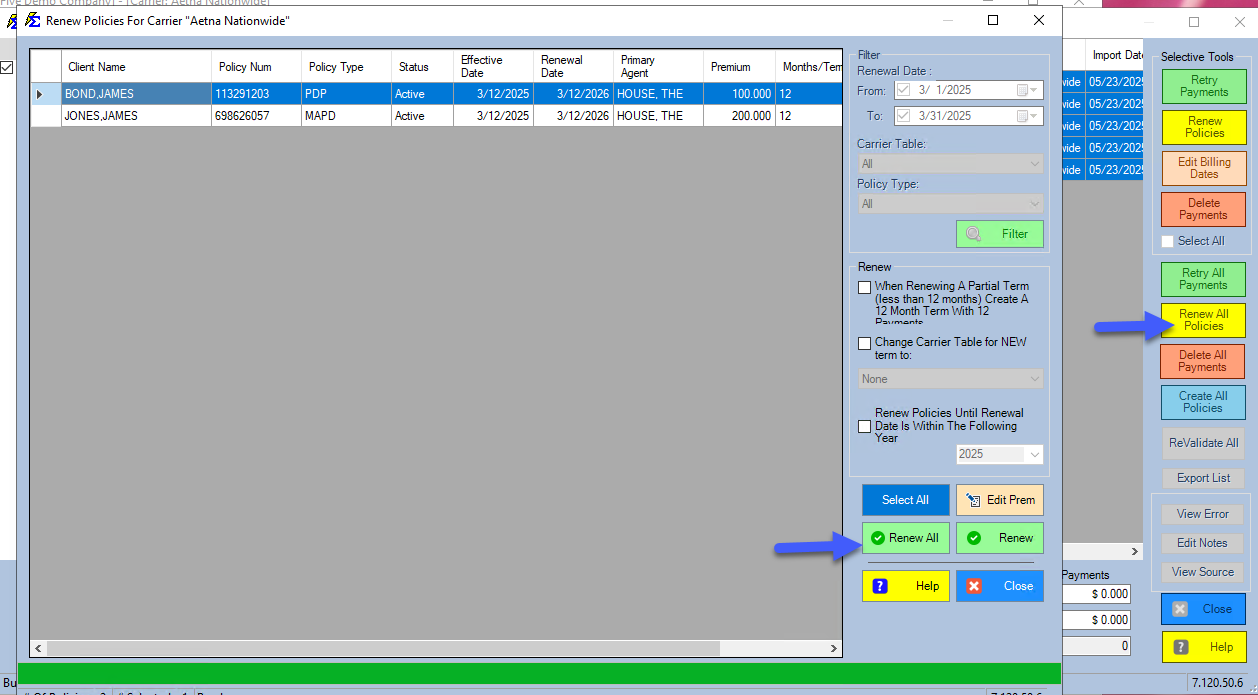
- Click Renew Policies (or Renew All Policies to include every Next Term row). The Renew Policies For Carrier window opens with those policies listed.
- Click Renew All, or select specific policies and click Renew, then close the window.
- Click Retry Payments to re-validate and post the payments.
Select All Is Safe
Clicking Select All before Renew Policies is safe — the system only processes rows with a "Billing Date Is For The Next Term" error. Rows with other error types are skipped.
Error Type Reference
| Error | Meaning | Resolution |
|---|---|---|
| Billing Date Is For The Next Term | The policy's current term is exhausted. | Click Renew Policies, then Retry Payments. |
| Billing Date Is For A Future Term | The policy is several terms behind the payment date. | Investigate whether multiple renewals are needed or whether the billing date is correct. |
| Billing Date: Older Term | The payment predates the policy's start date (often a chargeback). | Use Edit Billing Date or post manually via Receive Payment Button. |
🔧 Troubleshooting
After clicking Renew Policies, the error is still showing. Confirm the error status is specifically "Billing Date Is For The Next Term." If the error is "Billing Date Is For A Future Term" (multiple terms behind), the policy may need to be renewed more than once. Check the policy's term history and renew again as needed.
I renewed policies but now I'm missing payments between the old and new terms. Review Payment History for the policy. If payments from months between the previous term and the new term are missing, they may need to be entered manually or re-imported.
The Renew Policies button is grayed out. No rows with a "Billing Date Is For The Next Term" error are selected. Select the appropriate error rows first, then the button will become active.
🔗 Related Topics
- Errors — Import Carrier Statement (ICSE) — The full error resolution workflow.
- Retry Payments — Post payments after resolving errors.
- Edit Billing Date — Adjust billing dates for older term errors.
- Renewing Policies — Manual and bulk policy renewal outside the import workflow.
Need help? Contact support@commission-tracker.com