Carrier Payment Details (Commission Source and Premium)
The Commission Source and Premium groups of the policy window define how much your agency is paid and how often those payments occur. (They replace the old Carrier Payment Details section of the policy screen.) The information entered here creates the "Expected Commission" schedule that the system uses to track your revenue and identify underpayments.
💡 Why Use This
Configure these groups when:
- Setting up a new policy — Without a carrier table or an expected commission amount, the system has no commission math to perform and will show $0 expected.
- Tracking advance commissions — Enter the number of payments paid in advance so the system correctly schedules your expected revenue.
- Investigating commission discrepancies — Expected vs. received comparisons in the Accounts Receivable and Payment Discrepancy reports are driven entirely by these groups.
🗺️ How to Access
Open any policy. The policy window has four groups of fields: Policy, Dates & Billing, Commission Source and Premium. The expected commission comes from the last two.
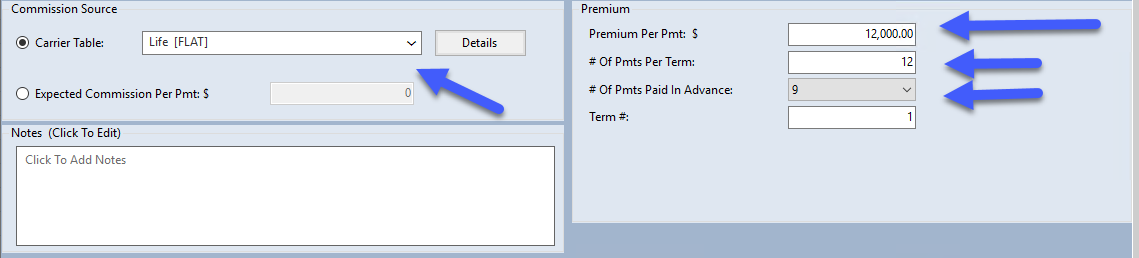
Commission Source: Where the Expected Amount Comes From
Pick one of the two choices. They are option buttons, so only one is on at a time:
- Carrier Table: — pick the policy's carrier commission table from the list. The table's rates, the premium in the Premium group and the Term # decide the expected commission. Details opens the selected carrier table.
- Expected Commission Per Pmt: $ — type the dollar amount the agency expects instead of using a table. Picking this choice sets the carrier table to None; picking Carrier Table: again sets the amount back to 0.
The amount reads Expected Commission Per Pmt: $ (an amount for each payment) or Expected Commission Per Term: $ (an amount for the whole term), depending on the Enter Premium Per Payment Or Premium Per Term setting in the Options menu.
Expected commission of $0
If you choose the expected commission amount and leave it at 0, Save asks: "Expected Commission Is $0, So This Policy Will Not Calculate Any Commission. Save Anyway?" Click No and enter the amount, unless the policy really pays nothing.
Premium: What the Client Pays and How Often
- Premium Per Pmt: $ (or Premium Per Term: $, following the same Options setting) — the client premium. On a Pay Per Subscriber carrier table this box asks for # of Subscribers: (newer versions: # of Members:) instead, or # of Subs Per Term: (newer versions: # of Members Per Term:).
- # Of Pmts Per Term: — how many times the carrier pays commission in a term (for example 12 for monthly, 1 for annual).
- # Of Pmts Paid In Advance: — how many payments the carrier front-loads into the first payment of the term.
- Term #: — 1 for the first year (New Business), 2 and up for renewals. The carrier table uses it to pick the rate.
How Much: Calculating Commission
Your total commission is determined by the combination of two key fields:
- Term # — Identifies if the policy is in its first year (New Business) or subsequent years (Renewal).
- Carrier Table — The carrier commission table that applies a percentage or dollar amount based on that term.
Example Scenario
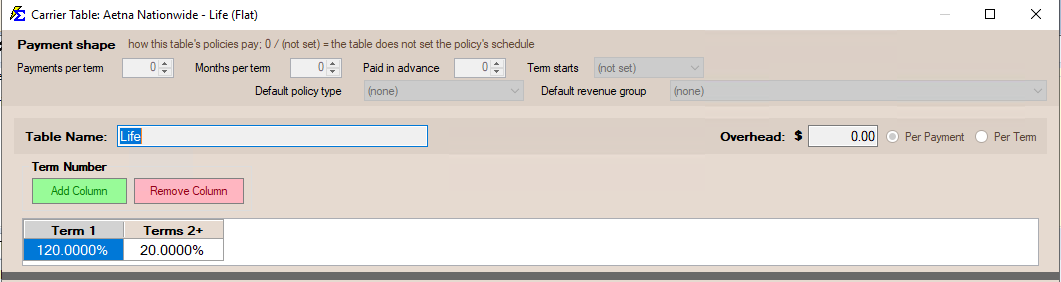
- Carrier Table: "Life" (Flat Table)
- Annual Premium: $12,000 (Premium Per Term: $ 12,000, or Premium Per Pmt: $ 1,000 with 12 payments per term)
- Term 1 Rate (New Business): 120%
- Term 2+ Rate (Renewal): 20%
The Result: In Year 1, the system expects $14,400 in total agency commission ($12,000 × 1.20).
How Often: Payment Schedules
The frequency of your payments is controlled by # Of Pmts Per Term and # Of Pmts Paid In Advance.
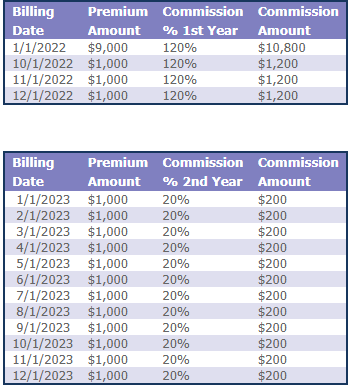
Example: A 9-Month Advance
Using the $14,400 commission calculated above:
- # Of Pmts Per Term: 12 (Monthly)
- # Of Pmts Paid In Advance: 9
- Schedule Logic: The first 9 months are bundled into a single "Advance" payment, while the remaining 3 months are paid "As-Earned."
| Payment Type | Timing | Calculation | Amount |
|---|---|---|---|
| Advance | Month 1 | $1,200 × 9 | $10,800 |
| As-Earned | Month 10 | $1,200 × 1 | $1,200 |
| As-Earned | Month 11 | $1,200 × 1 | $1,200 |
| As-Earned | Month 12 | $1,200 × 1 | $1,200 |
| TOTAL | $14,400 |
Renewal Continuity
Once a policy is renewed, this logic repeats. In Year 2 (Renewal), the system looks at the carrier table for the "Term 2" rate (20%) and generates a new schedule based on the renewal premium.
Key Field Definitions
- Premium Per Pmt / Premium Per Term — The amount the client pays per installment, or per term.
- # Of Pmts Per Term — How many times the carrier issues a commission (e.g., 12 for monthly, 1 for annual).
- # Of Pmts Paid In Advance — How many months of commission the carrier front-loads.
- Expected Commission Per Pmt (Commission Per Payment) — The specific dollar amount the agency expects to receive per individual payment, used instead of a carrier table.
🔧 Troubleshooting
The "Expected Commission" in Commission Tracker doesn't match my carrier contract. Verify your Carrier Commission Table rates first (select the table under Commission Source and click Details). If the table rates are correct, check that the premium, # Of Pmts Per Term and Term # in the Premium group are entered accurately.
The system shows $0 expected commission. Check the Commission Source group. If Carrier Table: is chosen, the table must not be None. If the expected commission amount is chosen, it must not be 0.
The system shows $0 expected commission on renewals. Ensure your Carrier Commission Tables have rates defined for Term 2 and beyond. If the renewal term column is blank or set to 0%, the system will calculate $0 for all renewal payments.
🔗 Related Topics
- Policy Information — The Policy and Dates & Billing groups.
- Term Number — How term numbers affect which rate applies.
- Carrier Commission Table — Select the commission math rule for this policy.
- Commission Per Payment — Override the table math with a fixed dollar amount.
- Number Of Payments Paid In Advance — Configure advance commission schedules.
- Billing Date vs Receive Date — Which month a payment is for, and when it arrived.
Need help? Contact support@commission-tracker.com