Policy Error Report
The Policy Error Report identifies policies with configuration issues that prevent accurate commission tracking. Fixing these errors ensures your Accounts Receivable and Payment Discrepancy reports are correct.
💡 Why Use This
Use this report when:
- Auditing policy setup — Find policies with mismatches between term length and expected payment count.
- After importing policies — Verify that newly imported policies were configured correctly.
- Investigating A/R gaps — If the Accounts Receivable report is missing policies you expect to see, error status may be the cause.
🗺️ How to Access
- Navigate to Reports → Policy → Policy Error Report.
- Set the filters (or leave everything selected for the whole book).
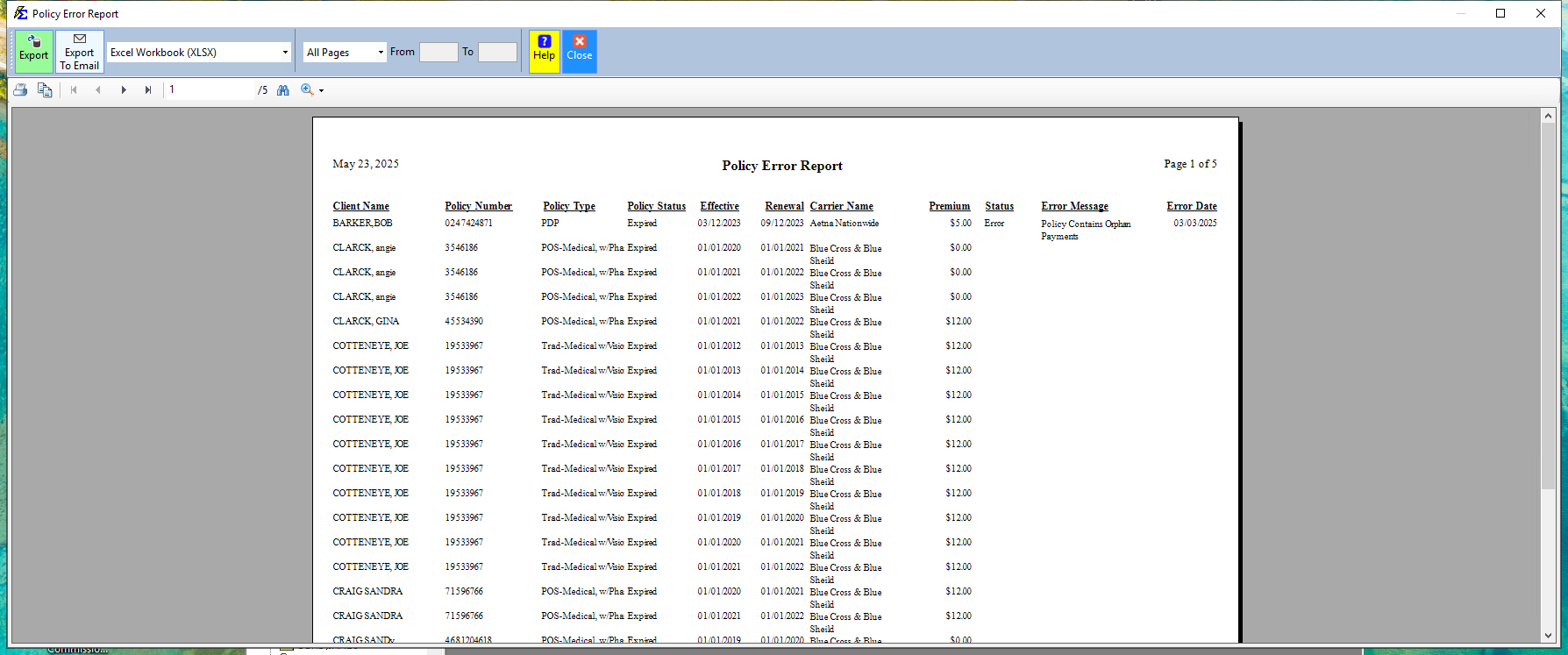
- Click Show Report and review the status column for each policy.
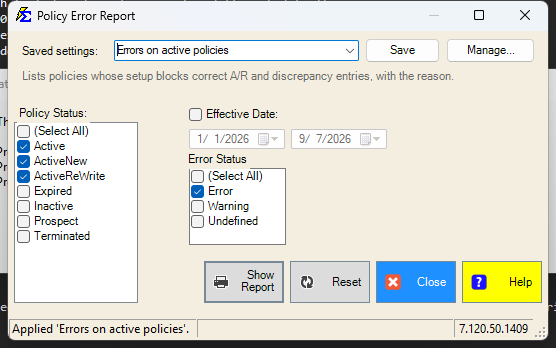
The picture shows a newer version, with the Saved settings row at the top. On other servers that row is not there.
Filters
- Policy Status — the policies to check, by status. The list opens with (Select All) ticked; untick it and pick the statuses you want.
- Error Status — which evaluations to show: Error, Warning, Undefined (not yet evaluated), or any mix. At least one must be ticked.
- Effective Date — tick the box to keep only policies whose effective date falls in the From/To range. The pickers open on last month to today.
Saved Settings
Newer versions only
This is in newer versions of Commission Tracker. If you do not see it, your server has not been updated yet.
The filter screen has a Saved settings row at the top. Set the statuses and the date filter the way you run this report, type a name and click Save; next time, pick the name and the screen fills in. Saved settings are shared by everyone in your company, and the report remembers the last one you used.
- Everything on the screen is remembered: both status lists, the effective-date box and its dates.
- A list left at (Select All) stays "all".
- The dates come back exactly as saved; there is no period chooser on this screen.
- Reset puts the screen back to the way it opens: every policy status, every error status, no effective-date filter.
See Saved Report Settings for saving, renaming and deleting.
Status Definitions
| Status | Meaning |
|---|---|
| Valid | Setup is correct — the policy will generate A/R and discrepancy entries normally. |
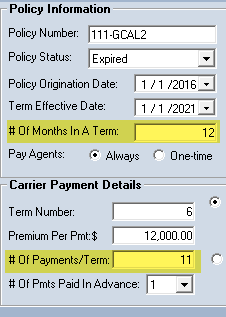
| Error | Setup is invalid (e.g., 12 months in a term but only 11 payments configured). |
| Undefined | The policy has not yet been evaluated by the system. |
Understanding Error Messages
An Error status includes a specific message describing the problem, such as a mismatch between the number of months in a term and the expected payments per term.
🔧 Troubleshooting
Policies show "Undefined" status. The system has not yet evaluated those policies. To force an evaluation:
- Go to Tools → Update Payment Tables.
- Re-run the Policy Error Report.
Undefined policies will update to either Valid or Error after the tables are refreshed.
Newer versions only
Update Payment Tables refreshes the tables only in newer versions of Commission Tracker (it runs the next time you start the program). On other servers, choosing it does not start a refresh yet: contact support@commission-tracker.com and we will refresh them for you.
A policy shows an "Error" status. Read the error message in the report — it will describe the specific mismatch. Common causes include setting a term to 12 months but configuring only 11 payment positions, or a billing date that falls outside the policy term. Correct the policy configuration, then refresh the payment tables (see the note above) to clear the error.
The report is not showing a policy I know exists. Check the Policy Status list and the Effective Date filter on the filter screen. If the policy was recently added via import, refresh the payment tables first (see the note above) to generate its status.
I need to fix errors in bulk. Open each errored policy individually and correct the term and payment configuration. After all corrections are made, refresh the payment tables once (see the note above) to re-evaluate all policies at once.
🔗 Related Topics
- Update Payment Tables — Refresh policy evaluation to clear Undefined status.
- Accounts Receivable — Error policies will not generate A/R entries.
- Payment Discrepancy Report — Error policies affect discrepancy calculations.
Need help? Contact support@commission-tracker.com