Release Notes
This page lists all Commission Tracker software updates in reverse chronological order.
September 4, 2026 — Version 7.120.50.1293
The New Interface. Commission Tracker's main screen has been rebuilt from the ground up. It is rolling out to Commission Tracker Cloud servers in stages. When your server is switched, the new screen opens automatically with the same login, data, and reports.
- Lists instead of folders — Agents, Clients, and Carriers are flat, sortable lists with live counts. No more expanding folders.
- Type to filter — a filter box above every list and above the policy grid narrows as you type.
- New Policies view — every policy in your database in one grid, replacing Policy Search.
- Details on the same screen — select an agent, client, or carrier and their details, notes, and policies appear beside the list.
- Configurable policy grid — choose columns, their order, and a default sort with the gear. Your layout, sort, and window size are remembered.
- Right-click a policy for Receive Payment, Partial/Chargeback, Bonus/Override, Payments, Policy History, Agent Advance, Agent Sharing, Edit Splits, Renew, and Duplicate.
- Redesigned policy editor — opens ready to edit, with every term on a strip at the top, a type-ahead client picker, and an Agent Splits preview on the policy.
- Multi-user awareness — the screen checks for changes by other users and tells you when a record you are editing has changed.
Watch the 3-minute video and read the highlights on Navigating the New Commission Tracker Interface.
July 18, 2026 — Version 7.120.50.1092
Contacts have moved. All of a record's contact people now live in one Contacts window.
- Click the new Contacts button on the toolbar of the Agent, Client, or Carrier screen (next to Help) to view and edit names, job titles, addresses, phone numbers, and email addresses in one place.
- The contact section that used to appear at the bottom of the Agent, Client, and Carrier screens has been retired.
- Existing contact information was moved over automatically. Nothing was lost.
See Contacts.
June 6, 2026 — Version 7.120.50.1080
Enhanced login security. The login screen now asks for your Email and Name in addition to your User Name and Password.
- Every session is tied to a verified individual, which keeps your audit trail accurate and your commission data secure.
- Your User Name is filled in automatically.
March 26, 2026 — Version 7.120.50.1062
Agent Split Template Manager. Agent commission splits are now managed as named, reusable templates instead of being configured on each carrier table one at a time.
- Define once, use everywhere — build a split template and assign it to as many carrier tables as you need.
- Update in one place — change the template and every carrier table using it is updated.
- See the impact — [View..] next to a template lists the carrier tables using it, and you are warned before saving changes to a shared template.
- Primary splits, named-agent splits, and Use Uplines are all supported.
- Open it from any carrier table's Agent Splits tab with Manage Agent Split Templates....
See Agent Split Template Manager.
December 10, 2025 — Version 7.1.1040
- Tippy, your in-app AI assistant — click the new AI Help button in the top-right corner (AI Support in the new interface) for instant answers about Commission Tracker. See Tippy.
- PDF to Excel conversion — the new PDF ➡ Excel button in Cloud Files converts PDF carrier statements into Excel so they can be imported. See PDFx.
- Agency Payments Received — the summary report now handles large volumes of data without memory errors, and the Client Filter is a searchable dropdown.
- Agency Payments Received (Annualized) — new Customer ID filter. Fixed the ClientType filter and crashes related to the Carrier Table column.
- Agent Commissions Earned Summary — now displays all active filters.
- Help videos moved to a new, faster video platform.
- User Management rebuilt, with User Session Logs available to administrators. See User Management.
October 28, 2025 — Version 7.1.1023
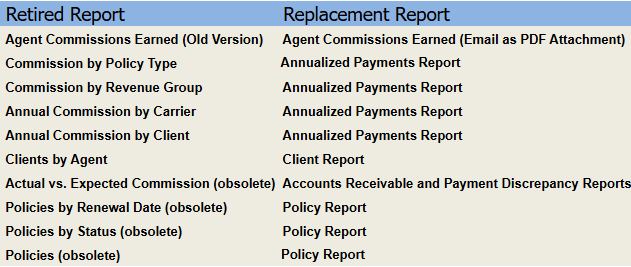
The following reports have been retired. See the table below for recommended replacements.
September 27, 2025 — Version 7.1.1022
- Primary Commission Tracker screens have been redesigned for a modern, organized look and feel.
- All older reports have been retired and replaced with modern versions.
- The Options Menu has been moved to a list with a detailed description of each setting.
- Folders for Inactive Clients and Agents are colored red.
- New button to show or hide Inactive Clients and Agents.
- New button to show or hide Terminated policies.
June 28, 2025 — Version 7.00.9901
- The House agent now shows up in the Agent Tree View with a blue folder instead of the standard yellow folder.
- Many other miscellaneous improvements.
May 13, 2025 — Version 7.00.9985
- New Agent List Report — Located in the Reports menu under the Agents section. Lists all agents including Agent Type, Agent Status, and Email Address.
- Includes advanced fields such as Agent Level and Upline.
- All columns are sortable and the sort is retained when exporting to Excel or PDF. Note: column headings are missing when exporting to Excel, but not when exporting to PDF.
January 20, 2025 — Version 7.00.9983
- New Annualized Report — A new Agent Payments Received Annualized (APR Annualized) report has been added. Shows totals by month with each of the 12 months as a column heading. Available in two formats: Revenue by Policy # or Revenue by Client Name.
- Manage Import/Reconcile Sessions — The "Reverse Import Carrier Stmt" button on the Carrier screen has been renamed to Manage Import/Reconcile Sessions to reflect its expanded functionality.
- Manage Import/Reconcile Sessions — You can now run the Agency Payments Received (APR) report directly from this screen.
- New A/R Report Format — A new Accounts Receivable format has been added that does not group by Carrier or Client name, making it ideal for exporting to Excel.
March 1, 2024 — Version 7.00.9960
- The Commission Tracker Cloud servers have been significantly upgraded. Performance improvements of 3–4x are expected across the application.
December 26, 2023 — Version 7.120.20.1
- Miscellaneous minor improvements to the report viewer and carrier statement importing.
July 16, 2023 — Version 7.00.9950
- Payment History — You can now edit and repost payments, or reverse and repost payments.
- Payment History — You can now view agent commission amounts for each payment by double-clicking the payment or clicking the new Agent Commission button.
- Update All Policies — From the Tools menu you can now edit policies for all carriers at once without selecting one carrier at a time.
- Update Policies — You can update policies for a single agent by clicking the Update Policies button on the Agent screen.
- ICS Errors — You can now edit the Billing Date of a pending payment to correct the error: "Billing Date Is For An Older Non-Existent Term."
- Manage Agents — Added to the Tools menu for batch editing of agent settings such as Active/Inactive.
- Create Policies Mappings — More fields can now be assigned a static value rather than being mapped to a spreadsheet column.
- Create Policies Agent Matching — Instead of creating a new agent name, the system will first try to match an existing agent name to prevent duplicate agents.
- Create Policies — You can now right-click on a new client or agent name to quickly create an alias without navigating to the separate alias screens.
March 23, 2023 — Version 7.00.9937
- Agency Payments Received Report — You can now sort and subtotal this report by Primary Agent.
March 3, 2023 — Version 7.00.9935
- Edit Payment History — Added the ability to edit and repost a payment. Delete the payment first, then go to Deleted Payments and use the Edit/Repost button to make changes and repost.
- Agent Commissions Earned Report — New Raw Data format exports cleanly to Excel for custom reporting.
- Exporting Reports — All reports can now be exported to Excel without formatting issues.
- Filtering Reports — All reports now list the filtering options used at the top of each page.
- Import Policies — The old Import Policies program has been permanently retired. Use the new Import Policies program.
December 9, 2022 — Version 7.00.9930
- Create Policies — New Client Name Matching feature. Instead of creating a new client name, the system will first try to match existing client names.
- Agency Payments Received Report — Premium Amount and Subscriber Count are now in separate columns for PPS policies.
- Agency Payments Received Report — Can now be exported to Excel without formatting issues.
October 1, 2022 — Version 7.00.9925
- Renew Policies — Now notifies the user if a partial term policy (fewer than 12 months) is found and asks if it should be adjusted to a full 12-month term with 12 payments.
- Renew Policies — Can now automatically renew a policy as many times as needed until a specified year is reached. No longer required to renew one term at a time.
- Renew Policies — A Renew All button has been added.
- ICS Errors — The error "Payment Is For A Future Term" can now be automatically fixed by clicking Retry Payments.
- ICS Errors — A Retry All button has been added.
- Reconcile — Now remembers the Receive Date, Check Date, and From/To Dates across sessions.
- Policy Screen — Receive Payment, Partial/Chargeback, and Bonus/Override buttons now autofill Check Date from the Receive Date and remember the last dates and Check Number entered.
- ICS Mapping — A new Paid-To Date checkbox has been added next to the Billing Date Column. When checked, the importer automatically subtracts one month from the spreadsheet date, eliminating the need to manually edit the file.
- ICS — A Notes button has been added to the Import Carrier Statement and Create Policies screens. The button displays yellow when no notes exist and red when notes are present.
- Import File Names — The full import file name is now displayed on all screens. Note: only new imports will show the full name; previous imports remain truncated at the old limit.
September 9, 2022 — Version 7.00.9921
- ICS Mapping — A spreadsheet preview has been added to the bottom of the Mapping screen to make column identification easier.
- ICS Mapping — You can now select which row contains the column headings. ICS will remember this setting and ignore all rows above it. No more need to delete rows before importing.
- ICS Mapping — In the preview, the column heading row is highlighted in green; rows above it are highlighted in gray.
- Payment Discrepancy Report — New options to include:
- Billing months that have not received a payment (missing payments)
- All payments received, including those without a discrepancy
- ICS — Now remembers the last Receive Date used so it does not need to be re-entered each session.
- ICS Errors — Totals at the bottom no longer include Skipped or Deleted payments. Only Posted and Pending payments are counted.
- Deleted Payments — The Deleted Payments screen now allows the user to repost all payments at once.
- Policy Effective Date — Can now be changed even after payments have been received. A warning appears if an existing payment will become invalid due to the new date range.
- Renew Policies — When manually renewing a partial term policy, the user is now asked whether to adjust it to a full 12-month term with 12 payments.
- Options Menu — New option to disable the warning when manually editing a policy that has already received payments.
- Options Menu — New option to disable the Agent Commission Splits warning when all commissions are going to The House because the Agent Split Table is blank.
June 18, 2022 — Version 7.00.9917
- ICS — You can now map the worksheet name on the Mapping screen. Transaction Type is now set on the Mapping screen and remembered by the software. Check Number defaults to the import file name. ICS can now recognize dates in YYYYMM format.
- Undelete Payments — It is now possible to undelete a payment from the Payment History screen. Click Deleted Payments to see deleted payments, then click Repost to re-enter the payment using current Carrier Table and Agent Split settings.
- Quick Reports — Three quick report buttons have been added to the main screen for fast access to the Agency Payments Received (APR), Agent Commissions Earned (ACE), and Policy reports.
- Delete All Payments — Added to the Tools menu. Allows deletion of payments based on filters without deleting any clients or policies.
- Bug fix — Fixed a crash in Agent Commissions Earned when emailing more than 75 agents at a time. Email sending is also significantly faster.
- Bug fix — Fixed a random freeze and crash on the Policy screen when adding a new Agent Split row.
May 20, 2022 — Version 7.00.9914
- ICS — CSV files can now be imported directly. No longer necessary to convert CSV files to Excel format before importing.
April 20, 2022 — Version 7.00.9912
- Preset Date Ranges — Preset options such as "Last Month" and "Last Year" have been added to the following reports. Selecting a preset automatically populates the From and To dates:
- Payment Discrepancy
- Book of Business
- Agency Payments Received
- Agent Commissions Earned
- Agency vs Agent Commission Comparison
- Policy List
- Remembered Report Settings — Date Range, Sort and Subtotal, and Report Format settings are now remembered for the following reports:
- Accounts Receivable
- Payment Discrepancy
- Book of Business
- Agency Payments Received
- Agent Commissions Earned
- Agency vs Agent Commission Comparison
- Policy List
April 14, 2022 — Version 7.00.9910
- Agent Commission — Dollars Type — If the agency earns a negative commission for the month, an agent set to receive a fixed dollar amount will now be paid that amount as a negative (e.g., a $5 setting results in −$5 on a chargeback month).
- Loading of the Agent, Carrier, and Client lists has been improved and is faster.
April 1, 2022 — Version 7.00.9909
- New Report — Agency vs Agent Commission Comparison — Quickly verify that commissions paid out to agents equal commissions received by the agency. Identifies overpaid or underpaid agents without needing to compare the APR and ACE reports separately.
March 20, 2022 — Version 7.00.9908
- Agency Payments Report — Can now be run "By State," useful for tax purposes.
- Book of Business Report — Now includes a Summary Mode with a policy count.
January 26, 2022 — Version 7.00.9906
- It is now possible to change a policy from using a Policy-Specific Agent Commission Split Table to a Carrier Table-Based Agent Commission Table.
November 5, 2021 — Version 7.00.9905
- Deleted Payments Archive — An archive of deleted payments has been added to the Payment History screen, showing who deleted each payment and when.
- Users can now purchase additional Agent Licenses without leaving the software. Licenses are activated immediately.
May 24, 2021 — Version 7.00.99
- Alias Feature for ICS — Clients and agents whose names appear differently across carrier statements can now be mapped using aliases. For example, "John R Doe" and "John Robert Doe" can be configured to be recognized as the same person.
December 16, 2020 — Version 7.00.98
- Policy History Log — Now available directly on the Policy screen.
- Policy Importer — Completely rewritten and significantly easier to use.
- Agency Payments Received Report — Can now be sorted by Receive Date.
- Options Menu — A new filter has been added to hide Terminated status policies from the list.
November 23, 2019 — Version 7.00.86
- Updated the Getting Started page of the help website to explain new features in this version.
- ICS Errors — Users can now Renew and Create Policies directly from the Errors – Import Carrier Statement screen.
- Options Menu — New option to allow Duplicate Policy Numbers. Two policies can share the same policy number as long as at least one of the following fields differs: Policy Type, Client Name, Revenue Group, Carrier Name, or Carrier Table.
- Payment History — Now records the username and timestamp for manually entered payments, not just imported payments.
- New Report — APR vs ACE — Lists only payments where there is a discrepancy of at least $1 between gross commission and total agent commissions paid out.
- Agent Commission Split reports have been cleaned up.
- New colors on several screens.
- The mouse wheel can now be used to scroll the tree up and down.
- The old (unsupported) Import Carrier Statement and Reconcile Carrier Statement programs have been permanently removed. All users must use the current versions.
July 16, 2018 — Version 7.00.80
- Improved Searches — Advanced partial matching lets you find Agents, Carriers, and Clients by any part of the name. For example, searching "John" or "Smith" or "Jo" will find "Smith, John." The Client search now displays only matching clients, reducing the list length significantly.
July 15, 2018 — Version 7.00.79
- Minor bug fixes.
July 14, 2018 — Version 7.00.78
- Policy Import Session Reverser — You can now reverse a policy import session without contacting support to roll back the database.
- Policies Report — A new filter lets you view exactly which policies were imported during a specific session.
- Cloud Database Backup — Located in the Help menu. Requests an encrypted copy of your Cloud database sent via email for disaster recovery purposes.
- Bug fix — Fixed issues reading certain types of Excel spreadsheets in ICS.
- ICS — The premium amount and subscriber count can now be mapped to the same spreadsheet column or to two separate columns.
- All Imports — All import programs now remember the last folder used to load Excel files.
- Policy Tree — Completely rewritten for improved stability. Edited policies no longer move to the bottom of the folder on save. Duplicated policies now navigate directly to the new record.
- Import Agent Commission Splits — Can now be used to import Agent Overrides and Bonuses as well.
- Policy Editing — Making a major change to a policy (such as changing the Primary Agent or Carrier Table) now asks if you want to apply the change to all terms of that policy.
- Newsletter Sign-Up — You can now sign up for the Commission Tracker newsletter from the Help menu.
- The following programs are deprecated and will be removed in a future release. Use the current ICS and Reconcile on the Carrier screen instead:
- Old Import Carrier Statement
- Old Reconcile
- Agent Commission Template (replaced by Carrier Table Agent Splits)
April 10, 2018 — Version 7.00.76
- Agent Commissions Earned Report — Can now email reports directly to agents as PDF attachments. An agent license must be purchased for each agent ($1/month per license).
- Advanced Agent Commission Splits — Agent hierarchies (Uplines) can now be created using Manage Agent Levels and Uplines in the Tools menu.
- Multiple Primary Agents — Two or more agents involved in writing a policy can now split the commission between them.
- Agent Commission Levels — Agent levels are no longer defined on the Agent screen. Use Manage Agent Levels and Uplines in the Tools menu to set levels for all agents on one screen.
- Import Policies Auto Refresh — The policy tree now refreshes automatically after Import Policies completes. No need to restart to see new policies.
- Delete Policies Utility — A new utility in the Tools menu allows you to quickly delete large numbers of policies and all associated payments with a single click.
- Accounts Receivable Report by Email — The A/R report can now be sent by email to any user with a CT username. Email addresses are configured in Tools > System Options.
- The following programs have been marked as unsupported and will be removed in a future release. Use the current ICS and Reconcile on the Carrier screen instead:
- Old Import Carrier Statement
- Old Reconcile
- Agent Commission Template (replaced by Carrier Table Agent Splits)
November 15, 2017 — Version 7.00.72
- New Import for Agent Advances — Agent Advances can now be imported from an Excel spreadsheet via the Import menu.
- Update Policies — Now requires a Termination Date when changing policy status to Terminated.
April 4, 2017 — Version 7.00.66
- AutoRenew — Improved with three options, including a new option to preview the list of policies before deciding whether to renew them.
- ICS Errors — A Print button has been added to allow printing a list of import errors.
- New Reconcile — A popup now appears after successfully writing payments. Receive and Check Dates now reset to today's date after writing payments.
August 24, 2016 — Version 7.00.64
- Bug fix for the new Reconcile and new Import Carrier Statement.
June 13, 2016 — Version 7.00.62
- New Import Carrier Statements (Beta) — The new Import Carrier Statement button is on the Carrier screen. A carrier must be selected first so that column mappings can be saved per carrier. Importing multiple carrier payments from a single Excel file is still supported.
- Options Menu — A new option has been added to turn off AutoRenew Policies.
February 22, 2016 — Version 7.00.58
- New Reconcile for Carrier Statements (Beta) — The new button is next to the existing Reconcile button on the Carrier screen. The old Reconcile remains available but will be phased out.
- Automatic Policy Renewal — When CT starts, it scans for policies coming due for renewal in the next 2 months and asks if you would like to auto-renew them.
- Bug fix — Commission Table list sorting on the Policy screen has been improved.
- Bug fix — Payment History now remembers your preference for Summary or Detail mode.
- Bug fix — Expected Commission was not calculating correctly for Scheduled Commission tables with payment advances.
- Bug fix —
ActiveNewandActiveReWritepolicies now retain their status when manually renewed from the Policy screen. - Bug fix — The Delete key on the Agent Commission Split Table was allowing removal of agents even after payments had been posted.
- Update Policies — "Pay Agent" option has been added.
- Bug fix — Changing the carrier on one policy version was not correctly updating the Commission Table selection across all versions.
- Bug fix — The old Reconcile and Future Commission Report were running very slowly since the last release. New database indexes have been added to fix performance.
July 31, 2015 — Version 7.00.54
- Minor bug fix for the new Payment History.
July 30, 2015 — Version 7.00.53
- Minor bug fixes for Payment History and Commission Table Agent Splits.
July 27, 2015 — Version 7.00.52
- Bug fix — A database conversion has been added to fix a minor issue with the Payment Discrepancy report for policies using a Scheduled Commission Table. This conversion may take more than an hour on very large databases.
- Payment History — Completely rewritten with new features and totals. All payment information for a policy is available on a single screen and can be printed.
- Reconcile — A progress bar has been added to the bottom of the screen.
- Minor enhancement — Improved sorting in the Commission Table Agent Splits grid.
- Minor enhancement — The Crystal Reports engine has been upgraded for faster and more stable reporting.
July 6, 2015 — Version 7.00.51
- Bug fix — Commission Table Details button was sometimes showing incorrect commission values.
- Bug fix — Partial Payments were not working correctly for policies using a Scheduled Commission Table.
- Bug fix — The A/R Report was not calculating the Commission Difference column correctly.
- The Primary Contact email address has been added to the Client List report.
June 22, 2015 — Version 7.00.50
- Agent Commission Splits at the Commission Table Level — Splits no longer need to be defined for each policy individually. Define them at the Commission Table level and agents are paid automatically based on the policy's Primary Agent and Commission Table.
- Commission Table Start Dates — Commission Tables can now be assigned Start Dates. CT automatically selects the correct table version based on the policy's Effective Date or the payment's Billing Month.
- Performance — Accounts Receivable, Payment Discrepancy, and Book of Business reports now run significantly faster.
- Database Engine Upgrade — The maximum database size has doubled and overall performance has improved.
- Agent Folders — Now show only policies where the agent is the Primary Agent. The Unassigned folder has been removed.
- If no Primary Agent is set on a new policy, The House agent is automatically assigned.
- Minor enhancement — A Copy Row button has been added when creating Scheduled Commission Tables.
- Minor enhancement — When creating a new policy, Renewal Date has been replaced with # of Months In A Term. CT calculates the correct Renewal Date automatically.
- Minor enhancement — Reverse Import or Reconcile Session has been rewritten and is now sorted in reverse date order.
- Minor enhancement — The Import Policies template has been modified. Users must use the latest version.
- Minor enhancement — The Import Agent Splits template has been modified. Users must use the latest version.
November 19, 2014 — Version 7.00.40
- Update Policies Button — A new Update Policies button has been added to the Carrier screen, allowing updates to multiple policies for a carrier with a single click.
- New Policies Report — Rewritten with additional features. The original Policies report remains available in this release but will be removed in a future version.
- Commission Tables No Longer Shared — Commission Tables can no longer be shared among multiple carriers. All previously shared tables have been converted to independent copies. The old "Share Comm Tables" button has been replaced by Copy Commission Tables.
- Bug fix — Import Policies was not always creating the default "System – None" commission table for new carriers.
- Minor enhancement — The Import Policies template has been modified (a column name changed). Users must use the latest version.
- Minor enhancement — The Import Agent Splits template has been modified with new columns. Users must use the latest version.
June 19, 2014 — Version 7.00.36
- Agent Commission Split Table Autofill — Improved matching logic with an explanation of how the match was made. No longer matches on policies with an empty Agent Commission Split table.
- Minor enhancement — Added Revenue Group, Cust ID, and Policy Status to Import Policies. If the Revenue Group does not exist it will be created.
- Report enhancement — Added Agent Location and Rep # to the "% of Premium" format of the Agent Commissions Earned report.
- Bug fix — Import Policies was not setting the Commission Table correctly if the table being imported already existed.
- Bug fix — Agent Locations could not be deleted even when no longer in use.
- Bug fix — The "Blank for All" filter was not working in the Agency Payments Received report for the Import/Reconcile filter list.
May 1, 2014 — Version 7.00.35
- Agent Advance — A new Agent Advance button has been added to the Policy screen. Allows an agency to pay an agent a commission before receiving payment from the carrier, or to charge an agent an office or advertising fee. Advances appear on the Agent Commissions Earned report as transaction type "AA."
- Bug fix — The Book of Business report was not calculating correctly for PPS commission table policies.
- Bug fix — The mouse hourglass was not appearing soon enough in the new A/R, Discrepancy, and Book of Business reports.
- Bug fix — The Book of Business and Discrepancy reports would crash if no carrier was selected on the filter screen.
November 5, 2013 — Version 7.00.34
- Major enhancement — Added Date of Birth, Age, and Customer ID to the Client by Agent report.
- Minor enhancement — Added a Policy Status filter to the Book of Business report to include or exclude Terminated policies.
- Bug fix — The Policy Status filter in the new A/R report was not working correctly.
- Bug fix — The "Use Proxy" feature on the Registration screen was not working correctly.
August 21, 2013 — Version 7.00.33
- Bug fix — Book of Business report Effective Date range filter was not working correctly.
- Bug fix — Standard and Custom Discrepancy reports had a minor issue.
- Bug fix — Renew Policies was not accepting decimal places when using the "Edit Premium" feature.
August 1, 2013 — Version 7.00.32
- New Report — Book of Business — Calculate the total value of your current book by Carrier, Client, or Primary Agent.
- Bug fix — Import Agent Splits was not requiring both a first and last name for agents.
July 22, 2013 — Version 7.00.30
- New Report — Accounts Receivable (A/R) — Shows commissions not yet received, sorted by Billing Date.
- New Report — Discrepancy — Shows one row per billing date, summarizing partial payments. A Policy # and Billing Date combination will appear in either the A/R report or the Discrepancy report, but never both.
- Import Policies — New policies can be imported from an Excel spreadsheet (.xls or .xlsx). A sample spreadsheet is included in your CommissionTracker directory.
- Import Agent Commission Splits — Agent Commission Splits can now be imported from an Excel spreadsheet. A sample spreadsheet is included in your CommissionTracker directory.
- ICS — You now have the option to set the Receive Date, Check Date, and Check Number on screen or import them from columns in the Excel file.
- Active/Inactive Clients — New option to show Active and/or Inactive Clients in the Client Tree View. The Client screen now has a checkbox to flag Inactive clients.
- Reverse Import Carrier Statement — Can now also be used to reverse a Reconcile session.
- Options Menu — New option to prevent auto-expiry of policies. After the renewal date passes, policy status remains unchanged instead of changing to "Expired."
- Policy Status — Terminated — When changing status to Terminated, you are now prompted for a Termination Date, displayed in red on the policy screen.
- Flat % of Premium Commission Table — Now offers two types of premium overhead fees: "per payment" or "per term."
- Renew Policies — Major upgrade. You can now assign a different Commission Table to renewals without changing the existing policy. Partial term policies can be forced to renew as a full 1-year term with 12 payments.
- AutoFill Split Table — A new button can populate the agent commission split table for an existing policy. It will not overwrite an existing table.
- Scheduled Commission Tables — Now compatible with advance payments. For example, a $25/month scheduled commission on a 10-month advance policy expects $250 on the first payment.
- New Client Fields — Date of Birth, Cust ID, and State have been added to the Client screen. The DOB field calculates the client's current age.
- Report enhancement — Added Annual (by Client) format to Agent Commissions Earned report.
- Report enhancement — Added Annual (by Carrier) format to Agent Commissions Earned report.
- Report enhancement — Added Detail (by Carrier) format to Agent Commissions Earned report.
- Report enhancement — Added Detail (by Carrier Premium) format to Agent Commissions Earned report.
- Report enhancement — Added Detail (Hybrid) format to Agent Commissions Earned report.
- Report enhancement — Added Detail (by Primary Agent) format to Agent Commissions Earned report.
- Report enhancement — Agency Payments Received report can now be filtered by Import/Reconcile session.
- Report enhancement — Agency Payments Received report can now be run for "All Dates."
- Report enhancement — Added a Policy Type filter to the Policies report.
- Minor enhancement — The Adjustment button on the Policy screen has been renamed to Partial/Chargeback for clarity.
- Minor enhancement — Import Carrier Statement now closes automatically after a successful import.
- Minor enhancement — Maximum policies per Agent or Carrier folder has been set to 2,000. Folders exceeding this limit will turn red and cannot be opened.
- Bug fix — Clients by Agent report was not showing the correct client count for each agent.
- Bug fix — The Reverse Import Carrier Statement selection list was occasionally showing extra garbage entries.
February 22, 2013 — Version 7.00.27
- Report enhancement — Added "Origination Date" filter to the Agent Commissions Earned report.
- Report enhancement — Added "# of Employees" column to the Agency Payments Received report (summary version, when sorted by Client).
November 1, 2012 — Version 7.00.26
- New Report Format — Detail (by Primary Agent) — Added to Agent Commissions Earned report. Sorts and totals an agent's commissions by the Primary Agent on the policy.
- Bug fix — Changed background colors on the Adjustment screen to correctly indicate which fields allow data input.
October 9, 2012 — Version 7.00.25
- Report enhancement — Added Policy Status to the filter options for the Agent Commissions Earned report.
- Report enhancement — The "Actual vs Expected Commissions" report can now search for either commission or premium discrepancies.
- Minor enhancement — Added the Actual Premium field to the Bonus/Override screen.
- Bug fix — Renew Policies was not resetting "# of payments paid in advance" back to 1 when renewing a policy.
- Bug fix — If the Commission Type column of the Agent Commission Split table was left blank, the system now defaults to "% of Commission."
August 27, 2012 — Version 7.00.24
- Agent Level Feature — Added to both the Tools menu and Agent screen. Used as part of the new "similar policies" function that copies the agent commission split table automatically.
- Reconcile Screen — Now shows payments due up to 3 months into the future.
- New Report Format — Agent Commissions by Carrier — Sorts and subtotals each agent's commissions by Carrier Name.
- Minor enhancement — On the Adjustment screen, the user can now edit the Expected Commission field.
- Bug fix — Carrier Statement Excel import was sometimes reporting an error if the day of the month in the Billing Date did not match the policy Effective Date.
- Bug fix — Agent Commission Templates were sometimes copying the primary agent's bonus % to secondary agents incorrectly.
- Bug fix — Fixed a memory storage problem affecting agencies with over 32,000 clients.
June 12, 2012 — Version 7.00.23
- Renew Policies — A new Renew Policies button has been added to the Carrier screen to quickly renew all policies for a single carrier. A preview screen lets you adjust premiums before renewing.
- Receive Payment — You can now select any Billing Date that has not yet been received, allowing out-of-order payments and full visibility into outstanding billing dates.
- New Report — Agency Payments Received (Annual Format) — Shows 12 months of payments on one page.
- New Report Format — Detail (Hybrid) — A combination of "Detail (% of Commission)" and "Detail (% of Premium)" formats for Agent Commissions Earned.
- New Report — Commissions by Carrier — Shows annualized commissions received by carrier for each month. Can be run by Commission Receive Date or Commission Billing Date.
- New Report — Commissions by Client — Shows annualized commissions received by client for each month. Filterable by Agent Type and sortable by Client Name and Policy Type.
- Enhancement — Progress bars have been added to the Reconcile Carrier Statement screen and the Book of Business report.
- Bug fix — When creating a new Agent Commission Template, users were being blocked from entering percentages for the primary agent.
- Bug fix — The A/R Aging report was not compatible with policies using Advance Payments and Commission Per Term simultaneously.
- Bug fix — Check Date was sometimes not copying correctly from the Received Date when posting payments.
- Bug fix — The Rep # field on the Agent screen was not limiting input to 50 characters, causing a crash on longer entries.
April 5, 2012 — Version 7.00.20
- Bug fix — ICS was trying to post payments to invalid dates (e.g., February 31) due to the version 7.00.16 enhancement.
- Enhancement — Added a Help button to the Import Carrier Statement screen.
- Enhancement — When posting payments using the Receive Payment button, Check Date now automatically copies from the Receive Date.
March 21, 2012 — Version 7.00.18
- Bug fix — Version 7.00.17 introduced a minor bug to the Adjustment button where adjustments were not always being calculated correctly for agents. Users on 7.00.17 should upgrade immediately.
March 12, 2012 — Version 7.00.17
- Enhancement — If a policy has received one or more payments, the Payment History button now turns red.
- Bug fix — When creating a new policy, setting the Origination Date was sometimes causing Effective and Renewal Dates to be set one year in the future.
- Bug fix — Entering a non-numeric character in a Commission Table percentage field was sometimes causing a crash. The field now only accepts numbers.
- Bug fix — CT no longer allows the Agent Commission Template to be changed for a policy that has already received payments. Payments must be deleted first.
- Bug fix — If payments have been received, the Effective Date cannot be changed until all commission payments are deleted. Bonus, override, or adjustment-only payments still allow an Effective Date change.
- Enhancement — If the Effective Date is changed, Agent Commission Split Start Dates for the first year and renewal year are automatically updated. Splits beyond the second year must be updated manually.
- Bug fix — Agents being paid a % of Premium for Bonus/Override via the Bonus/Override button were not receiving the correct amount.
- Enhancement — Changed the word "CLEARED" to "PAID" on the Reconcile Carrier Statement screen for clarity.
- Enhancement — Added a Help button to the Policy screen.
- Enhancement — When creating a new policy, a warning now appears if the # of Payments/Term is greater than the # of months in the date range. CT also attempts to calculate the # of Payments/Term automatically.
- Bug fix — There was no way to enter a chargeback for agents paid using the "Dollars" commission split type. The Adjustment screen now prompts for the chargeback amount.
- Enhancement — Added an option to disable the Auto Receive feature.
- Enhancement — If the Agency Predict Commissions report does not terminate properly, CT will now attempt to auto-repair the database on the next startup.
February 20, 2012 — Version 7.00.16
- Bug fix — Using Search to find a policy and then changing the agent commission split table was occasionally producing the error "Not a Unique Key" and crashing CT.
- Enhancement — ICS now uses only the month and year of the Billing Date to determine when to post a payment. The day of the month no longer needs to match the policy Effective Date exactly.
- Bug fix — The Duplicate Policy feature was sometimes producing an incorrect premium in the new policy.
- Major upgrade to the online help system with expanded content and improved search options.
February 1, 2012 — Version 7.00.15
- Options Menu — New option to allow or disallow new policies with $0 premium.
- Bug fix — CT was crashing on databases with over 32,000 policies. Single folders are now limited to 1,000 policies.
- Bug fix — The Agent Payments Received report was not accurate when filtered to a single carrier.
- Bug fix — On the Policy screen, the Effective Date was occasionally not being set correctly after setting the Origination Date.
January 23, 2012 — Version 7.00.14
- Reconcile Carrier Statement — Major update with many new options to make carrier statement entry easier and faster.
- New Commission Table Type — Pay Per Subscriber (PPS) — Calculates commission for group policies based on the number of members in the group.
- Reports have been reorganized and several consolidated with more powerful filtering options.
- New Report — Agency Payments Received — Powerful report for gross income tracking and carrier commission reconciliation.
- New Report — Policies — Flexible report for creating lists of policies by client or agent, with an Integrity Check option to identify policies with invalid configurations.
- Three New Book of Business Reports — For determining the value of each agent's book.
- UnRegister — Added to the Help menu. Users can now unregister CT and install on a new computer without calling support.
- JoinGotoMeeting — Added to the Help menu for easy remote support access.
- New option to pay agents only once even if the agency receives monthly payments.
- The A/R Aging report and Reconcile Carrier Statement screen are now compatible with partial payments.
- The Terminated policy icon color has been changed from red to black to distinguish it from Expired.
- Help buttons added to many screens, linking directly to the relevant help page.
- The View menu has been renamed to Options with additional configuration options.
- A warning now appears if two CT users are sharing the same username on different computers.
- New Agent Field — EIN or SSN can now be stored on the Agent screen and appears on the Agent Commissions Earned (Summary) report.
- Flat Commission Tables — Now support an overhead fee deduction (commission = % of (premium – overhead fee)).
- Notes — If a note exists on the Agent, Client, Carrier, or Policy screen, the Notes button now turns red.
- AutoReceive Payments — When CT is loaded with existing policies that have unpaid historical payments, CT will offer to automatically post past payments. Useful during initial setup.
- Many performance improvements, especially on large databases (10,000+ policies).
- Bug fix — Users were occasionally required to re-activate CT for no apparent reason.
- Bug fix — Excel files generated by CT were sometimes producing an error when opened in Excel.
- Bug fix — The Policy by Status report was sometimes listing the same policy more than once.
- Bug fix — The Commission Table Details button on the Policy screen was sometimes showing the wrong table.
- Updated the CT Database Repair program for compatibility with Windows 7.
April 18, 2011 — Version 5.00.91
- Accounts Receivable (Aging Report) — Can now report on either premium outstanding or commission outstanding.
- Bug fix — Fixed a problem finding the Documents folder when located on the network.
- Bug fix — "Check Support" in the Help menu now works correctly for Rental users.
- Bug fix — Proxy Settings were not being read correctly, causing a startup error about the internet connection.
- Bug fix — Fixed a problem with Registration and Activation on some computers.
January 15, 2011 — Version 5.00.09
- Bug fix — Fixed a crash introduced in 5.00.3 when determining the location of the My Documents folder.
- Bug fix — Fixed a problem with Rental customers not being able to download software updates.
- Enhancement — Email (MAPI) is now an optional export destination for all reports.
- The software has been renamed from "AmbiCom Commission Tracker" to "Commission Tracker."
November 5, 2010 — Version 5.00.07
- Bug fix — The Adjustment button was ignoring the new Agent Commission Type column introduced in version 5.
- Enhancement — Restored the ability to type the first letters of an agent name to filter the dropdown list.
October 20, 2010 — Version 5.00.05
- Bug fix — The version 5.00.03 feature was causing the Agent Commission Report (% of Premium) to calculate totals incorrectly.
September 22, 2010 — Version 5.00.03
- New Agent Commission Type Column — Added to the Agent Commission Split Table. Choose from three types: % of Commission, % of Premium, or Dollars.
- New menu item under View to set the default Agent Split Commission Type.
- New report format for the Commission by Client report designed for clean Excel export.
- The default database location is now the Windows Documents folder, avoiding issues with Windows Vista and Windows 7.
- Bug fix — The Advance Pay feature was ignoring the "Commission Per Term" field on the policy screen.
- Bug fix — ICS was ignoring the "Commission Per Term" field. It now uses it to populate the Expected Commission column.
- ICS now calculates correctly when using "Commission Per Term" and Advance Pay simultaneously.
March 18, 2010 — Version 5.00.01 BETA
- Now fully compatible with 32-bit and 64-bit versions of Windows XP, Windows Vista, and Windows 7.
- New Commission Table Type — Pay Per Subscriber (PPS) — Also known as Pay Per Member. Found on the Carrier Commission Table screen. Subscriber count is stored on the Client screen.
- New Policy Field — # of Payments Paid In Advance — Primarily used for Life Insurance. For example, a setting of 9 on a 1-year policy means CT expects the first payment, then waits 9 months before expecting the next.
- The Agent Commission Split table has been redesigned for improved usability.
- The Agent Commission Split table now changes with the Policy Term selection at the top of the policy screen.
- Bug fix — The Receive Date and Check Date on the Reconcile screen were always defaulting to 4/12/2009 instead of today's date.
- Enhancement — When entering Adjustments, you can now enter a custom Billing Date.
- Enhancement — Improved tab order on the Adjustment and Receive Payment screens.
- Enhancement — CT can now manage multiple databases, each with its own Company Name. Additional licensing required.
- Minor enhancement — The POLICY view button has been renamed to SEARCH to reduce confusion.
September 1, 2009 — Version 4.51.29
- New report engine with more exporting options and improved stability. All reports have been rewritten to be compatible.
- All date fields now use an improved calendar control. Arrow keys can be used to quickly enter dates.
- Payment History — Improved to include policy details and allows deletion of payments that are not the last in the list. The Payment History report now matches the screen content.
- ICS — Now includes the option to receive bonuses and overrides.
- Enhancement — CT can now manage multiple companies in separate databases. Additional licensing required.
- Enhancement — Added Check Date and Check # fields to the Adjustment screens.
- Enhancement — The Book of Business report now includes the version 4 format as an option.
- Bug fix — Reverse Import was not deleting all records, causing them to remain payable after the Receive record was deleted.
- Bug fix — The Accounts Receivable Aging report now accurately reports every missed or late payment.
- Bug fix — Fixed a crash in the Commission Tables report.
- Bug fix — Fixed report screen options locking up after closing a report, requiring a restart to change them.
- Bug fix — Fixed installation error 429 that occurred when CT was installed under one Windows user account but run under a different one.
- Bug fix — Import Policies for SalesLogin was changing Terminated policy status back to Expired.
- Bug fix — The Agent Commission Split Table was allowing agent names to be changed after commissions had been paid using the original split.
- Agent Commission Report — New filters to display any combination of Commission, Bonus, and Overrides. New direct-to-Excel export option with no formatting for custom reporting.
March 17, 2009 — Version 4.51.22
Happy St. Patrick's Day! Updates to the Book of Business report, continued performance improvements, and several minor bug fixes. Considered the most stable 4.51 release.
- Enhancement — Now remembers the last login name used.
- Report enhancement — Actual vs. Expected report now has a page break on Carrier and a new filter to show only payments with discrepancies.
- Report enhancement — Agent Commission Splits report has a new filter to ignore bonus/override percentages.
- Report enhancement — Agent Commission Report (Detail) now shows Agent and Agency totals at the top.
- Report enhancement — Book of Business now includes a "Show Summary – sort by subtotals descending" option and includes bonuses and overrides.
- Enhancement — ICS now automatically sets the import name to the Excel filename and sets the start and end rows automatically.
- Enhancement — When creating a new policy, Origination Date is now automatically set to the Term Effective Date.
- Enhancement — A warning now appears if other network users have installed a newer version of CT.
- New Tool — Repair Database — Located in the Tools menu. Recommended to run monthly.
- New Tool — Clear Event Log — Located in the Tools menu.
- New option to turn off Auto Refresh. Disabling it improves performance but prevents the screen from updating when other network users make changes.
- Enhancement — CT now prompts to close itself before installing an update.
- Enhancement — Networks using Proxy Configurations are now supported.
- Enhancement — Added scroll bars to the Release Notes box in Check for Updates.
- Enhancement — Added a feature to the Help menu to load the Getting Started manual.
- Enhancement — New installations now open in normal window mode instead of maximized.
- Bug fix — Fixed an issue with adding a new user.
- Bug fix — Fixed an issue with viewing a user's security level.
- Bug fix — Fixed an issue on the Registration screen not accepting some email addresses.
March 1, 2009 — Version 4.51.20
- Limited public release to resolve Book of Business, Carrier Statement Import, and Internet Proxy setting problems.
February 10, 2009 — Version 4.51.18
Happy Valentine's Day! Several powerful new reports and enhancements to existing ones. Much faster load times using a new cache system.
- New Report — Book of Business — Calculates how much revenue an agent is generating for the agency and other agents.
- New Report — Policies — Flexible report with filters for Origination Date, Effective Date, Renewal Date, Status, and Primary Agent.
- Report enhancement — Agent Commission Split report with new options including Not Equal To 100%, Grouped by Primary Agent, and Grouped by Client.
- Report enhancement — Added option to show Policies in the Carrier List report.
- Report enhancement — Added Carrier Name to the Policy Renewal report.
- Report enhancement — Added option to group the Clients by Agent report by Agent or by Primary Agent.
- Report enhancement — Added grand total to the bottom of the Commissions by Client Summary.
- Enhancement — A sample Carrier Statement import file (US Health & Life Sample.xls) is now included in the install directory.
- Bug fix — Fixed an issue with CRM import not marking imported Agents as "In" or "Out" of house.
- Bug fix — Fixed errors in Add New Client and Add New Agent when no Client Type, Agent Type, or Location was selected.
January 13, 2009 — Version 4.51.16
- Bug fix — Fixed a crash ("Run-time error '35602' Key is not unique in collection") when entering the first agent in the split table for a new policy. This bug was introduced in version 4.0.0.
January 7, 2009 — Version 4.51.14
- Bug fix — Fixed a problem with creating a new username and using it for the first time. Introduced in version 4.51.12.
- Enhancement — Check for Updates now compares down to the revision number for more accurate update detection.
- Enhancement — The latest version of CT can be downloaded directly from the Check for Updates screen.
- Enhancement — CT now checks for updates on startup.
- Enhancement — Trial Version users can now check for and download updates.
December 25, 2008 — Version 4.51.04
Merry Christmas!
- Enhancement — Improved date validation when creating a new Commission Start Date for an Agent Commission Split Table.
- Bug fix — Fixed an issue with the Explorer tree sync when modifying a policy, which was causing run-time errors for some users.
December 17, 2008 — Version 4.51.03
- Bug fix — Fixed a bug where creating a comment for a policy would copy that comment to every new policy created afterward.
- Bug fix — Fixed a critical bug allowing agents to be deleted even when policies were still assigned to them.
December 9, 2008 — Version 4.51.00
- Minimum screen resolution increased to 1024 × 768. The CT screen is cut off at 800 × 600 resolution.
October 10, 2008 — Version 4.00.47
- Enhancement — The Term Renewal Date now auto-updates to one year after the Effective Date when creating or editing a policy.
- Bug fix — Payment History was sometimes not showing all payments or all columns.
- Enhancement — The Carrier Reconcile screen can now be sorted by Billing Date in addition to Policy # and Client Name.
- Bug fix — View → Policy in the menu was not doing anything.
- Enhancement — All reports now open full screen so the entire report is visible without horizontal scrolling.
October 9, 2008 — Version 4.00.45
- Bug fix — When using the Receive Payment button, Expected Commission was not being saved correctly and appeared incorrectly in Payment History. Affected only policies using the "Commission Per Term" option with the Receive Payment button (not Reconcile Carrier).
September 25, 2008 — Version 4.00.43
- Enhancement — Template lists on the Policy screen (Agent Split) and in Edit Agent Commission Templates are now sorted by template name.
- Bug fix — Fixed a critical bug where Bonus/Override percentages were being ignored and standard Commission percentages were used instead when paying agents. Affected only commissions entered through the Reconcile screen.
September 25, 2008 — Version 4.00.41
- Report enhancement — Added filter by Primary Agent to the Agent Commission report.
August 17, 2008 — Version 4.00.39
- New Report — Commission by # of Employees.
July 1, 2008 — Version 4.00.37
- Bug fix — Fixed the Policies by Agent report for version 4.0 compatibility.
- Enhancement — Updated the Revenue by Check # report to show totals.
June 13, 2008 — Version 4.00.35
- Enhanced Accounts Receivable Report — Added Carrier Name column and filters by Client and Primary Agent. Added filter to show only policies with payments more than 90 days old.