Detail (Percent of Commission)
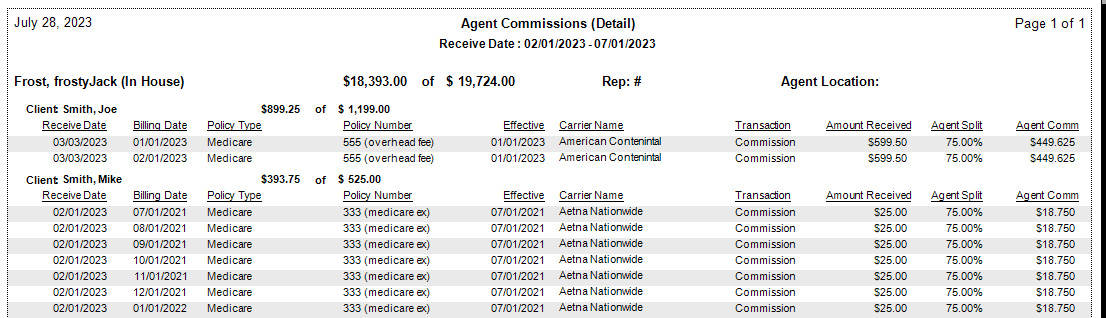
The Detail (Percent of Commission) format shows the agent's earnings as a percentage of the total agency commission received from the carrier. This exposes the gross commission the agency received, making it the most transparent detail format for agents whose contracts are based on a share of agency revenue.
💡 Why Use This
Use this report format when:
- Agent contracts are based on a percentage of agency gross commission — Agents can verify their split was applied correctly to what the carrier paid.
- You want to show policy-level payment detail — The report breaks down each payment individually with client, carrier, and date information.
- You are running payroll and need auditability — The detail format supports agents in verifying their own earnings.
🗺️ How to Access
- Click the Agent Commissions button on the main toolbar, or navigate to Reports → Agent → Agent Commissions Earned.
- Select Detail (% of Commission) under Select Report Format:.
- Set your date range and click Show Report.
Other ACE Report Formats
- Detail (Percent of Premium) — Hides agency gross; shows agent earnings relative to client premium.
- Detail (Hybrid) — Shows both premium and agency gross for full transparency.
- Detail (by Carrier) — Groups payments by carrier.
- Detail (with Year-To-Date Total) — Includes a running YTD total alongside the period earnings.
- Summary Only — Agent totals only, no policy-level detail.
🔧 Troubleshooting
An agent's commission total doesn't match what they expected. Verify that the Agent Commission Split Table for the affected policies reflects the correct percentage. Then check Payment History to confirm the payment Received Date falls within the report's date range.
The agency gross column shows more than the agent expected. This is expected — the agency gross is the total the carrier paid before any splits. The agent's commission is their percentage of that gross amount.
🔗 Related Topics
- Agent Commissions Earned Report — Full ACE Report overview and email setup.
- ACE Email Setup — Configure bulk email delivery for agent statements.
- Preset Date Range — Quickly set the reporting period.
Need help? Contact support@commission-tracker.com