Agent ID Assigned By Carrier
The Agent ID Assigned By Carrier is an optional field located within the Policy Information section. It is used to store the specific identification number a carrier uses to identify an agent for that particular policy.
When to Use This Field
While this field is optional, it is highly recommended when:
-
Using Carrier Imports - Many carrier statements identify the agent by an ID number rather than a name. Storing that ID here helps with data matching.
-
Auditing Statements - Quickly cross-reference the ID on a physical carrier statement with the data in Commission Tracker.
-
Tracking Multiple Appointments - If an agent has different ID numbers for different carriers, this policy-level field ensures the correct ID is linked to the correct business.
Locating the Field
You can find this field in the Policy Information section when creating or editing a policy.
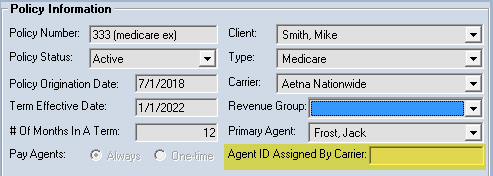
Step-by-Step Instructions
- Navigate to the Policy you wish to edit.
- Locate the Agent ID Assigned By Carrier field (usually found near the Primary Agent selection).
- Type in the ID exactly as it appears on your carrier statements.
- Click Save.
What Happens When You Use This Field
- The ID is stored as part of the policy's metadata.
- During a Carrier Statement Import, the system can use this ID to help verify that the commission is being attributed to the correct agent/policy combination.
- This field can be pulled into custom reports to assist with carrier-level reconciliation.
Troubleshooting
Q: Is this the same as the Agent's Social Security Number or Tax ID? A: No. This field is specifically for the ID assigned by the insurance carrier (e.g., a Writing Code or Agent Number). Tax IDs should be stored in the main Agent Profile.
Q: What if a carrier uses the same ID for all of an agent's policies? A: You should still enter it here for each policy to ensure that any automated matching features in the Import Carrier Statements process work correctly.
Next Step: Learn more about how to set the Primary Agent for this policy.
Need help? Contact support@commission-tracker.com