Agent Licenses
To generate Agent Commissions Earned reports, an active license is required for each agent. These licenses ensure your system is scaled to your agency's size and allow for the secure distribution of commission data.
License Pricing and Activation
Agent licenses are affordable and easy to scale as your agency grows:
-
Cost: $1 per month per agent.
-
Packs: Licenses are sold in packs of five ($5/month).
-
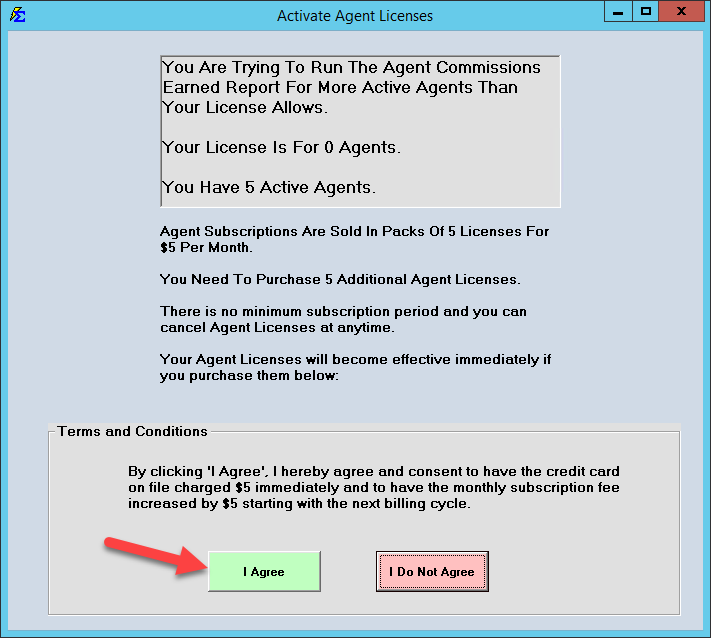
Activation: The process is automated. When you attempt to run a report for more agents than you have licensed, an activation prompt will appear.
When to Use This Feature
Access the licensing or status settings when:
-
Hiring New Agents - Increasing your capacity to generate payout reports.
-
Offboarding Agents - Freeing up license seats by marking agents as "Inactive."
-
Audit Preparation - Ensuring all active producers are eligible for commission statements.
Managing License Usage (Active vs. Inactive)
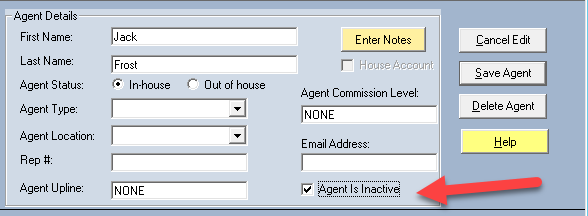
You only pay for the agents you need to report on. If you have an agent who is no longer with the agency or doesn't require a monthly statement, you can manage your license seat by changing their status.
Marking an Agent Inactive
-
Navigate to the Agent Profile.
-
Change the status to Inactive.
-
What happens: This agent no longer occupies a license seat. While commissions are still tracked and assigned to them in the background, you cannot generate an ACE Report for them until they are reactivated.
Step-by-Step: Adding New Licenses
- Attempt to run an Agent Commissions Earned report.
- If your agent count exceeds your current limit, the Activate Agent Licenses box will pop up.
- Review the terms and click the I Agree button.
- The $5 charge is applied to your card on file immediately, and your monthly billing will increase by $5 starting your next cycle.
- The licenses are added to your software instantly—no restart required.
What Happens When an Agent is Inactive
- Data Preservation - All historical commission data and current splits remain intact.
- Background Tracking - The system continues to calculate what the agent would be owed based on your Split Tables.
- Reporting Restriction - The agent will be hidden from the ACE Report filter screen until their status is returned to "Active."
Troubleshooting
Q: I have 6 agents but only want to pay for 5 licenses. Can I do that? A: Yes. Simply mark one agent as "Inactive." You can swap which agents are active at any time to stay within your license count.
Q: I clicked "I Agree" by mistake. How do I cancel? A: Please contact support@commission-tracker.com immediately to adjust your license count and billing cycle.
Next Step: Now that your agents are licensed, you can finalize your ACE Email Setup.
Need help with billing? Contact support@commission-tracker.com