Carrier Contact Info
The Carrier Contact Info section is used to store the name and professional title of your primary point of contact at the insurance carrier. This ensures that anyone in your agency knows exactly who to reach out to regarding commission discrepancies or policy questions.
When to Use This Section
Complete these fields during the initial carrier setup or when:
-
Assigning a Representative - Recording your specific Broker Rep or Commission Accounting contact.
-
Updating Personnel - Changing the contact name when a carrier assigns a new representative to your agency.
-
Improving Communication - Ensuring that follow-up calls to the carrier are directed to the correct individual.
Adding or Editing Contact Details
Once you have created the carrier record, you can fill in the specific person's details.
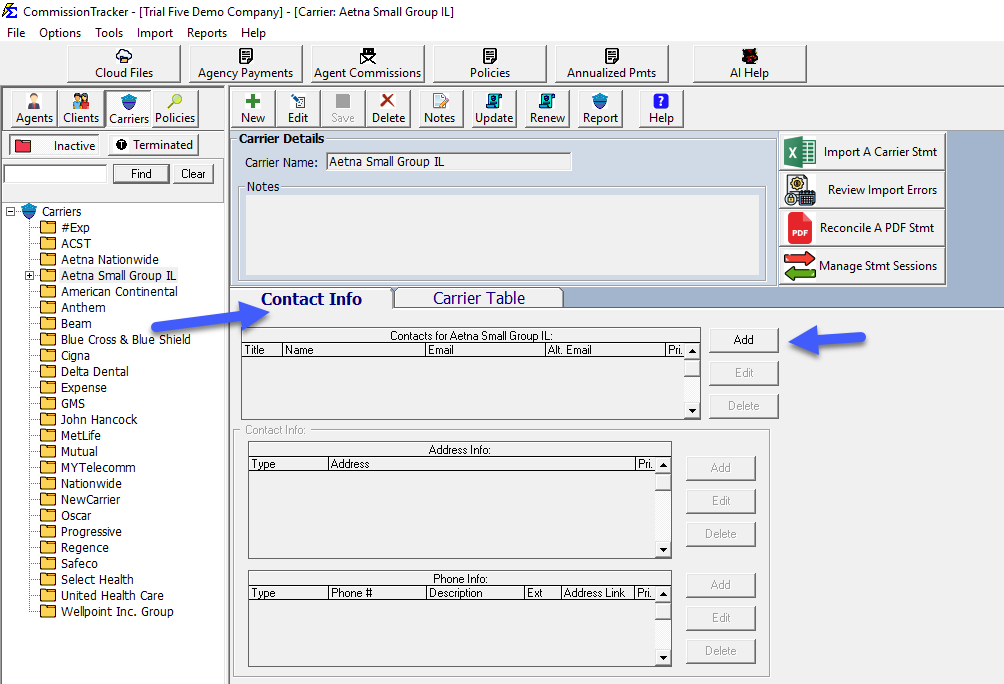
Key Fields:
- Contact Name: The full name of your primary contact person.
- Title: The professional title of the individual (e.g., "Broker Sales Rep" or "Commission Specialist").
Step-by-Step Instructions
- Navigate to the Carrier management screen.
- Select the desired carrier and click Edit.
- Locate the Contact Name and Title fields.
- Enter the updated information.
- Click Save.
What Happens When You Save
- The contact name is instantly updated in the carrier's profile.
- This information is reflected in the Carrier List Report, allowing for a quick-reference directory of all your carrier reps.
- These details are stored historically, so you always have a record of who your agency's primary contact is for that provider.
Troubleshooting
Q: Can I store more than one person's name? A: The main profile is designed for your primary contact. If you deal with multiple departments (e.g., one person for Sales and another for Commissions), we recommend listing the primary person here and using the Notes section for additional contacts.
Q: Does this information appear on client reports? A: No. This is internal agency data only and will not be visible to your clients or agents on their commission statements.
Next Steps:
Need help with carrier management? Contact support@commission-tracker.com