Carrier Table Agent Splits: Agent Uplines
The Agent Upline feature allows you to create dynamic hierarchical relationships between agents. Instead of hard-coding a specific manager for every rule, you can define an "Upline" (e.g., a mentor, recruiter, or manager) for each agent. The Carrier Table then uses that hierarchy to determine who receives an override.
The Logic of Uplines
Upline splitting works by separating two distinct pieces of information:
-
The Relationship (The WHO): Defined in the Manage Agent Levels and Uplines screen.
-
The Payout (The HOW MUCH): Defined within the Carrier Table.
Step 1: Defining the Hierarchy
Before the table can pay an upline, you must tell the system which agents report to which managers.
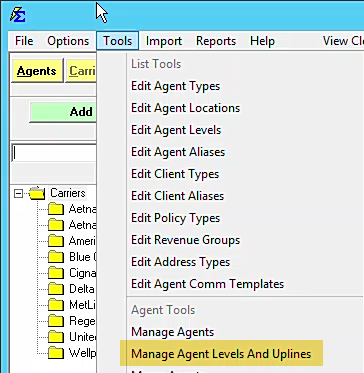
- Navigate to the Tools menu.
- Select Manage Agent Levels and Uplines.
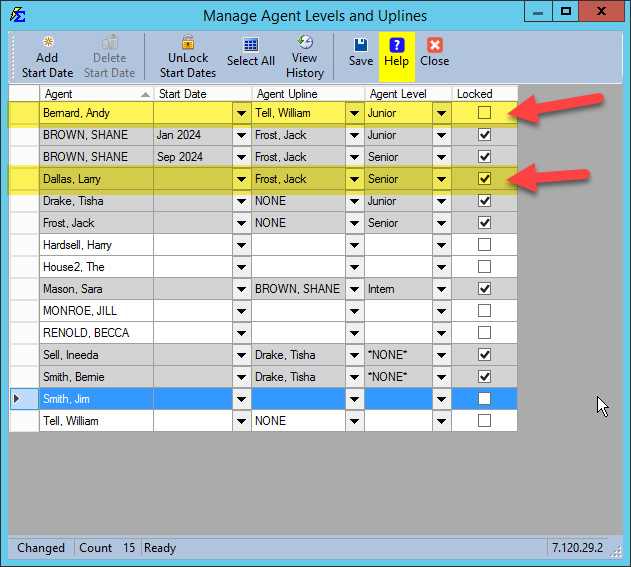
- Locate the writing agent and select their manager in the Upline Agent column.
Example: > * Andy Bernard reports to William Tell. * Larry Dallas reports to Jack Frost.
Step 2: Enabling Upline Payouts on the Table
Once the relationships are set, you must configure your Carrier Table to look for those uplines.
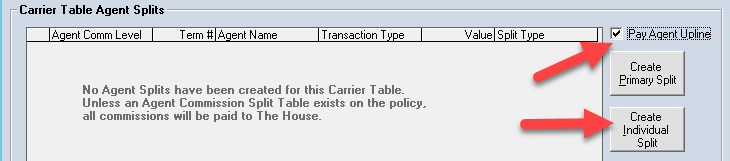
- Open your Carrier Table and select the Agent Splits tab.
- Check the box for "Pay Agent Upline." This tells the system to look at the hierarchy you defined in Step 1.
Step 3: Setting the Override Amounts
Now you must define how much the upline agent should receive. Even though different managers may be involved, you are setting the rule for the "Upline Role."
- Click the Create Individual button.
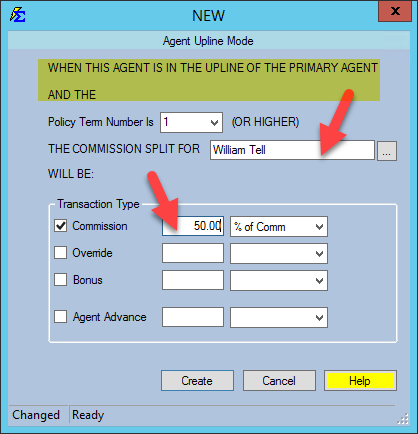
- Select the Agent who serves as the Upline (e.g., William Tell).
- The system will automatically label the level as "UPLINE" because the payout is triggered by the hierarchy, not the agent's rank.
- Set the commission percentage (e.g., 50% or 10%).
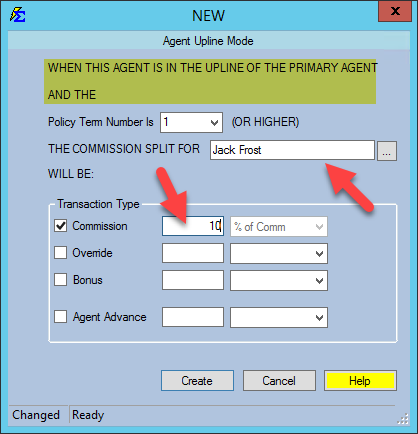
Final Table Review
Your table now acts as a dynamic engine that pays whoever is "above" the writing agent in the hierarchy.
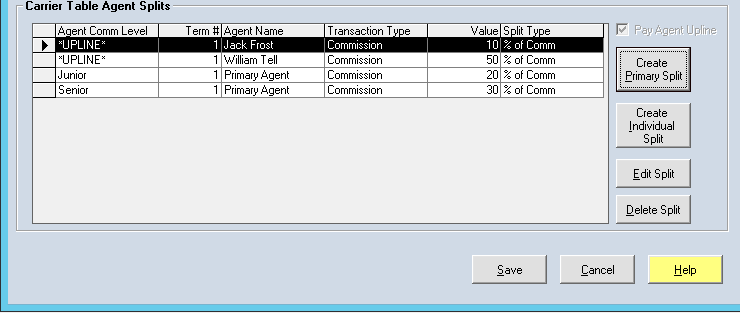
How it calculates:
| Writing (Primary) Agent | Their Payout | Their Upline | Upline Payout |
|---|---|---|---|
| Andy Bernard | 20% | William Tell | 50% |
| Larry Dallas | 30% | Jack Frost | 10% |
| Any Other Agent | Based on Level | None | 0% |
What Happens During Processing
- Depth: Upline hierarchies are not limited to one level. You can have multiple tiers (Agent -> Manager -> Director) and set payout rules for each tier.
- Flexibility: If an agent changes managers, you only need to update the Manage Agent Levels and Uplines screen once. Every policy that uses an "Upline" table will automatically begin paying the new manager correctly.
Troubleshooting
Q: Why is the Upline not receiving a payment? A: Ensure the "Pay Agent Upline" box is checked on the Carrier Table and that the writing agent actually has an Upline Agent assigned in the Tools menu.
Q: Can I use Levels and Uplines at the same time? A: Yes. You can pay an agent based on their Junior/Senior rank while simultaneously paying their manager via the Upline rule.
Next Step: Learn how to apply these advanced rules to your Carrier Commission Tables.
Need help building your hierarchy? Contact support@commission-tracker.com