Partial Payments and Chargebacks
The Partial/Chargeback tool allows you to handle financial discrepancies where the commission received does not match the expected amount. This is most commonly used for Chargebacks (when a carrier claws back a previously paid commission) or Partial Payments (when only a portion of a month's commission is paid).
When to Use This Tool
Use this feature in the following scenarios:
-
Commission Reversals: A client cancels a policy, and the carrier takes back commission they already paid you.
-
Underpayments: The carrier pays part of a commission now and will pay the rest later.
-
Lapses: Adjusting the records to reflect that a carrier is not paying for a specific month due to client non-payment.
Processing a Chargeback
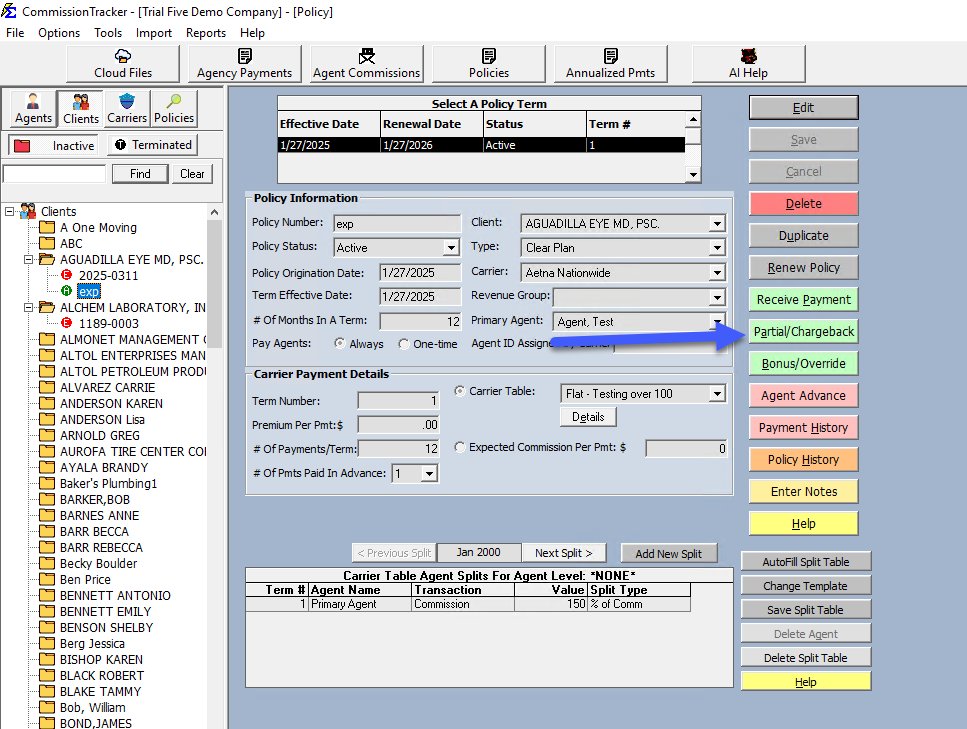
To record a chargeback, locate the policy and click the Partial/Chargeback button.
Critical Entry Fields
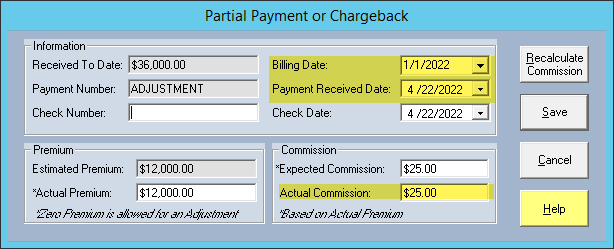
To ensure your accounting and agent payouts are correct, focus on these three fields:
- Billing Date: Select the specific month from the list that the carrier is charging you back for.
- Received Date: Enter the date you received the statement showing the chargeback. Note: This date determines which Agent Commission Report period the deduction will appear in.
- Actual Commission: Enter the amount as a negative number (e.g.,
-250.00). This represents the amount the carrier is deducting from your agency.
Premium Adjustments
If your agents are paid based on a Percentage of Premium, you should also enter a negative Actual Premium amount. This ensures the split logic calculates the agent's deduction correctly.
What Happens After Posting
Once you save the entry, Commission Tracker automates the following:
- Agent Deductions: The system identifies which agents were paid for that billing date and automatically creates a negative entry on their next commission statement.
- Payment History Audit: A new line item is added to the policy's Payment History with the negative values, providing a clear audit trail.
- A/R Balancing: The status of that billing month is updated to reflect the reduction in revenue.
Fixed Dollar Agent Splits
If an agent on the policy is paid a flat "Dollar Amount" rather than a percentage, the software will trigger a pop-up asking you to manually specify exactly how much of the chargeback should be applied to that agent.
Troubleshooting
Q: I entered a chargeback but it isn't on the Agent's report. A: Check the Received Date of the chargeback. If that date falls outside the date range of the report you are running, the deduction will not appear until the next period.
Q: Can I use this for a partial payment? A: Yes. For a partial payment, enter the positive amount received. The system will show the month as "Partially Paid," and the remaining balance will stay in your Accounts Receivable report.
Next Step: To verify the impact on your carrier statements.
Need help with a complex reversal? Contact support@commission-tracker.com