Client Alias
The Client Alias feature is a database normalization tool used primarily when you have enabled Duplicate Policy Number matching. It solves the common issue where different carriers report the same client using slight naming variations (e.g., "Widgets Inc" vs. "Widgets Incorporated").
Why Use Client Aliases?
If you do not use aliases, the Create Policies screen will assume these naming variations are entirely new clients and attempt to create duplicate records. By setting up an Alias, you tell Commission Tracker: "Whenever you see Name B on a statement, treat it as Name A in our database."
Rules for Aliases:
-
Uniqueness: You cannot create an Alias that matches an existing Client name, or a Client name that matches an existing Alias.
-
Multiple Aliases: A single master Client can have an unlimited number of Aliases linked to them.
-
Automation: Once an Alias is saved, the software will automatically convert that name during all future imports.
Method 1: Creating Aliases via Tools Menu
If you know a carrier uses a specific naming convention, you can set up the Alias in advance.
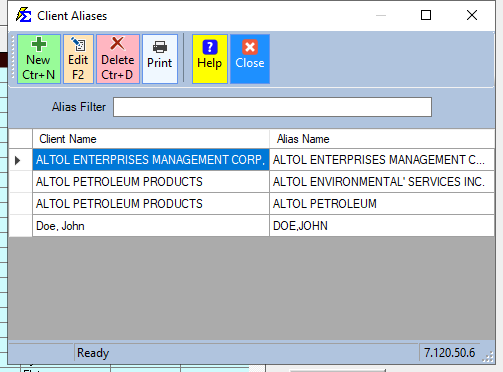
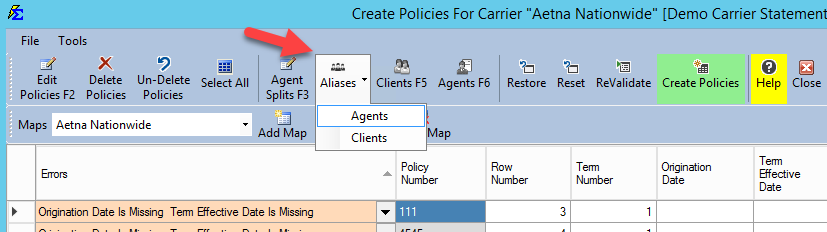
- Navigate to the Tools menu.
- Select Client Alias.
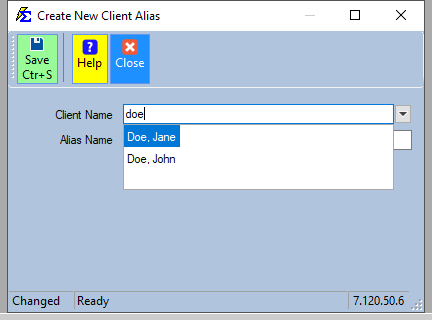
- Select the "Master" client from the dropdown.
- Type the variation (Alias) in the text box and click Save.
Method 2: Creating Aliases During Import (The Create Policies Screen)
This is the most common workflow. When importing a carrier statement, "New" clients are highlighted in Green. If you recognize that a green-highlighted client actually exists under a different name, follow these steps:
- Identify the Duplicate: In the lower grid, find the client name the carrier provided (e.g., "Jane R Doe").
- Right-Click: Right-click the name in the grid.
- Link to Master: Select the existing master client (e.g., "Doe, Jane") from the list to create the Alias.
- Re-Validate: Click the Re-Validate button.
- Confirm Logic: The system will now highlight the row in Yellow. This indicates that the software successfully found an Alias and has mapped the data to your existing master client.


Visual Example: Jane and John Doe
In this workflow, the carrier provided "Jane R Doe" and "John L Doe." Without Aliases, the system would create two new, unnecessary records. By right-clicking and assigning the existing records ("Doe, Jane" and "Doe, John"), we maintain a single point of truth for these clients.
| Carrier Statement Name | System Master Name | Result |
|---|---|---|
| Widgets Incorporated | Widgets INC | Aliased (Mapped to INC) |
| Jane R Doe | Doe, Jane | Aliased (Mapped to Doe, Jane) |
| John L Doe | Doe, John | Aliased (Mapped to Doe, John) |
Troubleshooting
Q: I tried to create an alias but got an error that the name exists. A: This means the "Alias" you are trying to create is already a "Master" client name elsewhere in the system. You may need to use the Merge Clients tool first.
Q: Does an Alias change the name on the carrier statement? A: No. It only changes how Commission Tracker records the data internally. Your original statement data remains unchanged for audit purposes.
Need help with naming variations? Contact support@commission-tracker.com