Client Contact Info
The Client Contact Info section serves as the communication hub for each record in your database. Maintaining accurate contact details is essential for automated notifications, renewal reminders, and agency-wide client audits.
When to Use This Section
Input or update these details during the initial intake or when:
-
Updating Personnel: Recording a new HR contact or administrator for a group client.
-
Enabling Communication: Ensuring the Email Address field is populated for use with digital correspondence or notification tools.
-
Refining Searchability: Adding specific contact names that may differ from the primary Client/Business name.
Key Contact Fields
The contact details are located on the primary Client screen.
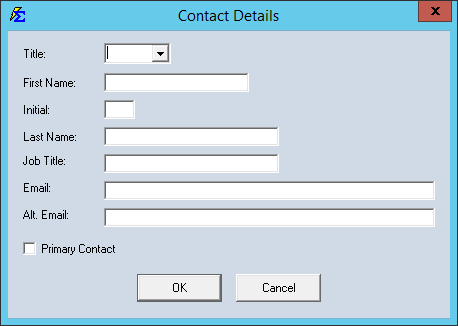
Essential Information:
-
Contact Name: The specific individual you speak with (especially useful for Business/Group clients).
-
Email Address: The primary destination for digital correspondence.
-
Title/Role: The position of the contact person within their organization.
Step-by-Step Instructions
- Navigate to the Client screen and select the client you wish to update.
- Locate the Contact Information group.
- Enter or edit the Name, Email, and Title.
- Click Save to update the record.
What Happens When You Save
- Reporting: These details are automatically pulled into the Client List Report and the Client Report.
- Communication Tracking: Having a dedicated email address allows the system to correctly identify the recipient for any future automated communications.
- Unified View: For Parent/Sub Client relationships, this ensures you have the correct contact for the specific sub-entity.
Troubleshooting
Q: Can I store multiple email addresses for one client? A: The primary field is designed for one main address. For secondary emails, we recommend using the Client Notes section.
Q: Does changing the Contact Name change the Client Name? A: No. The Client Name is the master record name used for policy matching. The Contact Name is simply the person you talk to at that client's location.
Next Steps:
Need help with client communication? Contact support@commission-tracker.com